Restrict Data Import to Group-Specific Records in Hardware table

- Mark as New
- Bookmark
- Subscribe
- Mute
- Subscribe to RSS Feed
- Permalink
- Report Inappropriate Content
03-05-2026 04:02 AM
Hello everyone,
We have a requirement to allow users to import data into the Hardware table (alm_hardware), with access restricted by a custom reference field u_managed_by_group (reference → sys_user_group). We have four distinct groups. Users should only be able to import records where u_managed_by_group matches their own group.
Example
- Hardware AC team members can import assets only when Managed by group = Hardware AC.
- Hardware DC team members must not be able to create/update records for Hardware AC, and vice versa.
By Using Data Sources we need to implement this, can someone suggest how to achieve requirement?
Any scripts needs to write?
@Ankur Bawiskar @Dr Atul - LNG @Kieran Anson
Thanks,
Sattar

- Mark as New
- Bookmark
- Subscribe
- Mute
- Subscribe to RSS Feed
- Permalink
- Report Inappropriate Content
03-05-2026 04:13 AM
Hello @sattar3 ,
I will recommend use Transform map script,
In the Transform Map, add an onBefore script that checks if the u_managed_by_group on the incoming record matches one of the current user’s groups (gs.getUser().getMyGroups()). If not, set ignore = true so the record is skipped.
Script :
var userGroups = gs.getUser().getMyGroups();
if (source.u_managed_by_group && userGroups.indexOf(source.u_managed_by_group) == -1) {
    ignore = true;
    gs.addInfoMessage("You are not allowed to import records for group: " + source.u_managed_by_group);
}
If my response helped mark as helpful and accept the solution.


- Mark as New
- Bookmark
- Subscribe
- Mute
- Subscribe to RSS Feed
- Permalink
- Report Inappropriate Content
03-05-2026 04:24 AM
how are they importing?
share the screenshot
Ankur
✨ Certified Technical Architect || ✨ 10x ServiceNow MVP || ✨ ServiceNow Community Leader
- Mark as New
- Bookmark
- Subscribe
- Mute
- Subscribe to RSS Feed
- Permalink
- Report Inappropriate Content
03-10-2026 03:58 AM
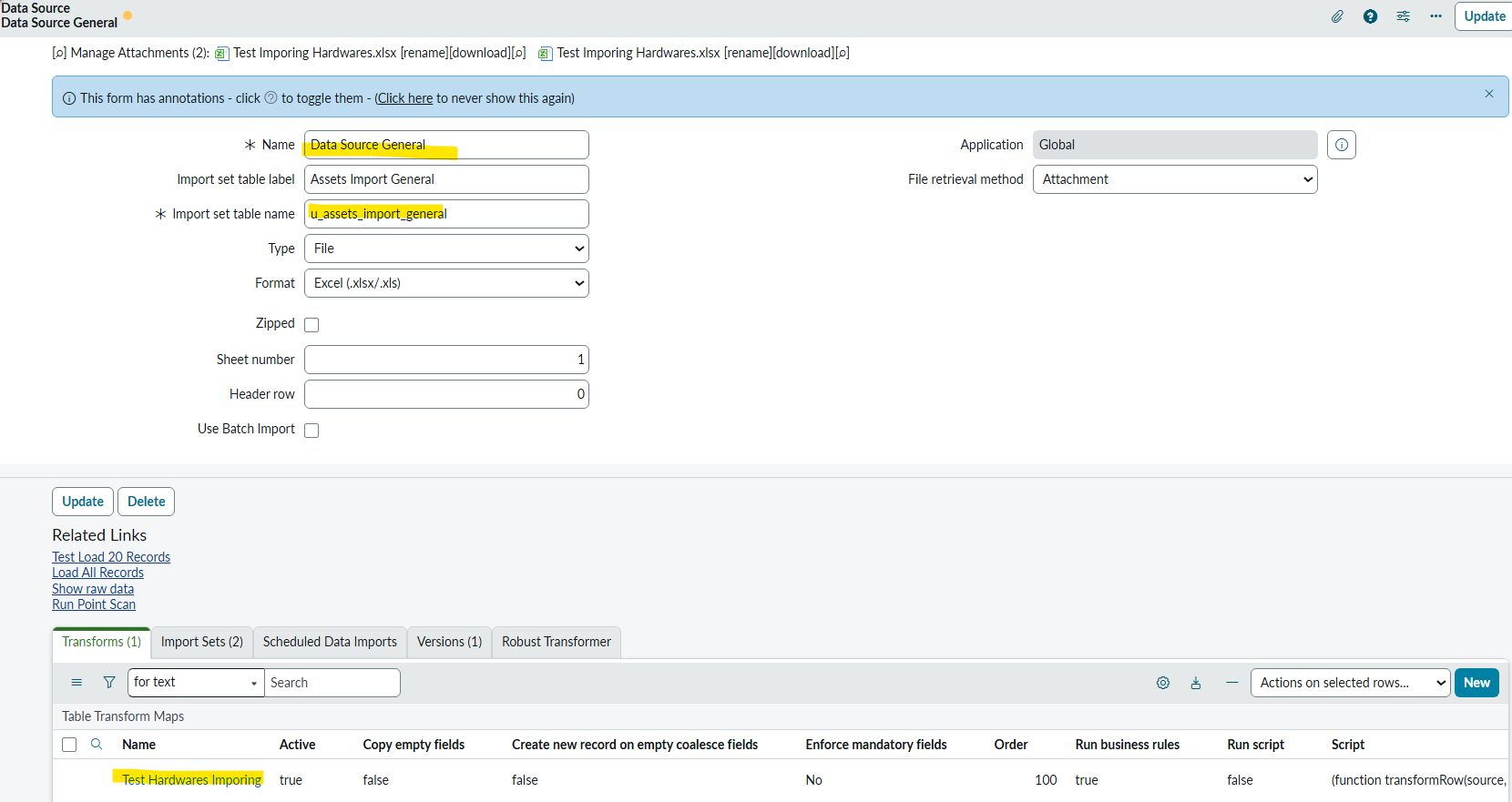
Hi @Ankur Bawiskar ,The data source and transform map have been configured successfully.
The pending issue is with access control—updates/inserts to Hardware Assets should be permitted only when the acting user is a member of the record’s managed group.
Kindly refer to the attached screenshots and suggest the fix for this condition.
Data Source

Transform Map

Transform Script:

Thanks,
Sattar
- Mark as New
- Bookmark
- Subscribe
- Mute
- Subscribe to RSS Feed
- Permalink
- Report Inappropriate Content
03-10-2026 04:57 AM
when your script runs it should give you system user which is running the transform and not the logged in user.
Did you try checking the sys_created_by in onStart transform script
-> get that sys_created_by
-> check if that is the actual logged in user and check if that user is member of that group
-> if not then ignore so that entire transformation is ignored
something like this
(function runTransformScript(source, map, log, target /*undefined onStart*/ ) {

    // Add your code here
    var createdBy = source.sys_created_by;
    var gr = new GlideRecord("sys_user_grmember");
    gr.addQuery("group.name", source.u_managed_by_group);
    gr.addQuery("user.user_name", createdBy);
    gr.query();
    if (!gr.hasNext()) {
        ignore = true;
    }

})(source, map, log, target);
💡 If my response helped, please mark it as correct ✅ and close the thread 🔒— this helps future readers find the solution faster! 🙏
Ankur
✨ Certified Technical Architect || ✨ 10x ServiceNow MVP || ✨ ServiceNow Community Leader