sys_user Reference Fields Empty in Service Portal Catalog Items

- Mark as New
- Bookmark
- Subscribe
- Mute
- Subscribe to RSS Feed
- Permalink
- Report Inappropriate Content
03-14-2026 02:10 PM
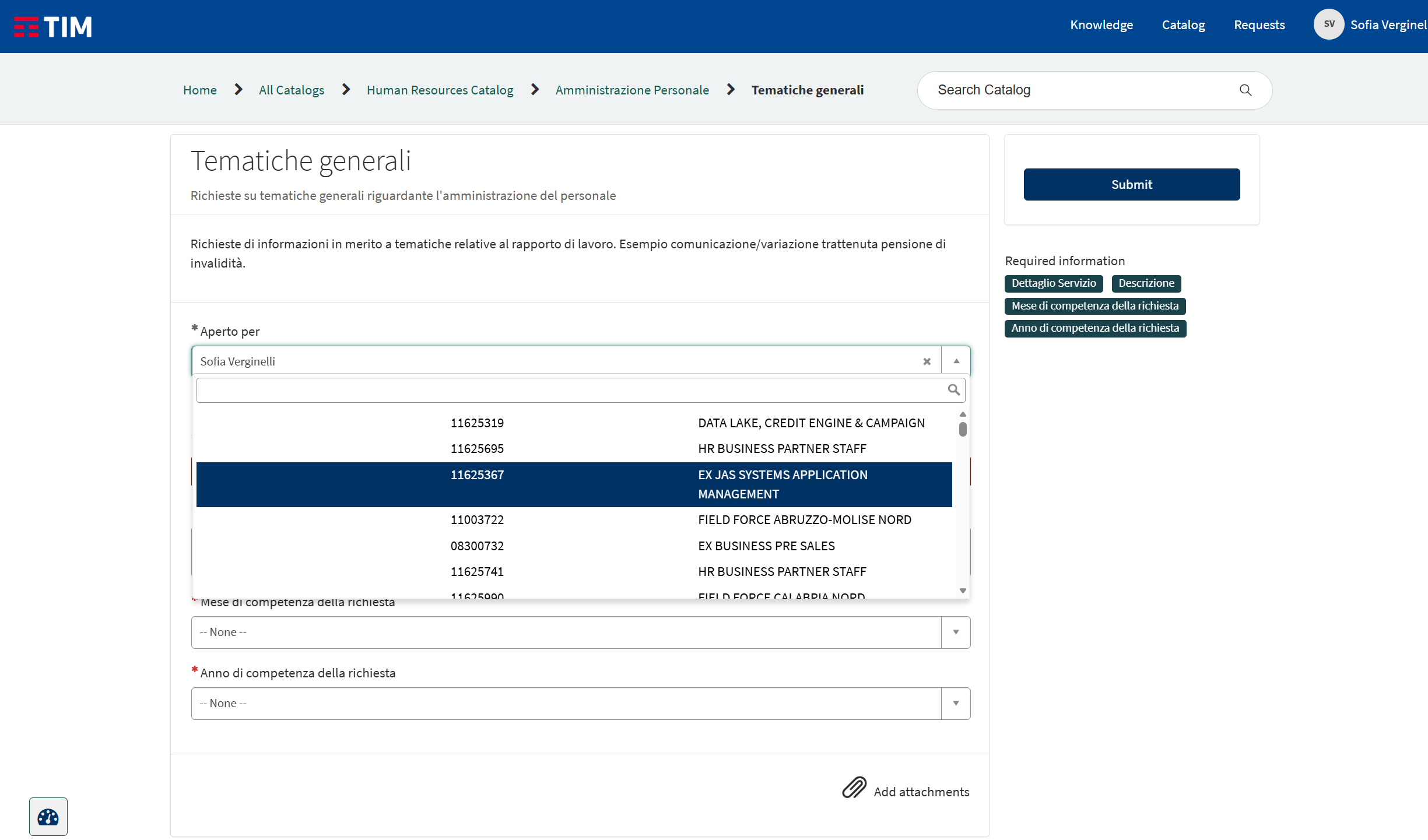
In the variablesubject_person, the field is supposed to show a list of users according to the query defined in the script (see attachments). Normally, the reference field should display all users matching that logic.Instead, when opening the Catalog Item in the Service Portal:
Portal users see no results at all — the list is empty.
Even as admin, I cannot select any user from the reference field.
What I have verified so far:
ACLs on the sys_user table:
I have created ACLs of type record read, query_range, query_match, and field read.
Portal user roles were included;
Despite this, the references on the portal continue to return “No results.”
Reference Qualifier
I temporarily removed all script qualifiers.
Even without a qualifier, the reference remains empty.
Reference Field Attributes
I removed all attributes (
ref_ac_columns,ref_auto_completer).No change: the lookup still returns nothing.
Additional attempt
I also tried creating a new variable with a simple reference to
sys_user.Even then, portal users cannot see any users, and as admin, I cannot select anything either.
One strange thing is that if I select a record, nothing actually appears in the field, but it still allows me to submit the ticket even though the field is mandatory. This reference was working correctly before, and now the issue appears without any modifications to the variables, scripts, or ACLs. What is causing this issue, and how can it be resolved?
- Mark as New
- Bookmark
- Subscribe
- Mute
- Subscribe to RSS Feed
- Permalink
- Report Inappropriate Content
03-14-2026 03:48 PM
- Even as admin, I cannot select any user from the reference field.
If after selecting any record from the drop down, mandatory star colour turns grey from red, in that scenerio what would be happening is, you are able to select the record of user, but the issue is that the records which are having there does not have value in the first column that is name!, so when you are select as there is value for name in that record you are not able to see anything in variable.
Trying submit the record and then check the xml of that record sn_hr_core_case record, you must see the sysid for the subject person field. Portal users see no results at all — the list is empty.
for this hope you have checked with Access Analyzer that the user have enough role to see the records,
If in case your user is external user, and he is able to see record in variable without the scriptInclude Query, that means the user wont be able to access the script include. in this particular scenerio if you can make your script include public by add the below function to the scriptIncludeisPublic: function() {
return true;
},
If you found my response helpful please mark it as helpful, if issues still persist please feel free to reply, will try best to contribute.


- Mark as New
- Bookmark
- Subscribe
- Mute
- Subscribe to RSS Feed
- Permalink
- Report Inappropriate Content
03-14-2026 11:33 PM
did you recently upgrade and this started coming after upgrade?
Happening with other reference variable on other items as well?
if yes then raise a case with ServiceNow
Ankur
✨ Certified Technical Architect || ✨ 10x ServiceNow MVP || ✨ ServiceNow Community Leader