- Mark as New
- Bookmark
- Subscribe
- Mute
- Subscribe to RSS Feed
- Permalink
- Report Inappropriate Content
08-19-2023 08:13 AM
Hello,
I am stuck over "robots License Distribution". I am going through the nowlearning RPA course and created unattended robot but unfortunately I have created 1 robots License Distribution for unattended license and it got auto attach to robot profile and now I got stuck here and not able to connect to Windows Unattended Robot app to ServiceNow instances because it is also asking for license, also not able to update robots License Distribution for unattended.


Could you please help me on the issue? as I couldn't find any solution in documentation to update it?
Also how much license we should create in an instances as if it does not modifiable?
Solved! Go to Solution.
- Mark as New
- Bookmark
- Subscribe
- Mute
- Subscribe to RSS Feed
- Permalink
- Report Inappropriate Content
11-14-2023 07:54 AM - edited 11-14-2023 07:56 AM
Hi Praveen,
PDI comes with only 1 license by default, and whenever you create a robot profile, it is auto-allocated to it, and you cannot modify it since the license is managed by ServiceNow.
If you are working in a partner company and have access to any demo ServiceNow instance, you can request access, as it comes with a minimum of 5 licenses for both attended and unattended
- Mark as New
- Bookmark
- Subscribe
- Mute
- Subscribe to RSS Feed
- Permalink
- Report Inappropriate Content
11-14-2023 10:14 AM
Thank you for your help @Vinay70 How to solve the issue in PDI with 1 license?
- Mark as New
- Bookmark
- Subscribe
- Mute
- Subscribe to RSS Feed
- Permalink
- Report Inappropriate Content
11-14-2023 11:13 PM
You can't, as I mentioned, the license is managed by ServiceNow, and if anyone has more than one license, they can integrate with any supporting system to perform automation. So, considering this, they just kept the default to one.
Hope this answers your question.
- Mark as New
- Bookmark
- Subscribe
- Mute
- Subscribe to RSS Feed
- Permalink
- Report Inappropriate Content
06-23-2025 03:04 PM
@Vinay70 I know this is long ago but without a resolution for the license issue, how did you complete the RPA course in Now Learning? I'm experiencing the same issue.

- Mark as New
- Bookmark
- Subscribe
- Mute
- Subscribe to RSS Feed
- Permalink
- Report Inappropriate Content
11-26-2025 08:05 AM - edited 11-26-2025 10:46 AM
I'm currently going through the course and found a solution.
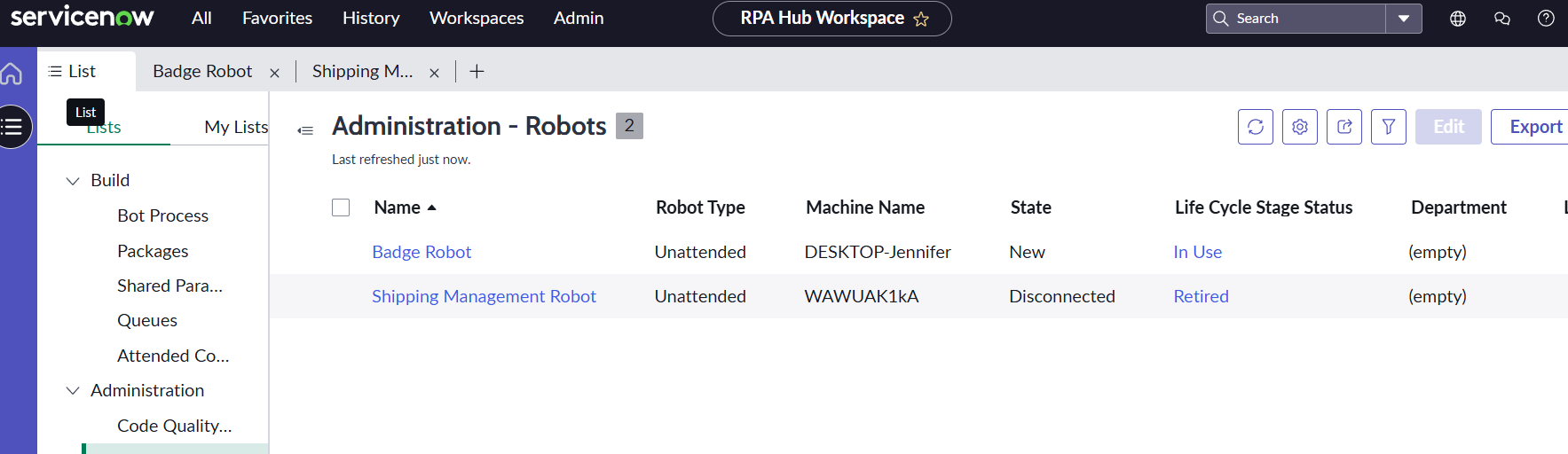
The license gets auto assigned to a shipping management process and robot. You will need to retire both the process and robot in order to free up the license. Once that is done you can proceed with creating your badge robot. There might be a better way to unlicense, but this is what I came up with for now. lol
Technical Lead | Infosys
- Mark as New
- Bookmark
- Subscribe
- Mute
- Subscribe to RSS Feed
- Permalink
- Report Inappropriate Content
11-28-2025 08:12 AM
Thanks for sharing this. That was what I eventually did to get through the course. I'm sure others may find this useful in the future.