Flow not working when add if statement at 55% duration. It works before and after this if statement

- Mark as New
- Bookmark
- Subscribe
- Mute
- Subscribe to RSS Feed
- Permalink
- Report Inappropriate Content
07-15-2026 07:30 AM
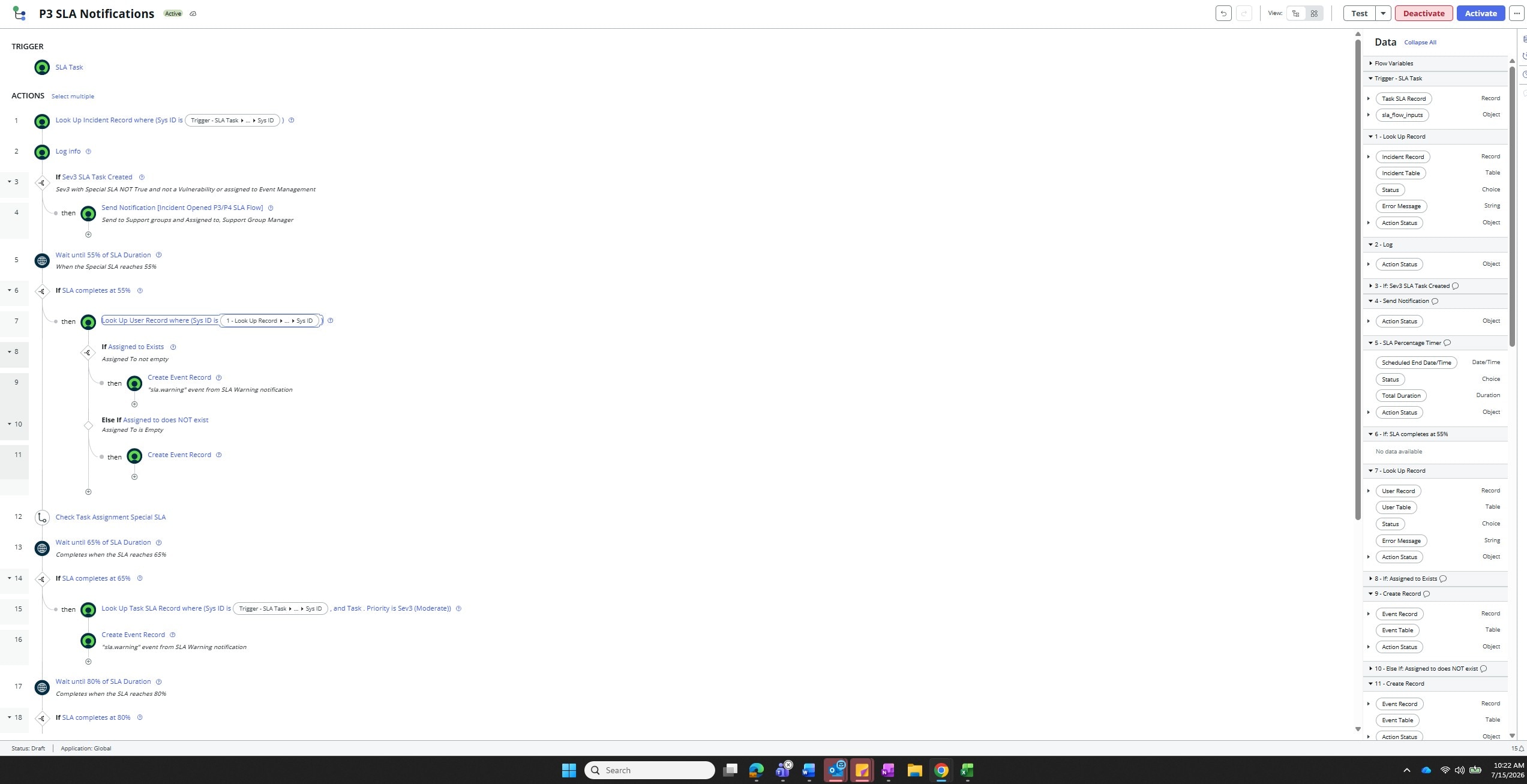
I have tried several times to get this flow to work. I had it working fine, but wanted to add an if and else if statement if the "assigned to" field is empty or not empty at the 55% SLA Percentage TImer, then two separate events would fire. I tried using user table, incident table, I can't even remember everything I have tried for my lookup record to get the sysid to look in the correct spot and create the event, but no luck. The timers later in the flow do work, just the if and else if statements no longer make the 55% timer work. Has anyone done this with success? Will attach.
- Mark as New
- Bookmark
- Subscribe
- Mute
- Subscribe to RSS Feed
- Permalink
- Report Inappropriate Content
07-15-2026 10:20 AM
Hi @pamelaskiba,
Your screenshots show the actual wiring, in which case the problem isn't the If/Else If logic itself, it's what step 8 is actually testing.
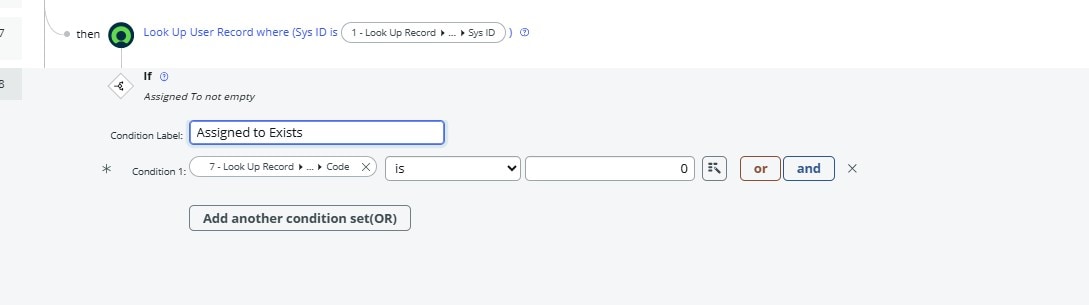
Look at step 8, "If Assigned to Exists." The condition isn't checking whether the incident's Assigned to field has a value, it's checking the Action Status Code coming back from step 7's Look Up User Record (Code is 0, and on the Else If, Action Status is not 0). That step 7 lookup runs unconditionally right after your 55% timer completes, before you've confirmed there's even a sys_id to look up with. When Assigned to is empty on the incident, step 7 tries to query sys_user with a blank Sys ID filter, finds nothing, and since "Don't fail on error" is unchecked on that action, the Look Up Record throws and the whole flow execution stops right there. That lines up exactly with what you're seeing: everything before the if/else works, everything scheduled after it never fires, and the 65% and 80% timers work fine once you strip the if/else out, because they don't depend on this lookup.
- Fix the condition: reference the Incident record's Assigned to field directly, from your step 1 Look Up Incident Record, is empty / is not empty, instead of the downstream user lookup's status.
- Reorder the steps: only run the Look Up User Record inside the "then" branch, after you've confirmed Assigned to is populated. There's no need to look up a user before you know there's a valid sys_id.
- Guard the lookup: if you keep a Look Up User Record that can legitimately return zero rows, check "Don't fail on error" on that action so a miss doesn't abort the flow context, then branch on the Action Status.
Also worth double checking: the Sys ID pill feeding step 7 (the truncated "1 - Look Up Record > ... > Sys ID" chip), make sure it actually resolves to Incident.Assigned to.Sys ID and not the incident's own Sys ID. That's an easy mix-up in the data pill picker and would produce the same failure even when Assigned to is populated.
If you pull up the flow's execution log for a run that stalls at 55%, does step 7 show an actual error, or does the run just sit there indefinitely? That would tell us for sure which of these it is.
References
- Flow Designer - Look up record - Don't fail on error is not working (Known Error)
- Flow giving an error if no record found in the lookup activity
- SLA Percentage Timer action
Thank you,
Vikram Karety
Octigo Solutions INC
- Mark as New
- Bookmark
- Subscribe
- Mute
- Subscribe to RSS Feed
- Permalink
- Report Inappropriate Content
07-15-2026 02:03 PM
Thank you Vikram,
I have trialed a few things with no luck. This is my first flow and learning as I go. Reordering the steps confuses me - do I need another If statement after the user lookup there? I will attach new attachments of the latest attempt and hoping you can step me through a resolution 🙂 I appreciate your support.