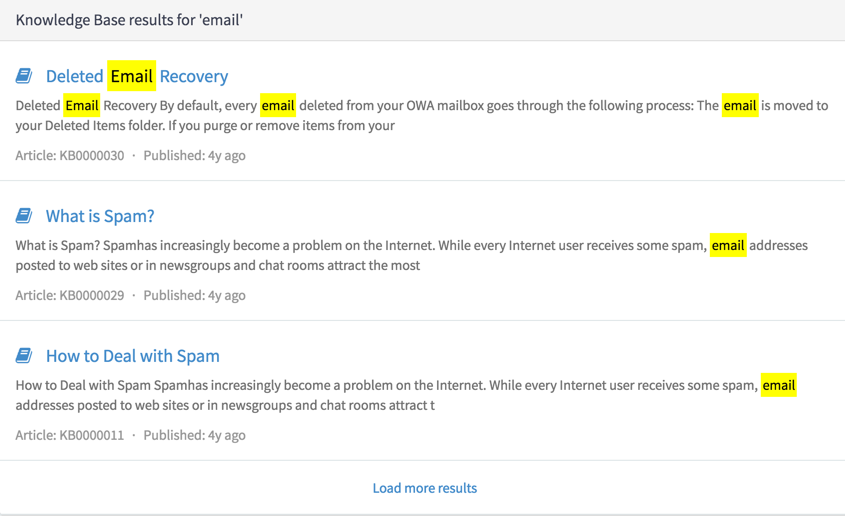
Limit the number of results that a search source
displays at one time to improve performance. End users can load more results
as needed.
시작하기 전에
Role required: admin or sp_admin
이 태스크 정보
If adding pagination to a simple search source, set
Paginate results on the search source record to true.
However, if adding pagination to an advanced search source, you must also modify the
data fetch script to handle multiple pages of results. When a user loads more search
results, the search source re-executes the data fetch script.주: If paginating a search source with advanced facets, do not modify the facet
generation script to load facets based on the results from each page. Facets
should enable end users to filter results from an entire result set, rather than
page-specific results.
프로시저
-
In the platform UI, navigate to .
-
Open a search source to add pagination to.
-
From the Data Source tab, set Paginate
results to true.
Enabling this field adds a Load more results button to
the search results page. This flag automatically enables pagination for simple
search sources.
- 옵션:
If the search source is advanced, modify the data fetch script to handle
multiple search result pages.
Update the data fetch script using one of the following GlideRecord APIs,
depending on the scope of the search source.
The following is an example data fetch script for a global search source
that queries the incident table and paginates results.
// queryLocation is a special value injected into the script,
// which holds the query_location property of the last item
// in the previously fetched result set
(function(query, queryLocation, count) {
	var results = [];
	var now_GR = new GlideRecord("incident");
	gr.addQuery("123TEXTQUERY321", query);
	gr.query();
	// Here, we are utilizing queryLocation to implement pagination.
	// In practice, there are many other ways to use the
	// query_location value of the last item in the previous
	// result set to implement pagination. Your implementation
	// will vary by use case.
	gr.setLocation(queryLocation - 1);

	var resultCount = 0;
	while(gr.next() && resultCount < count + 1) {
		results.push({
			label: gr.getDisplayValue(),
			short_description: gr.getValue("short_description"),
			// Here, we are populating the query_location
			// property of each result item. This is how the
			// framework knows what value to pass into the
			// next fetched search result script execution
			query_location: gr.getLocation(),
			primary: gr.getDisplayValue(),
			state: gr.getDisplayValue("state")
		});
		resultCount++;
	}

	if (results.length == 0)
		return results;

	if(results.length > count) {
		results.pop();
	} else {
		// In order to indicate that a result in the result
		// set is the final result (that there are
		// no more results to be fetched), add this property
		// to the final element in your result set.
		results[results.length - 1].isLastResult = true;
	}
	return results;
})(query, queryLocation, count, facets);
For an additional example, see the Knowledge Base search
source.
-
Define the maximum number of results per query for the search source in the
Search Page widget or Faceted Search widget instance options.
결과
The search page only returns the defined number of results
at one time. When a user selects Load more results, the search
source re-executes the query or data fetch script.