Link color on text buttons

- Mark as New
- Bookmark
- Subscribe
- Mute
- Subscribe to RSS Feed
- Permalink
- Report Inappropriate Content
01-16-2026 12:09 PM
Hello all,
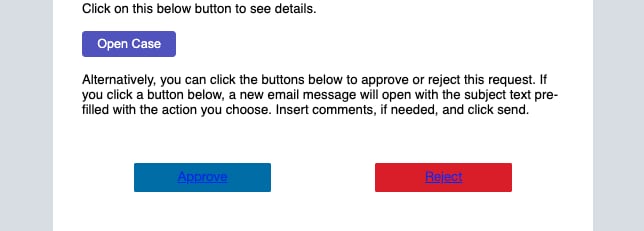
I am reporting an issue encountered after updating an HTML notification based on an email template. The text color of the buttons is appearing as standard HTML links (blue) instead of white.
Initially, the HTML code was using mail_script. In the Preview option, the buttons appeared correctly, but when the end user received the email, the styling was not applied correctly. Because of this, we decided to switch from mail_script to mailto, as we already use this approach in other notifications in our instance.
After making this change, the issue is now also occurring in the Preview, with the button text appearing as blue links.
Does anyone know how to fix this issue?
Additionally, does anyone know why, when using mail_script, the buttons appear correctly in Preview but show blue link text when received by the end user?
Thank you in advance.
Obs: I used the exactly HTML code from the other notification, and it isn't works.
I shared some screenshots.

- Mark as New
- Bookmark
- Subscribe
- Mute
- Subscribe to RSS Feed
- Permalink
- Report Inappropriate Content
01-16-2026 09:59 PM
This happens due to email client limitations, not because of ServiceNow or mail_script.
In Notification Preview, the email is rendered in the browser, so CSS works correctly. When the email is delivered, clients like Outlook and Gmail override link styles and force the default blue color on anchor tags.
How to fix:
Make sure the button text color is explicitly forced on the link itself (inline), not inherited from a parent element or CSS class. Email clients ignore classes and style blocks.
Why mail_script looked fine:
Preview supports more CSS, but during actual email delivery, styles are stripped or overridden by the email client.
*************************************************************************************************************
If this response helps, please mark it as Accept as Solution and Helpful.
Doing so helps others in the community and encourages me to keep contributing.
Regards
Vaishali Singh


- Mark as New
- Bookmark
- Subscribe
- Mute
- Subscribe to RSS Feed
- Permalink
- Report Inappropriate Content
01-16-2026 11:12 PM
share your email script here
From my experience this is not a ServiceNow issue.
Different email application such as Outlook etc handle the HTML differently and that could be causing this.
Try to use inline css in the <a> tag
check this KB which talks about same and workaround
How to customize hyperlink colors in email notifications
💡 If my response helped, please mark it as correct ✅ and close the thread 🔒— this helps future readers find the solution faster! 🙏
Ankur
✨ Certified Technical Architect || ✨ 10x ServiceNow MVP || ✨ ServiceNow Community Leader
- Mark as New
- Bookmark
- Subscribe
- Mute
- Subscribe to RSS Feed
- Permalink
- Report Inappropriate Content
01-18-2026 07:54 PM
Hope you are doing good.
Did my reply answer your question?
💡 If my response helped, please mark it as correct ✅ and close the thread 🔒— this helps future readers find the solution faster! 🙏
Ankur
✨ Certified Technical Architect || ✨ 10x ServiceNow MVP || ✨ ServiceNow Community Leader

- Mark as New
- Bookmark
- Subscribe
- Mute
- Subscribe to RSS Feed
- Permalink
- Report Inappropriate Content
01-17-2026 12:14 AM
Hi @odorcik ,
Hope you are doing well.
This type of issues may occour sometime due to Email configurations.
But if you want to get the proper colour for the Approve and Reject button please try to use the InLine CSS in the HTML code for the email Notification.
<!-- START BUTTON CONTAINER -->
<table role="presentation" border="0" width="100%" cellspacing="0" cellpadding="0">
<tbody>
<tr>
<td style="text-align: center; padding: 10px 0;"><!-- START APPROVAL BUTTON (Left aligned in cell) -->
<table style="display: inline-block; vertical-align: middle; margin: 0 10px;" border="0" cellspacing="0" cellpadding="0">
<tbody>
<tr>
<td style="border-radius: 50px;" align="center" bgcolor="#28a745"><a class="btn-approve" style="background-color: #28a745; border: 1px solid #28a745; border-radius: 50px; color: #ffffff; display: inline-block; font-family: sans-serif; font-size: 16px; font-weight: bold; line-height: 45px; text-align: center; text-decoration: none; width: 200px; -webkit-text-size-adjust: none; box-shadow: 0 0 10px transparent; transition: box-shadow 0.3s ease-in-out;" href="mailto:${instance_email}?subject=Re:${sysapproval.number}%20-%20approve&body=%0A%0A${watermark}"> APPROVE </a></td>
</tr>
</tbody>
</table>
<!-- END APPROVAL BUTTON --> <!-- START REJECT BUTTON (Right aligned in cell) -->
<table style="display: inline-block; vertical-align: middle; margin: 0 10px;" border="0" cellspacing="0" cellpadding="0">
<tbody>
<tr>
<td style="border-radius: 50px;" align="center" bgcolor="#dc3545"><a class="btn-reject" style="background-color: #dc3545; border: 1px solid #dc3545; border-radius: 50px; color: #ffffff; display: inline-block; font-family: sans-serif; font-size: 16px; font-weight: bold; line-height: 45px; text-align: center; text-decoration: none; width: 200px; -webkit-text-size-adjust: none; box-shadow: 0 0 10px transparent; transition: box-shadow 0.3s ease-in-out;" href="mailto:${instance_email}?subject=Re:${sysapproval.number}%20-%20reject&body=%0A%0A${watermark}"> REJECT </a></td>
</tr>
</tbody>
</table>
<!-- END REJECT BUTTON --></td>
</tr>
</tbody>
</table>
You may use the code above to put the Inline CSS in a button that you are using in your HTML Code.
It will show the output like I pasted the image below.

So please try the code above.
If you find it helpful plese mark it as Helpful and accept the solution to stop the thread.
Regards,
Sagnic


.png)
