Is it possible to add Now Assist to the Global Header Menu on the ESC portal?

- Mark as New
- Bookmark
- Subscribe
- Mute
- Subscribe to RSS Feed
- Permalink
- Report Inappropriate Content
07-06-2026 05:25 AM
Hi Community,
I'm trying to add Now Assist (Virtual Agent Chat) to the Global Header Menu in the Employee Service Center (ESC) portal.
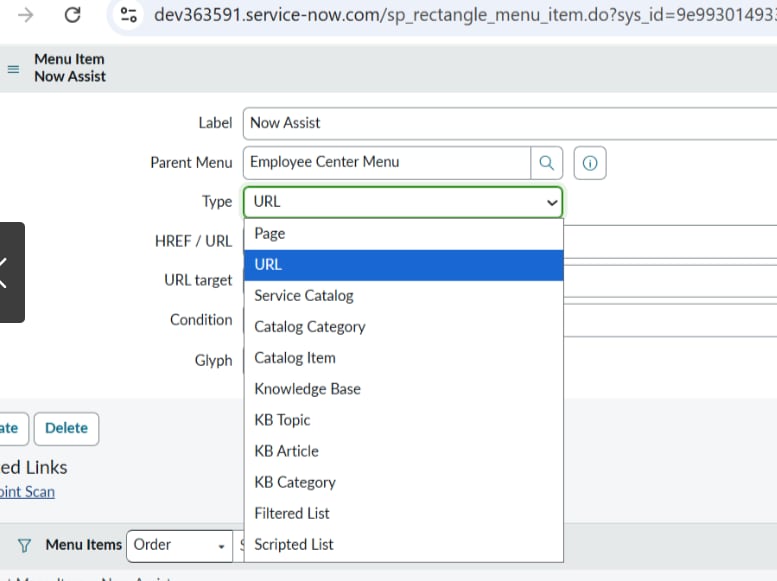
When configuring the menu item, I can see that the available menu item types are things like:
- URL
- Page
- Catalog
- Knowledge Base
- etc.
However, I'm struggling to find the correct approach for launching Now Assist chat from a menu item.
I initially tried both URL and Page types, but neither works as expected. My understanding is that Now Assist / Virtual Agent chat is rendered as a popup widget/window rather than a portal page with a direct URL, so pointing the menu item to a page doesn't actually open the chat experience.
In my PDI, I was able to create a "Now Assist" entry in the Global Header Menu, but when I click it, the chat window does not open.
What I'm trying to achieve:
- Add a "Now Assist" option to the ESC Global Header.
- When users click it, the Virtual Agent / Now Assist chat window should open directly (similar to clicking the native chat launcher).
Questions:
- Is there an OOB way to launch Now Assist/Virtual Agent chat from a Global Header menu item?
- Does the menu item need to call a specific widget, client script, event, or API rather than a URL/page?
- Has anyone successfully implemented this in ESC and can share the approach?
I've attached screenshots of the menu configuration and current behavior.
Any guidance would be greatly appreciated.
Thanks!

- Mark as New
- Bookmark
- Subscribe
- Mute
- Subscribe to RSS Feed
- Permalink
- Report Inappropriate Content
07-06-2026 07:56 AM
Hi @Kruthika1
Refer:
Now Assist for Employee Center: An introductory guide
Regards
Tanushree Maiti
ServiceNow Technical Architect
LinkedIn: https://www.linkedin.com/in/tanushreemaiti
- Mark as New
- Bookmark
- Subscribe
- Mute
- Subscribe to RSS Feed
- Permalink
- Report Inappropriate Content
08-05-2026 12:06 AM
hello @Kruthika1
Interesting question. I think because Now Assist chat is usually opened as a widget not as a page, you have to fire it somehow from client side code on a particular event instead of using a url. Curious whether anyone made it work with plain ESC out of the box.