How to update change request view - fields and Tabs in SOW

- Mark as New
- Bookmark
- Subscribe
- Mute
- Subscribe to RSS Feed
- Permalink
- Report Inappropriate Content
03-30-2026 08:07 AM
Hi All,
We have 4 different requirements related to update the view for change record in SOW as below,
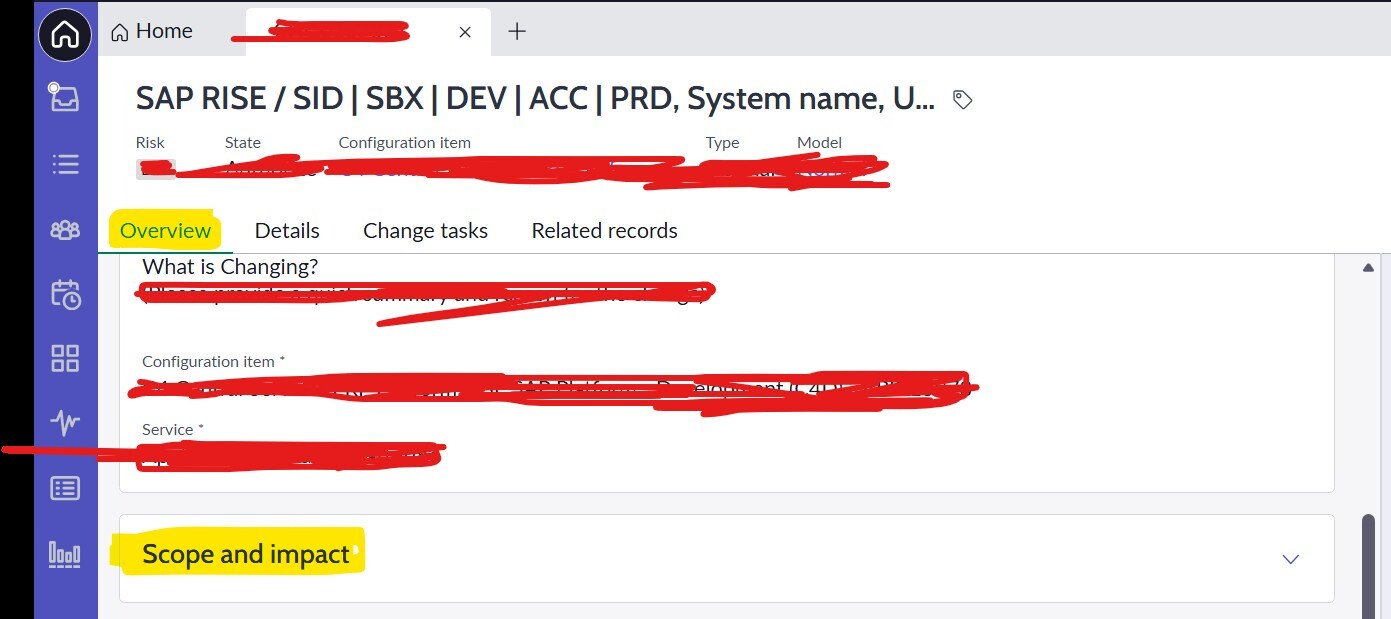
Currently there are 4 tabs Overview, Details, Change tasks, Related records
1. In 'Overview' tab we want to remove a block 'Scope and Impact' containing few fields inside.
2. In 'Details' tab we want to add and remove some fields but not able to locate this tab to edit the fields.
3. New tab 'Closure Information' needs to be created with two fields 'Close code' and 'Close notes' next to the existing tab 'Related records'.
4. New tab 'SAP Changes' needs to be created to show up if 'Category = SAP' i.e. based on condition.
Can you please help with the detailed steps as its bit tricky to locate all these tabs and edit them. Thanks.


- Mark as New
- Bookmark
- Subscribe
- Mute
- Subscribe to RSS Feed
- Permalink
- Report Inappropriate Content
03-31-2026 02:23 AM
Point 3
new tab -> means a related list table.
Why you want related list table for this to capture 2 fields for closure? Customer simply wants 2 new fields and added to that form section. Seems you got confused here
Point 4 -> do you have a related list table For SAP Changes
a) if yes then add that related list on Workspace view and use onLoad client script to show/hide it
b) if not then create new and then use onLoad logic
💡 If my response helped, please mark it as correct ✅ and close the thread 🔒— this helps future readers find the solution faster! 🙏
Ankur
✨ Certified Technical Architect || ✨ 10x ServiceNow MVP || ✨ ServiceNow Community Leader
- Mark as New
- Bookmark
- Subscribe
- Mute
- Subscribe to RSS Feed
- Permalink
- Report Inappropriate Content
04-01-2026 12:07 AM
Hi
Point 3
We already have separate form section 'Closure information' with these two fields under 'Details' tab, but customer needs it as a tab same as Details/Change tasks as in screenshot.
Can you please confirm its feasibility to configure it. If not feasible any supporting ServiceNow document will be helpful.
Point 4
Currently, we don't have any related list table for SAP Changes. If this needs to be created newly, can you please share detailed steps for the same. Thanks.
Regards,
Pradnya
- Mark as New
- Bookmark
- Subscribe
- Mute
- Subscribe to RSS Feed
- Permalink
- Report Inappropriate Content
03-31-2026 08:07 PM
Hope you are doing good.
Did my reply answer your question?
💡 If my response helped, please mark it as correct ✅ and close the thread 🔒— this helps future readers find the solution faster! 🙏
Ankur
✨ Certified Technical Architect || ✨ 10x ServiceNow MVP || ✨ ServiceNow Community Leader