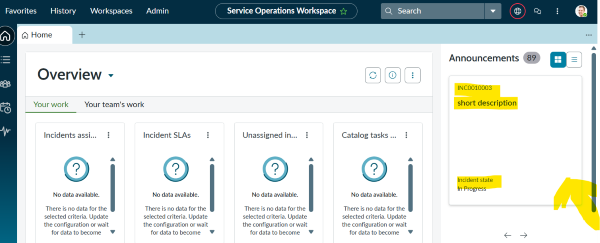
Added incident on announcement on SOW grid view, but clicking on a record does not open it.

- Mark as New
- Bookmark
- Subscribe
- Mute
- Subscribe to RSS Feed
- Permalink
- Report Inappropriate Content
04-19-2026 10:45 PM
In Service Operations Workspace, I have added the Incident table under Announcements, where outages are already shown from EVAM.
I can see the incident records in the grid view, but when I click on any incident block, nothing happens. The record does not open.
However, when I click on the out‑of‑box outage record, it opens correctly.
Please find the screenshots below for reference.
Let me know if any more clarity is needed.
- Mark as New
- Bookmark
- Subscribe
- Mute
- Subscribe to RSS Feed
- Permalink
- Report Inappropriate Content
04-20-2026 06:32 AM
HI @Mohni ,
1.Create new Template SOW - incident template
{
  "component": "now-card-evam-record",
  "staticValues": {
    "highlightedHeaderIcon": {
      "translatable": false,
      "key": "alert-outline"
    },
    "highlightedHeaderBkgColor": {
      "translatable": false,
      "key": "high"
    },
    "textHeaderLabel": {
      "translatable": true,
      "key": "Incident"
    },
    "detailLabelOne": {
      "translatable": true,
      "key": "Configuration item"
    },
    "detailLabelTwo": {
      "translatable": true,
      "key": "Priority"
    },
    "cardLabel": {
      "translatable": true,
      "key": "Open incident record"
    },
    "buttonLabel": {
      "translatable": true,
      "key": "Open incident record"
    }
  },
  "mappings": {
    "highlightedHeaderLabel": "state",
    "titleLabel": "short_description",
    "subtitle": "description",
    "detailValueOne": "state",
    "detailValueTwo": "priority"
  },
  "actionMappings": {
    "clickAction": "sow_announcement_open_record"
  }
}
2.Open EVAM View config record and Add Attach new template created.
3.Now in the related list click Link Existing and in the declarative action select sow_announcement_open_record
4.Now the incident card will be clickable and opens in a new tab.