ServiceNow ATF- issue while ordering a catalog item with an attachment in service portal (SP)

- Mark as New
- Bookmark
- Subscribe
- Mute
- Subscribe to RSS Feed
- Permalink
- Report Inappropriate Content
3 weeks ago
Hi,
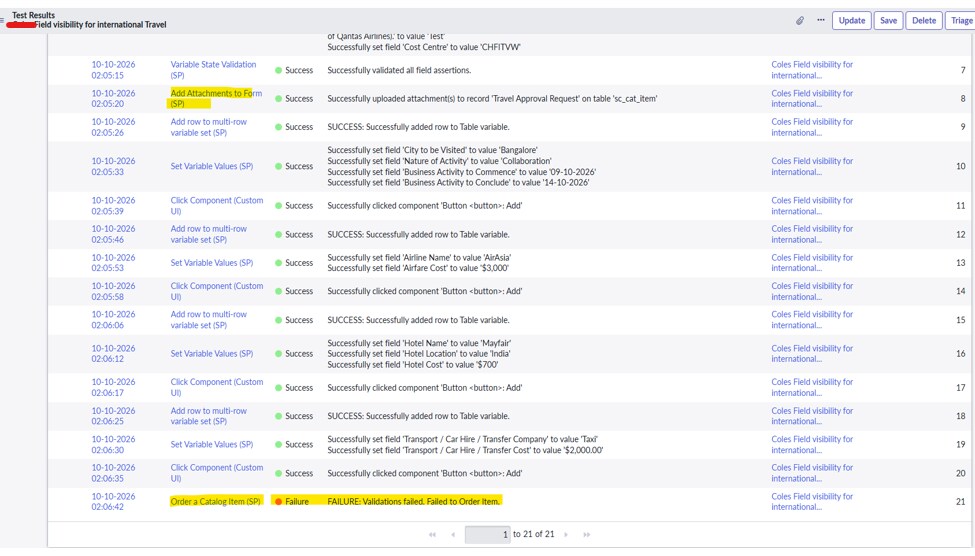
The existing Add Attachments to Form (SP) and Add Attachments to Form ATF steps are not working when ordering the Service Catalog item through the Service Portal.
The ATF execution fails with the error: “You must attach a file to submit the request.”
Could you please advise how to proceed and suggest an alternative approach to resolve this issue?
Thanks,
Janmejay


- Mark as New
- Bookmark
- Subscribe
- Mute
- Subscribe to RSS Feed
- Permalink
- Report Inappropriate Content
3 weeks ago
Refer Link1
KB: KB0952775
***********************************************************************************************************************
If my response proves useful, please indicate its helpfulness by selecting "Accept as Solution" and " Helpful." This action benefits both the community and me.
***********************************************************************************************************************
Regards
Shaqeel
- Mark as New
- Bookmark
- Subscribe
- Mute
- Subscribe to RSS Feed
- Permalink
- Report Inappropriate Content
3 weeks ago
Hi
The steps mentioned in KB0952775 are not working for me. Could you please share any screenshots or a step-by-step guide to help resolve this issue?
Thanks,
Janmejay
- Mark as New
- Bookmark
- Subscribe
- Mute
- Subscribe to RSS Feed
- Permalink
- Report Inappropriate Content
3 weeks ago

- Mark as New
- Bookmark
- Subscribe
- Mute
- Subscribe to RSS Feed
- Permalink
- Report Inappropriate Content
3 weeks ago
Check this KB: KB0832273 Automated Test Framework "Add Attachment" steps fail when "No attachment" table attribute ...
Regards
Tanushree Maiti
ServiceNow Technical Architect
LinkedIn: https://www.linkedin.com/in/tanushreemaiti