Add text to the banner in Agent Workspace

- Mark as New
- Bookmark
- Subscribe
- Mute
- Subscribe to RSS Feed
- Permalink
- Report Inappropriate Content
01-13-2022 12:04 PM
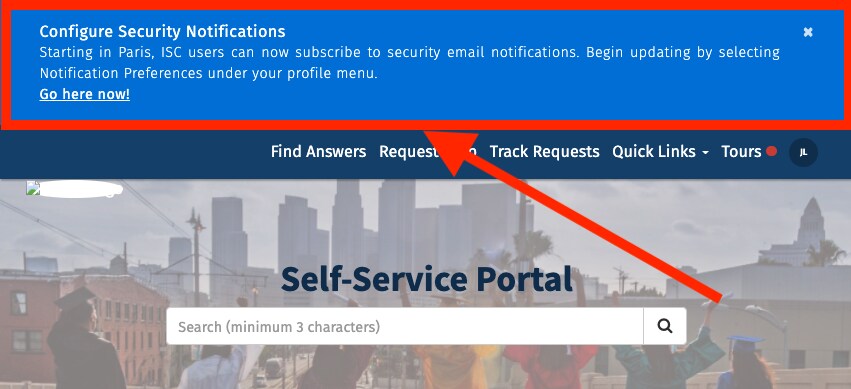
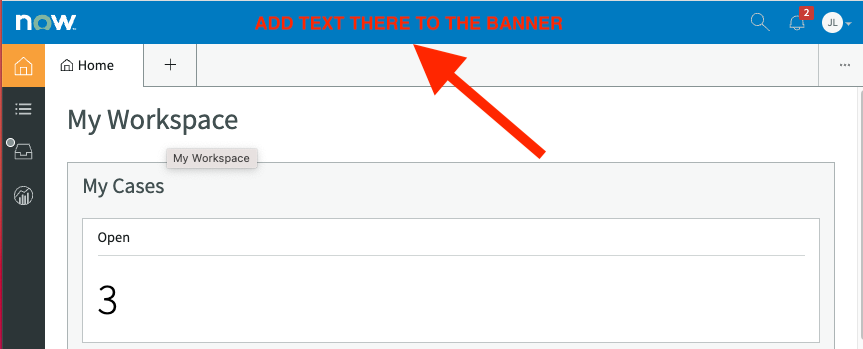
Is there a way to add text to the agent workspace banner as shown below?

It seems that the left side is reserve for the logo and the right side is reserve for the search bar.

On the other hand, could I display a message or popup message each time the landing page for agent workspace loads, similar to the service portal? Thanks!

- Labels:
-
Agent Workspace


- Mark as New
- Bookmark
- Subscribe
- Mute
- Subscribe to RSS Feed
- Permalink
- Report Inappropriate Content
01-21-2022 04:39 AM
Hello
Please check the below link, Using this you can brand the workspace.
e.g.:

Please Mark ✅ Correct/helpful, if applicable, Thanks!!
Regards
Sulabh Garg
Regards
Sulabh Garg
- Mark as New
- Bookmark
- Subscribe
- Mute
- Subscribe to RSS Feed
- Permalink
- Report Inappropriate Content
01-24-2022 09:30 AM
Hi Sulabh,
I am looking for something similar to an announcement banner or broadcast message in the agent workspace.
https://support.servicenow.com/kb?id=kb_article_view&sysparm_article=KB0727669
Branding allows me to change color but I can't display a message. In addition, the logo is too small to put a message.
- Mark as New
- Bookmark
- Subscribe
- Mute
- Subscribe to RSS Feed
- Permalink
- Report Inappropriate Content
01-24-2022 11:27 AM
Hi Jin,
please check below community link
Please Mark ✅ Correct/helpful, if applicable, Thanks!!
Regards
Sulabh Garg
- Mark as New
- Bookmark
- Subscribe
- Mute
- Subscribe to RSS Feed
- Permalink
- Report Inappropriate Content
01-24-2022 12:03 PM
Thanks Sulabh!
Is there a way to add a message so it displays in all list views? The proposed solution will only appear in 1 list view. Conversely, an announcement banner or adding text to the banner allows the message to appear even if they navigate to another portion of the site.