jamesmcwhinney
Giga Guru
Options
- Post History
- Subscribe to RSS Feed
- Mark as New
- Mark as Read
- Bookmark
- Subscribe
- Printer Friendly Page
- Report Inappropriate Content
on 03-29-2019 02:28 PM
I had a hard time finding a sample or any guidance for how to test out a scripted SOAP service.
Here is one method I found that works:
- Download and install postman
- Create a new request
- Set to POST
- Use URL: https://yourinstancename.service-now.com/yourscriptedwebservicename.do?SOAP
- Authorization: BasicAuth
- Specify your the SN account username and password you will use for the interface
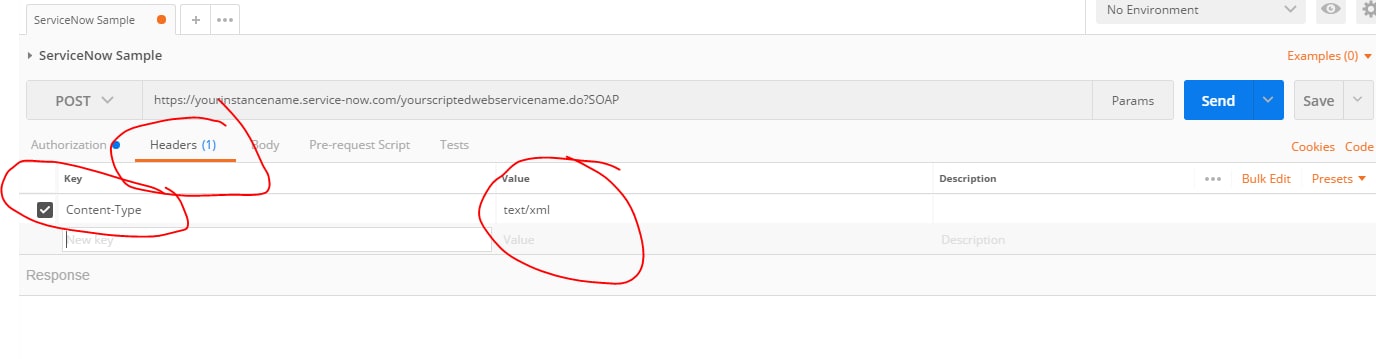
- Headers
- Add a key “Content-Type” and set the value to “text/xml”
- Body
- Switch to RAW mode
<soapenv:Envelope xmlns:soapenv="http://schemas.xmlsoap.org/soap/envelope/" xmlns:u="http://yourinstancename.service-now.com/yourscriptedsoapservicename">
	<soapenv:Body>
		<yourfunctionname>
			<yourinputparameter>hello world</yourinputparameter>
		</yourfunctionname>
	</soapenv:Body>
</soapenv:Envelope>
Here is what that should look like:


Labels:
- 5,467 Views
Comments
adamn
Tera Contributor
- Mark as Read
- Mark as New
- Bookmark
- Permalink
- Report Inappropriate Content
03-30-2019
12:46 PM
SoapUI is a good alternative for API testing. Its a bit heavier than Postman (still a free version) but it natively supports SOAP so you can do WSDL loading and done need to manually construct the body raw.
It supports REST too
jamesmcwhinney
Giga Guru
- Mark as Read
- Mark as New
- Bookmark
- Permalink
- Report Inappropriate Content
04-01-2019
12:56 PM
Thanks! I will try that next time!