- Post History
- Subscribe to RSS Feed
- Mark as New
- Mark as Read
- Bookmark
- Subscribe
- Printer Friendly Page
- Report Inappropriate Content
on 01-05-2021 03:55 AM
Hi
In this article, I will show how to integrate with 3rd party API using Flow Designer. To explain this, i have taken 1 small requirement.
Requirement: Currency conversion. Create a catalog item where the user submit a request selecting the target currencies and base currency.
For this, we create a flow designer which looks something like this.

As you can see the Flow is created on Request table. Then fetched the latest RITm for the request and filtered by our catalog item.
To fetch the values submitted in the request, you need to use Get Catalog variables action in Flow designer.
This will allow you to select the variables of your catalog item which you can use in your Flow. So in our case, we select base currency and target currencies here.

Once we have selected these, then we will pass these values to our action called Get Rates.
I have created a custom Action named Get Rates.
In Flow Designer -> You will see Actions tab. Go to actions tab and from there you can create action.
So our Get Rates action will look like this.

Click on Get Rates, it will open our action, which looks like this.

In this action i have created 3 input variables.
Access key: the key of our 3rd party API
symbols: refers to target currencies
base: refers to base currency
The data for these 3 variables are passed to this action from our flow designer.

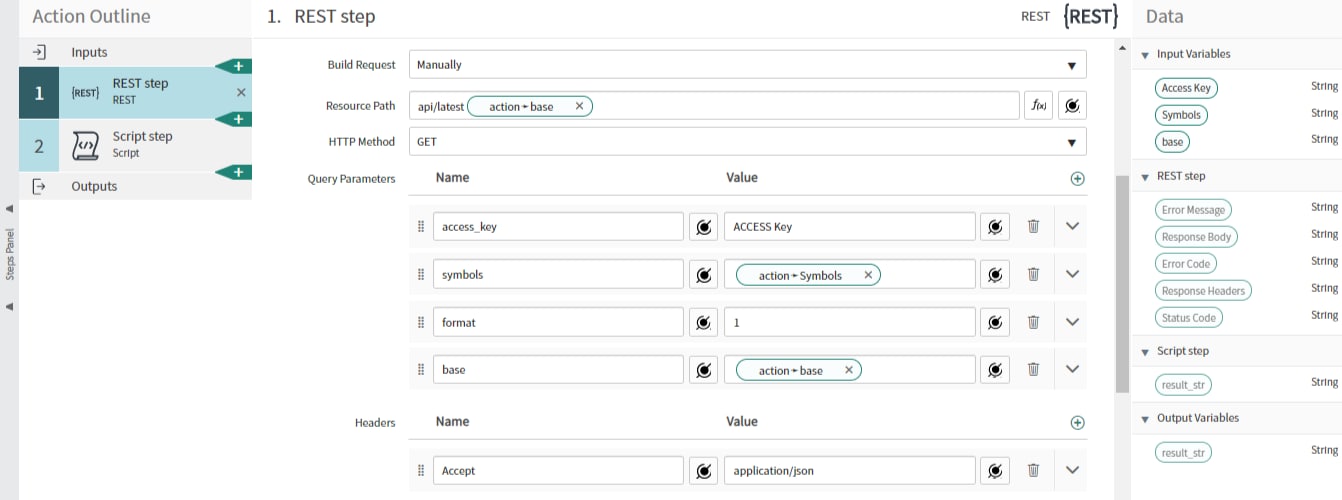
Once the inputs are given to the action, then in the action we create REST STep and give the details like this.
In this step we are basically building a request and calling it.


Once this is done, then we need to capture the response of the API. For this, I have created a Script Step where we capture the response and pass it back to our flow designer.

Then in the script we actually parse the output and store it in a variable.

The create output variable where we can store the output of this script step.

Now the result_str contains the output of the script step, which is basically a parsed response from 3rd party API.
Then go to outputs section of our Action and there you capture this script step output like below.

So once we got the output, then we are taking this output and updating the work notes of the RITM as below.

That's it. We are done. It is very simple requirement but this should give you an idea on how to fetch the variables values from RITM in the flow designer, pass to the action call REST API, parse the API response and update the RITM.
Let me know if you have any questions in the comments below.
Mark the article as helpful and bookmark if you found it useful.
Regards,
Asif
2020 ServiceNow Community MVP
- 4,968 Views