

- Post History
- Subscribe to RSS Feed
- Mark as New
- Mark as Read
- Bookmark
- Subscribe
- Printer Friendly Page
- Report Inappropriate Content
on 09-04-2022 10:31 PM
Hi All,
This post is to participate in #BuildWithAES challenge, to showcase how simple it is to get an app up and running in ServiceNow using App Engine Studio.
In this post, I created a NewRocket leave application using the Time off template in the AES. On top of the time off template, I've also created and added an automation flow to send a notification to our slack channel #leave_update. Works like a charm.
1. Created an application using the time-off template in AES.

2. Adding an automation/integration flow to post an update on Slack
3. Remember you also have conversational Integration with Slack installed on your instance to have actions to post a message and other updates to slack.


4. Created a simple flow to send updates on slack for leave requests submitted.
5. Creating a new record using a form view of the leave request(time off request)
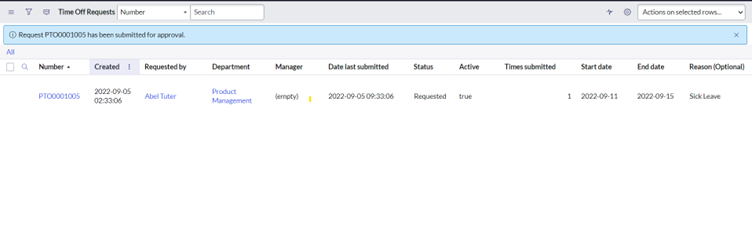
6. Once the record is submitted and approval is requested.
8. Update is sent to slack in the form below message.
It's intuitive and super easy to #buildWithAES on the #servicenow platform.
Thank you ServiceNow Developer Program team for this challenge.


- 3,256 Views

- Mark as Read
- Mark as New
- Bookmark
- Permalink
- Report Inappropriate Content
Your instructions are top notch Surya!



Regards,
Surya