

- Post History
- Subscribe to RSS Feed
- Mark as New
- Mark as Read
- Bookmark
- Subscribe
- Printer Friendly Page
- Report Inappropriate Content
05-10-2023 02:02 AM - edited 05-10-2023 02:06 AM
Catalog Builder comes with three fulfilment step types that can be used to create your own fulfilment process in a low-code workspace.
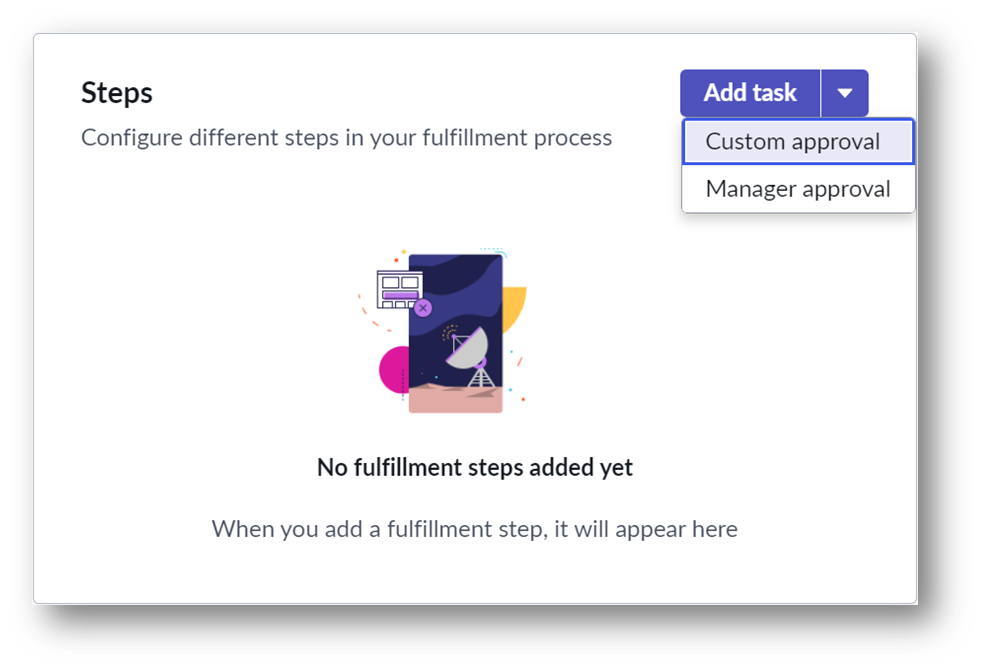
It is possible to create new fulfilment step types to extend the fulfilment use cases that can be used to build workflows in Catalog Builder. ServiceNow has documented this process here, but it can be a little hard to follow without an example or screenshots.
Having created a number of fulfilment steps myself, I have written this guide using an example to help the community in extending the functionality of Catalog Builder.
In this example, we will create a new fulfilment step to add an additional comment to the RITM. In an OOB ServiceNow instance, this will trigger a notification to the requestor.
Create a new table
When creating a fulfilment step, the data is stored in a table. We will need to create a new table for our custom step to work with extra inputs. This table is exempt from your custom table count, so no license implications exist.
Start by navigating to System Definition > Tables via the All application menu and select New.
Name the table using the existing naming convention. In this example, I will be calling the table Service Fulfillment Comment Step. Set Extends table to Service Fulfillment Step [sc_service_fulfillment_step] and deselect Create module.
The Columns section should be selected by default. Add new columns to support your configuration on the Table Columns embedded list. In this example, we will add a String field called 'Comments' with a Max length of 1024.
Navigate to the Application Access table and ensure Can read, Can create, 'Can update' and Can delete are all selected.
Set User role to catalog_builder_editor.
Populate any remaining mandatory fields as required and save the record.

You may wish to add the domain_master attribute to the dictionary collection record if domain separation is in use.
Create a composite record producer
The composite record producer is the configuration behind the form shown when modifying a fulfilment step in the Catalog Builder. The inputs are all stored in the table we just created.

To ensure our composite record producer is configured correctly, it's best to use an out-of-the-box template. In this example, we will use the Manager approval composite record producer.
Start by navigating to Service Catalog > Catalog Administration > Service Fulfillment Steps Configurations via the All application menu and select the Service Fulfillment Steps - Base step link in the Producer column in the Manager Approval row.
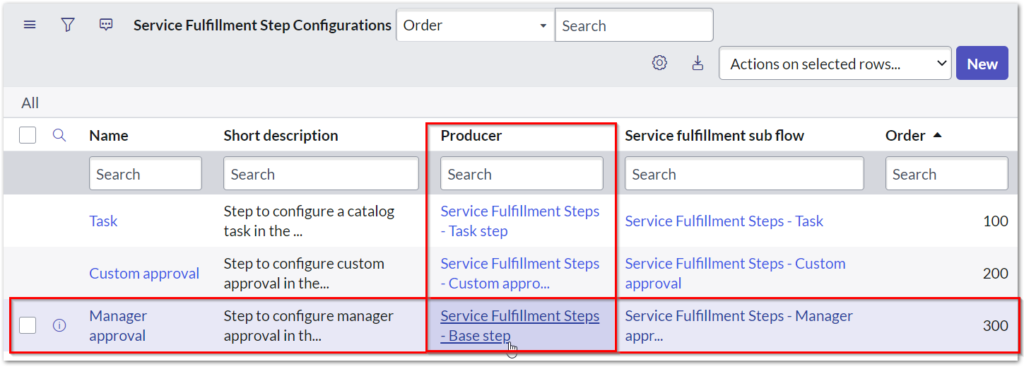
Due to being outside the appropriate scope, the 'Service Fulfillment Steps - Base step' record producer will be in read-only mode. Nonetheless, this suits our needs since we don't intend to alter this record. Firstly, select the Copy option, and as a result, you will be directed to a new record. Subsequently, rename this new record to reflect our ownership, including its short description, and change the table to the custom table we established earlier. Lastly, apply the changes by saving the record.

Now that the form is saved, you need to create a variable for each input in our fulfilment step type. In this example, we will navigate to the Variables related list and select New. Check Map to Field, setting Field to "Comments" and Type to "Multi Line Text". Check the Mandatory field and populate all remaining mandatory fields. When you are ready, select Submit to save and return to the composite record producer.
You may have noticed that ServiceNow has tried to be too clever and has added the Variable Set Service Fulfillment Steps - Properties set twice. This does not happen if we were to create the record producer from scratch, but that method requires more manual steps to get it working. Navigate to the Variable Sets tab, check the first row, select Actions on selected rows.. and Delete. Confirm deletion to proceed. Please note that removing via Edit will not work!

We are now ready to build the logic of our fulfilment step.
Create a subflow
Continuing the theme from the previous step, we are going to start with a template that we know will work.
Launch the Flow Designer and open the subflow 'Template: Service Fulfillment Steps'. Navigate to the More Actions menu and select Copy subflow. Rename the flow as desired and select Copy.

We need to use our custom service fulfilment step table. Change the Type of input Service Fulfillment Step to the custom table we created earlier. We use the 'Service Fulfillment Comment Step' table in this example.
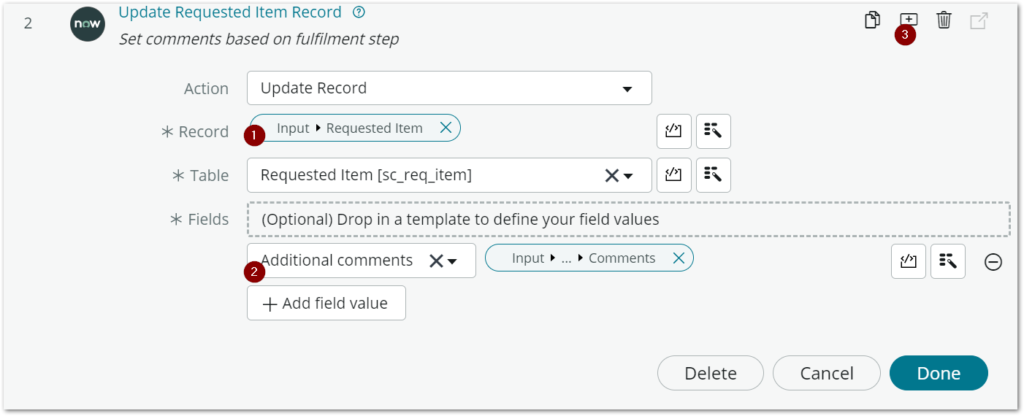
Add an Update Record action to your Subflow. Set record to Input 'Requested Item', setting field Additional comments to 'Service Fulfillment Step' input Comments field. It's always a good idea to annotate your action to make it easier to document your work.
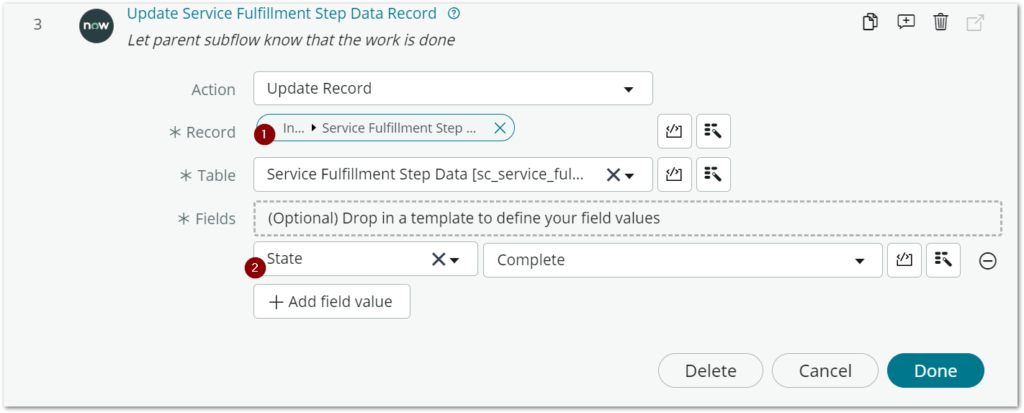
We need to let the parent subflow know that our step is complete. Add another Update Record action using the input Service Fulfilment Step Data, setting State to "Complete".
Update or remove the Log action in Step 1 and publish the flow.

Fulfilment step configuration
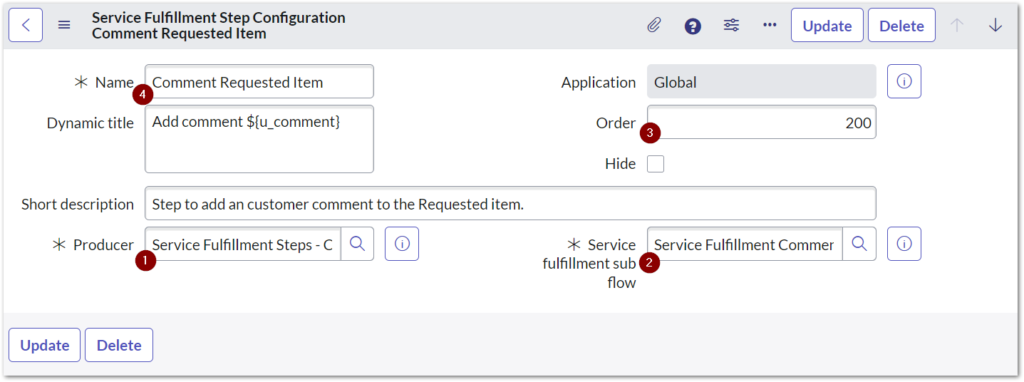
To use our custom fulfillment step, follow these steps: Go to Service Catalog > Catalog Administration > Service Fulfillment Steps Configuration, select New, and populate the Producer field with the previously created composite record producer. Set the Service fulfillment sub flow to the newly published one and ensure that the Order is greater than 200 to display it after the default options. Complete all other mandatory fields and then select Submit. We have tied everything together with these steps, and our custom fulfillment step is now ready to use.
Putting it into practice
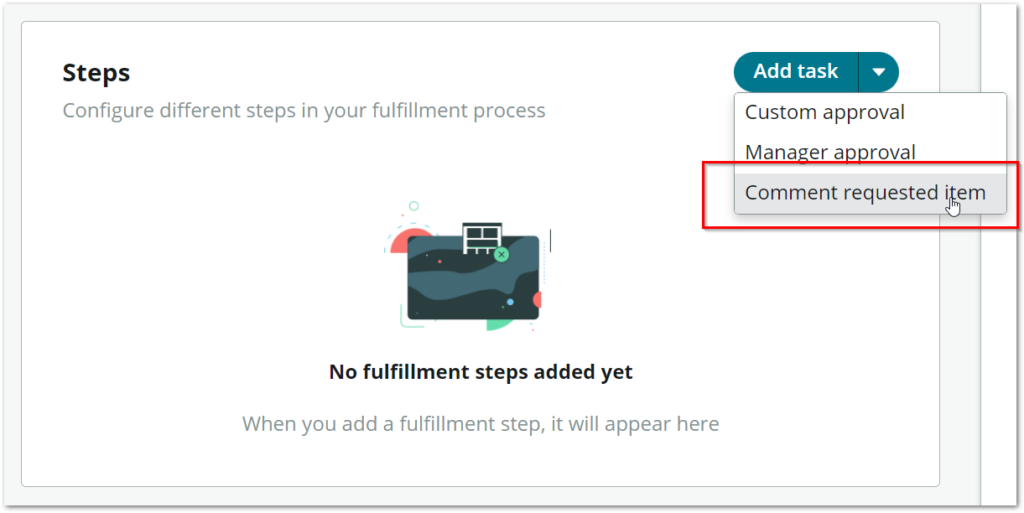
In the Catalog Builder, you should now see an extra fulfilment step in the menu.
Add the desired input and submit the record.

Publish your item and test it out!

If you had trouble getting this to work, I have uploaded the working example here at ServiceNow Share.
Comment below on the use cases you have extended into Catalog Builder by creating new fulfilment steps!
 |
I've also posted this article on my personal blog, The ServiceNow Nerd. You can find future updates on this topic, as well as my other blogs and articles there.
If you enjoyed reading the article, please mark as helpful 👍 and comment 💬 below. |
- 13,677 Views


- Mark as Read
- Mark as New
- Bookmark
- Permalink
- Report Inappropriate Content
How to create a COMPOSITE record producer? I can't find any documentation on it.

- Mark as Read
- Mark as New
- Bookmark
- Permalink
- Report Inappropriate Content
Hi @carmen_man
You can create a composite record producer on this table = sc_cat_item_composite_producer

You will find some composite RP

Take example on composite present on table.
Regards
- Mark as Read
- Mark as New
- Bookmark
- Permalink
- Report Inappropriate Content
Can you add stages to these new steps? I want to have more than, what appears to be, the default three request stages. EG I want to have a Manager Approval stage.
I tried creating a new step at that with a Manager Approval stage on the subflow but it didn't work (I think because stages don't cascade up).
Any idea how I can add additional stages into the flow at all?
Thanks!
- Mark as Read
- Mark as New
- Bookmark
- Permalink
- Report Inappropriate Content
@spike There is a limitation in Flow Designer where you cannot add stages to subflows, making this impossible to do cleanly.
This feature was initially planned for Vancouver but didn't make it in. I expect to see it in Washington, then you should be able to add stages into your fulfilment step subflows.
- Mark as Read
- Mark as New
- Bookmark
- Permalink
- Report Inappropriate Content
@paulmorris - Many thanks! Do you know where I can find a Washington feature list or something so I can keep an eye on what they include. Spent some time browsing this morning and can't seem to find anything!

- Mark as Read
- Mark as New
- Bookmark
- Permalink
- Report Inappropriate Content
Many Thanks!
I need to convert 5000+ mailtemplates to ServiceNow requests and I hope that I can do this 95% with Catalog Builder & the standard fulfillment step flow.
eg. Is it possible that I only ask an approval if the requestor is not a manager?
Is that possible in catalog builder with the standard step fulfillment flow?
Do you have other examples of interesting custom fulfillment steps?
Thx
FrankW
- Mark as Read
- Mark as New
- Bookmark
- Permalink
- Report Inappropriate Content
You could certainly create a custom step that does that. I've replaced the custom steps on my instance with ones that include a timeout on the approval.
- Mark as Read
- Mark as New
- Bookmark
- Permalink
- Report Inappropriate Content
@Frank Waegeman I created a custom fulfilment step for the use case of skipping manager approval when manager approves.
- Mark as Read
- Mark as New
- Bookmark
- Permalink
- Report Inappropriate Content
Ive created a custom step for the Manager Approval, so would like to remove the OOTB step 'Manager approval' from the fulfillment section 'steps'. but it seems the Service Fulfillment Step Configuration is 'read only' so I can't hide it.
Has anyone else seen this and managed to hide an OOTB step?
- Mark as Read
- Mark as New
- Bookmark
- Permalink
- Report Inappropriate Content
While I was doing this I actually hit "Insert and Stay" on one of the OOTB steps. I couldn't delete the copy as it was readonly. I had to raise a ticket with ServiceNow to get them to delete it.
My takeaway being that no, you can't change the stuff that's set as readonly by ServiceNow. Ergo, you can't delete the existing steps.

- Mark as Read
- Mark as New
- Bookmark
- Permalink
- Report Inappropriate Content
hi @paulmorris
Is it possible to update the catalog task short description based on the any of the variable's value selected in the catalog item , currently using the standard step based fulfillment flow, task short description comes from the task name itself from 'service Fulfillment Task Steps' table.
Please suggest the approach to achieve this.
- Mark as Read
- Mark as New
- Bookmark
- Permalink
- Report Inappropriate Content
Hello @paulmorris
Is it possible to update the catalog task short description based on the variable's value selected in the catalog form, currently using Step based request fulfillment flow, task short description updates with the task from table 'Service Fulfillment Task Steps'.
Please guide
- Mark as Read
- Mark as New
- Bookmark
- Permalink
- Report Inappropriate Content
Hi all,
I have a set of catalog tasks to be generated in sequence. However if the first task is closed cancelled, we need the rest of the task to stop generating. Can this be achieved using step based fulfillment flow.
- Mark as Read
- Mark as New
- Bookmark
- Permalink
- Report Inappropriate Content
I have Catalog Item Approval subflow that I want to incorporate into step fulfillment. Is that possible? Do I need to create a customized step in order to pull it in?
- Mark as Read
- Mark as New
- Bookmark
- Permalink
- Report Inappropriate Content
@KMNichols - Yes. That's exactly what I've done. I have a number of custom approval steps that I use for different things.
- Mark as Read
- Mark as New
- Bookmark
- Permalink
- Report Inappropriate Content
I want to create a customer step that calls a subflow to add a user into an Entra ID group. The idea being this step could be called from any of the software SRs where that is done. However I can't work out how to get the RITM variables into the step subflow. I've got access to the RITM, but the Get Catalog variables set requires a specific template and this could be called from a number of different places.
Anyone got any ideas how I can do that?
- Mark as Read
- Mark as New
- Bookmark
- Permalink
- Report Inappropriate Content
Hi,

use the Flow Designer action 'Get Catalog Variables' with anyone of your catalog items which contains the needed variables.

The selected catalog item will help you to identify the name of the variables.
If your requested item contains these variables the system can use them.
- Mark as Read
- Mark as New
- Bookmark
- Permalink
- Report Inappropriate Content
That won't work. As I stated the catalog item is different each time. The step you mention you have to provide a specific catalog item therefore the two things aren't likely to line up.
I did find a solution however. On the customer step I have two values, one is a question name, and the other is the type of variable the question is.
Then in the flow, it looks up the question name that's provided, for the current item and finds the value. Knowing what type of question it is then allows the flow to react accordingly.


- Mark as Read
- Mark as New
- Bookmark
- Permalink
- Report Inappropriate Content
Currently working on task to develop a service fulfillment step to "Add User to a ServiceNow Group"
How should I go by doing this?
