- Post History
- Subscribe to RSS Feed
- Mark as New
- Mark as Read
- Bookmark
- Subscribe
- Printer Friendly Page
- Report Inappropriate Content
on 04-15-2020 02:03 PM
Intended Audience: Custom scoped application developer + system administrator
Estimated Reading Time: 5 minutes
The purpose of the article is to document my learning experience with setting up Git integration via MID Server, and hopefully, this will help you with your setup as well. I find that sometimes when I read the doc site, I still can't completely figure out how to get things to work. Either I skim through the doc too quickly (TLDR) or encounter some unexpected issues or have a lack of knowledge in other areas.
In Orlando, MID server support for Git integration is introduced. See more in the Studio release notes here.
Previously, to connect to our on-premise Git server from ServiceNow instance, I had to ask our system administrator to relax the firewall rules to allow ServiceNow instance to talk to our internal Git server. Now with the MID server support, we no longer need to. Through this exercise, I worked with our system administrator to clean up the unnecessary allow rules, and re-tested to confirm that we can securely keep the communication between the NOW platform and Git within our internal network.
Git Lab / Git Hub / Bitbucket
Before we get into the how's, let's understand the benefits and the why's of using a code revision system like Git. There are 3 major benefits of using a code revision control system:
- I am a fan of knowing I have a production-ready state of codebase. If something blows up on the production server or I made a mess in my local development environment, I can quickly fetch the code from the application repository and deploy the application without any issues. Recovery is fast and easy.
- Code review process. Using Git's pull request process, it allows an easier code review process. Nothing gets promoted to master unless the pull request is approved. What's good about the commit and pull request process is that you can review changes made since the last commit and all commits are tracked.
- An industry standard. If you are a developer, you must know Git. Even if you change your career to develop outside of the NOW platform, there's Git. It's important to keep up with the industry standard of managing your code. ServiceNow developers are developers after all. I know the NOW platform has spoiled us to write low-code, no-code. But let's not let our developer skills slide.
Setting up your Git user account (Optional)
This is recommended on the doc site as well as my personal preference so I don't enter my Git password on the ServiceNow instance. I created a personal access token in my Git user account to use in place of my password. The personal access token can be revoked at any time. Note: once the access token is generated, you won't see it again. So note it down or save it in your password manager. Instructions on how to set up a personal access token can be found here.
Setting up the Application Repository
For each custom scoped application, create a repository in Git. Make sure you give read and write access to your ServiceNow developers.
Your email address set on your ServiceNow user account will match the email address set on your Git user profile. So even though the application is linked using your credentials, the commit's author will show as the person who made the commit. Thanks to my colleague
MID Server
It's important to note that the MID server always initiates the connection to ServiceNow instances and not the other way around. So no inbound firewall rule is required to allow ServiceNow instance to talk to the MID Server.
To understand the flow, we need to know how ECC (External Communication Channel) queue works. So there is the Asynchronous Message Bus that the MID Server subscribes to. Work is put on the ECC queue for the MID server to process. More information can be found on ServiceNow's doc site here.
If you already have a MID server set up for your instance, there's nothing else you needed to do, other than making sure that your corporate firewall rules allow access from the MID Server to the internal Git server. For https protocol, use port 443.
ServiceNow Instance
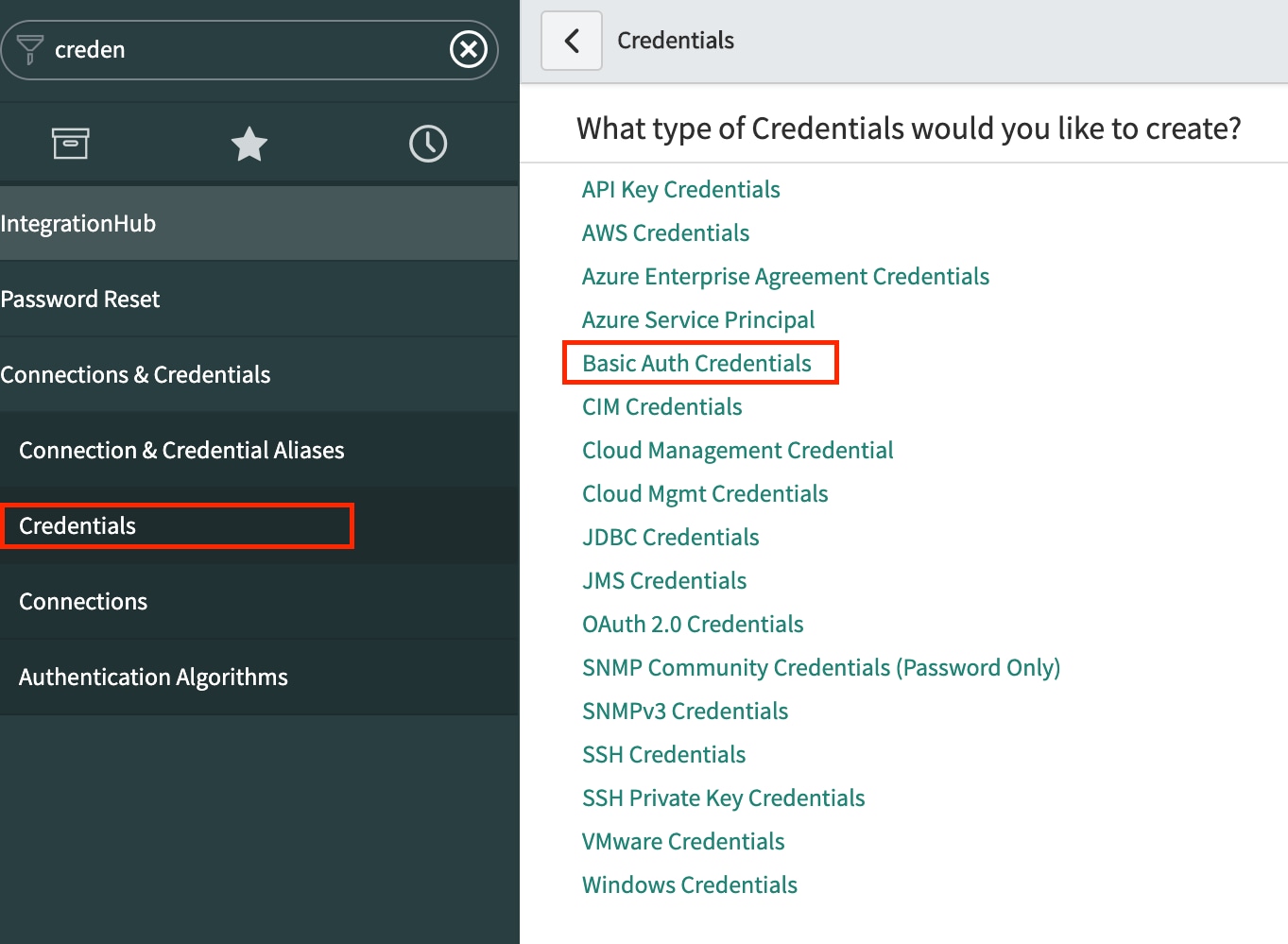
To make the connection to a Git repository via the MID server, you need to create a Git credentials record on the ServiceNow instance. For an https connection, create a Basic Auth Credential. From the navigator, search and select "Credentials", click on the "New" button, and pick "Basic Auth Credentials".

In the name field, put in something like "Git Credentials". In the username field, enter your Git username. In the password field, paste in your personal token key generated from above or simply type in your Git password.
Once you have the Credentials record created, you are all set. You can link any custom scoped applications (except mobile applications) in Studio to Git. Note that you only use one credential to connect to your Git repo. If you have multiple developers working on the same application, just use one developer's Git credentials to link to the Git repo. Subsequent commits will be tracked correctly by the committer's email address as set in their user record. So, not to worry. More information on linking and importing Git repo can be found on the ServiceNow doc site here.
Caveats
Special thanks to
- Comments in Customer Update will be lost after commit. Using Git requires a different way of thinking. You no longer will be managing Customer Update entries. So commenting on a Customer Update record is unnecessary as they will be lost. Use commit comments instead.
- Switching between branches means everything will be dropped and re-created. You will lose your table data. So be mindful when you are switching branches.
- Never ever use Git in your production instance. Use Git only in non-production instances.
- In Orlando, there seems to be a bug with the 'Commit' option greyed out even if a change is made is Studio. The workaround is to simply refresh Studio.
- 3,533 Views
- Mark as Read
- Mark as New
- Bookmark
- Permalink
- Report Inappropriate Content
This is very useful. Thank you.
- Mark as Read
- Mark as New
- Bookmark
- Permalink
- Report Inappropriate Content
Instead of using a specific Developer's personal Git credentials, we created a non-user or service account and added it as a Team member in GitHub. And then used that account in ServiceNow to get connected to GitHub.
- Mark as Read
- Mark as New
- Bookmark
- Permalink
- Report Inappropriate Content
How to setup this using oAuth 2.0 credentials?