- Post History
- Subscribe to RSS Feed
- Mark as New
- Mark as Read
- Bookmark
- Subscribe
- Printer Friendly Page
- Report Inappropriate Content
on 09-30-2020 03:37 PM
Best practices in migrating Update Sets with 3 stage environment (DEV, UAT & PROD)
Archived Process:
For migration of new developments to PROD system, we use agile and bi-weekly sprint release.
STEP 1: Developers create update sets for their stories, perform unit testing in DEV and push the update set to UAT using "Push to Test" button (custom development) in DEV environment. This button commits the update set in UAT. Developers have no access to UAT.
Ex:
| Developer | Update Set | Scope | State |
| A | STRY101 | Global | Pushed to UAT |
| A | STRY102 | HR | Pushed to UAT |
| B | STRY201 | Custom App1 | Pushed to UAT |
STEP 2: Business tests the stories and provides the feedback to fix stories STRY101 & STRY201.
STEP 3: Developers create new update sets relavant to stories, make the fixes and push the stories to UAT.
| Developer | Update Set | Scope | State |
| A | STRY101 2 | Global | Pushed to UAT |
| B | STRY201 2 | Custom App1 | Pushed to UAT |
STEP 4: Business tests the stories and provides the feedback to fix stories STRY201.
STEP 5: Developers create new update sets relavant to stories, make the fixes and push the stories to UAT.
| Developer | Update Set | Scope | State |
| B | STRY201 3 | Custom App1 | Pushed to UAT |
STEP 6: Business approved all the changes. Ready to move to PROD on Sprint Release date.
STEP 7: All developers send a list of update sets to ADMIN for moving them to PROD on sprint release date. There could be 50-70 update sets with several versions to be moved to PROD.
STEP 8: Admin commits the update sets one after the other. This has become a 1-2 hr job for Admin once in 2 weeks.
Developers were not merging update sets. Why?
Reason 1: Developers dont have access to UAT.
Reason 2: Admin has to merge these sets. He don't have the idea on what these changes mean. And if merging creates conflict errors, it would bring further confusion on how to act for each unresolved individual update.
NEW PROCESS:
STEP A: Admin creates a blank update set called - "Sprint Release 105 (09/01-09/14)" in GLOBAL scope at the beginning of sprint.
STEP B: Follows steps 1-6 from above as usual.
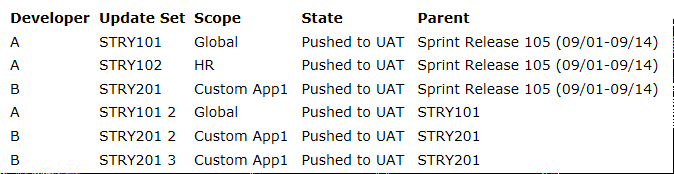
STEP C: On the day before Sprint release, developers set the parent to the update sets in the following way.

STEP D: On Release day, Admin will close the "Sprint Release 105 (09/01-09/14)" by changing it's state to Complete.
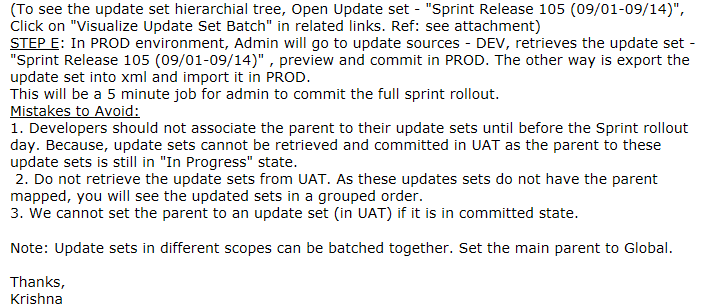
(To see the update set hierarchial tree, Open Update set - "Sprint Release 105 (09/01-09/14)", Click on "Visualize Update Set Batch" in related links.)

STEP E: In PROD environment, Admin will go to update sources - DEV, retrieves the update set - "Sprint Release 105 (09/01-09/14)" , preview and commit in PROD. The other way is export the update set into xml and import it in PROD.
This will be a 5 minute job for admin to commit the full sprint rollout.
Mistakes to Avoid:
1. Developers should not associate the parent to their update sets until before the Sprint rollout day. Because, update sets cannot be retrieved and committed in UAT as the parent to these update sets is still in "In Progress" state.
2. Do not retrieve the update sets from UAT. As these updates sets do not have the parent mapped, you will see the updated sets in a grouped order.
3. We cannot set the parent to an update set (in UAT) if it is in committed state.
Note: Update sets in different scopes can be batched together. Set the main parent to Global.
Thanks,
Krishna
- 6,630 Views

- Mark as Read
- Mark as New
- Bookmark
- Permalink
- Report Inappropriate Content
Nice! But in the first step of pushing/committing the update sets to UAT via customized option, how are you handling the conflicts if any?
- Mark as Read
- Mark as New
- Bookmark
- Permalink
- Report Inappropriate Content
Unfortunately, that's still a challenge for us. Developers have read access to their update sets in UAT to check if they are committed or not and reach out to admin to resolve the conflicts.
- Mark as Read
- Mark as New
- Bookmark
- Permalink
- Report Inappropriate Content
Thank you for this information, very useful. Quick question, how would you tie these release to the change management process?