april_mcgehee

ServiceNow Employee
Options
- Subscribe to RSS Feed
- Mark as New
- Mark as Read
- Bookmark
- Subscribe
- Printer Friendly Page
- Report Inappropriate Content
09-30-2015
02:06 PM
Some of you might be experiencing the product defect where your reference fields that were made read-only through a UI Policy or a Client Script can still be edited using the look-up icon (aka magnifying glass). An example of this is may be you've made the User field on your incident form read only. Even though the field is greyed out, when you click on the magnifying glass, it allows you to edit the field. This can be risky business because all of your read-only fields are mostly read-only for security purposes.
There are two work-around paths for this issue:
- Configure the reference field definition in the dictionary to read-only.
- Add a read-only ACL to the reference field.
To configure the reference field definition in the dictionary to read-only.
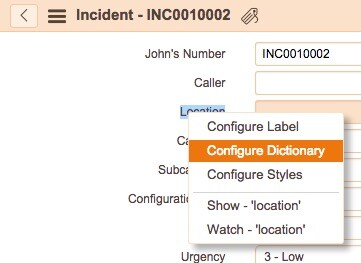
- Right click on the field label.
- Select Configure Dictionary
- Check the read only box.
- Click Update
To add a read-only ACL to the reference field
- Elevate your privileges by clicking on the lock icon
- In the form access the context menu by right clicking in the header
- Select Configure > Security rules
- Create a New ACL
For more information see:
Reference fields set as readonly in Fuji still have working lookup magnifying glass
You must be a registered user to add a comment. If you've already registered, sign in. Otherwise, register and sign in.