kim_purcell
Kilo Explorer
Options
- Subscribe to RSS Feed
- Mark as New
- Mark as Read
- Bookmark
- Subscribe
- Printer Friendly Page
- Report Inappropriate Content
06-16-2015
04:22 PM
The visual task board (VTB) is a interactive tool that allows you and your team to collaborate on multiple task records in real time. Any user can create, view, and edit visual task boards, and share these boards for other users to view and edit.
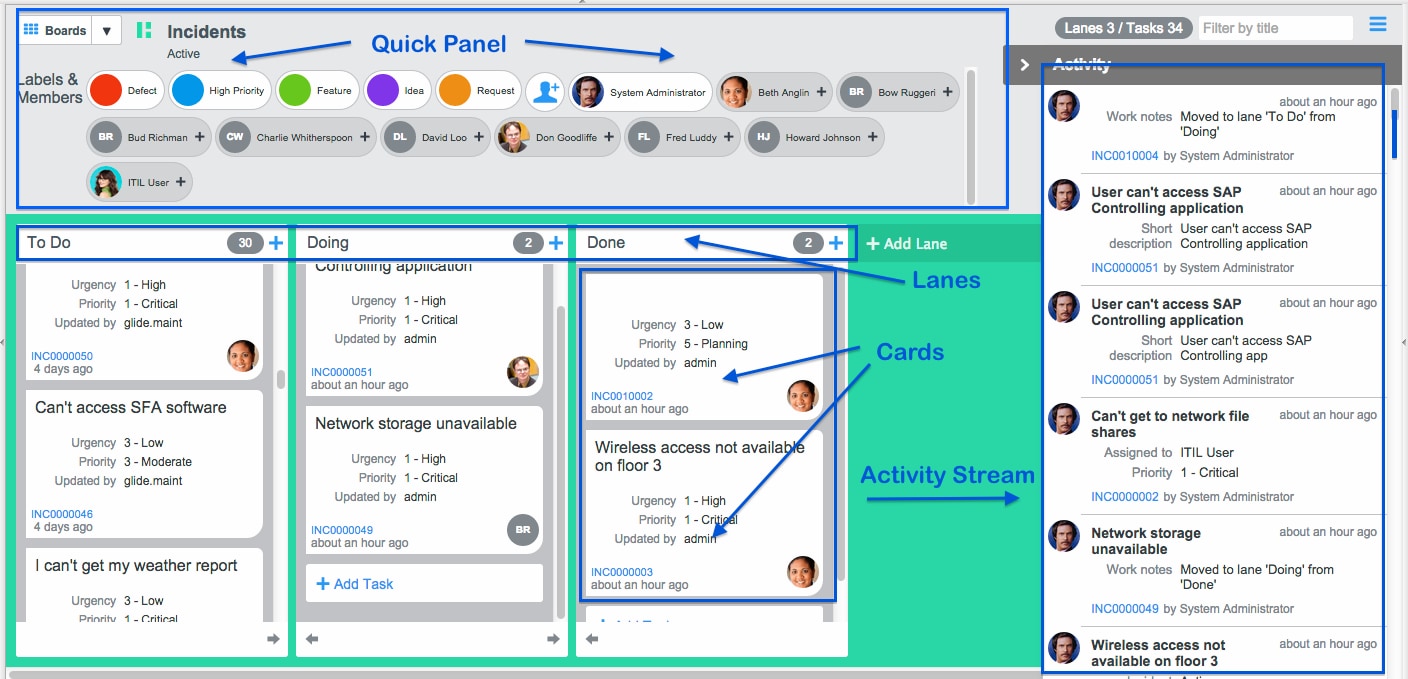
Your task board consists of a quick panel, lanes, cards and activity stream. You can add task cards, edit card details, add labels to cards, and access the task record, depending on the type of board you've created. In addition, you can move the cards between lanes and keep track of recent activity using the activity stream in the top right.
For tips on using VTBs, check out 6 tips for using Visual Task Boards by Chuck Warner and this knowledge15 session Visual Task Boards: Interact with Work More Efficiently.
If you need to edit your short description in Eureka, you may encounter an error message when you double-click the card that opens in a pop-up: An error occurred saving your change. Please verify you have permission to make this change.
Don't fret. Chances are, you do have permission, just not access to edit from here. There are many options for quickly editing the short description for your task.
How to edit the short description on your visual task board:
Choose from the following options:
- Edit the text directly from the card in the lane on the Visual Task Board (click on the short description to open the field to edit):
- Navigate to the pop-up form of the record to edit:
You can also:
- Edit the short description from the list view:
- Edit the short description from the form view:
(Note: You may receive this message if you attempt a move that you don't have permission for, like a lane change, because of ACLs. In that case, it is an expected result, and not an error. So double-check your ACLs before submitting an incident or reporting an issue.)
If you are on Eureka Patch 6, Eureka Patch 6 Hot Fix2, Eureka Patch 6 Hot Fix 4 or Eureka Patch 7, you could run into this problem. This issue is fixed in Eureka Patch 9. You can get more information about this issue in ServiceNow KB: Visual Task Board permission error when editing Short Description from the pop-up car...
2 Comments
You must be a registered user to add a comment. If you've already registered, sign in. Otherwise, register and sign in.