Brad Tilton
ServiceNow Employee

There are a lot of great features in ServiceNow's London release, but my favorite, by far, is the Multi-row variable set. As someone who has implemented Service Catalog through the native UI, CMS, and Service Portal over the years this is something that I've always wanted to be in the platform. There have been some really good alternate solutions found on share, but those are unsupported and can make upgrades a bit riskier. I'm happy to report that the multi-row variable set functionality in the London release is very well done and we'll explore that here.

In this post we'll create a multi-row variable set, henceforth to be known as a MRVS, add variables, then show it in action. In a subsequent post we'll access its values from a background script (which could represent a business rule, scheduled job, workflow script, or flow designer script action). We're going to take a fairly common use case that I've seen in the past where someone is requesting access to different applications, and the level of access may be different for each application. I've seen this done via order guides, adding separate items to the cart manually, or some sort of custom variable solution, but it seems like a great use case here.

Creating the MRVS

We'll start with a new catalog item I've created with one variable with requester information so far:
find_real_file.png

We're now going to add the new MRVS by going into the Catalog Item record and clicking New in the variable set related list. Notice the new interceptor that's been added:
find_real_file.png

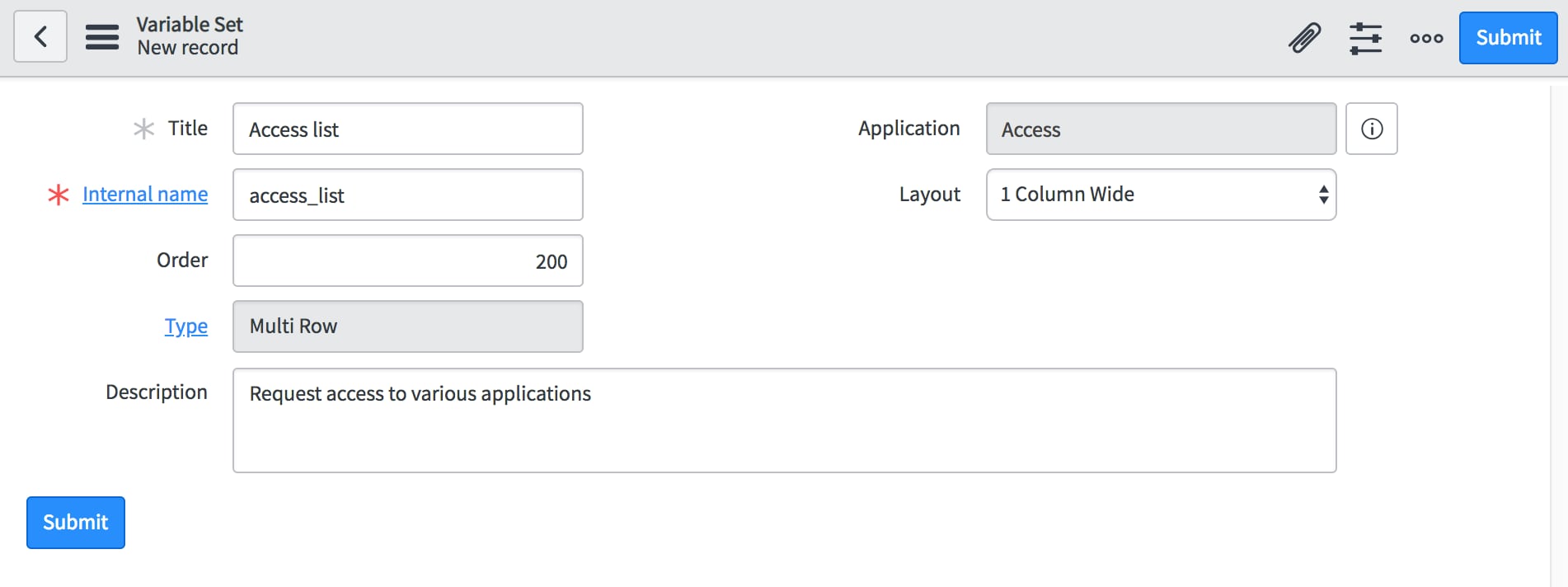
Clicking on the MRVS we get a new variable set record to fill out:
find_real_file.png

I'm now going to create three variables in my update set:
find_real_file.png

The users will be able to select applications along with an access level for each application. Also, we're going to want to require a business justification if they ask for "Full access" to an application, so we'll add a ui policy to make that field mandatory. Note: Because the variable is located in the MRVS and will show up as a table you cannot toggle the visibility with a ui policy.

Testing the MRVS

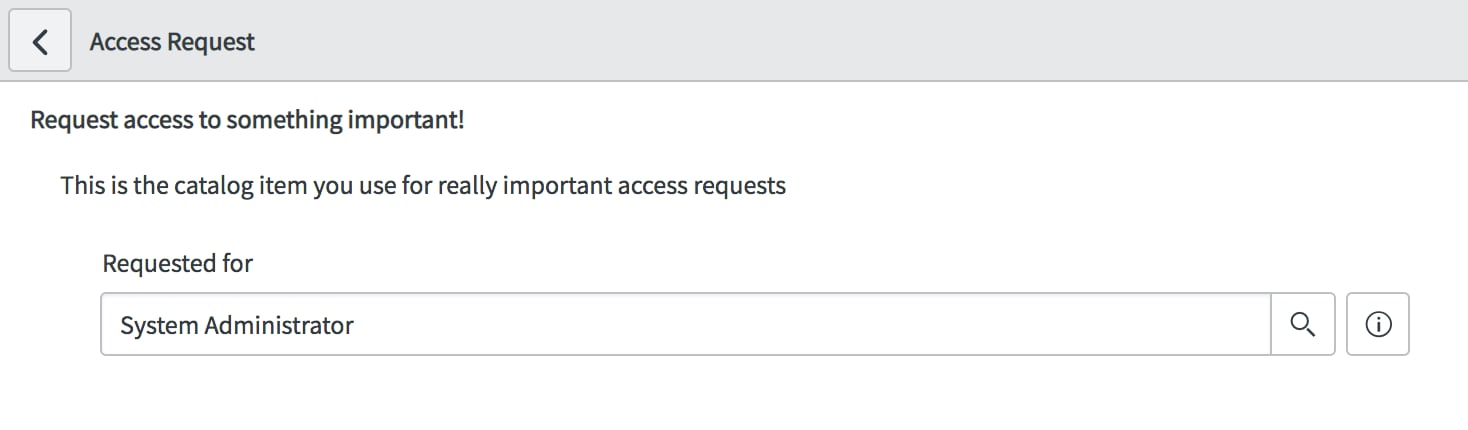
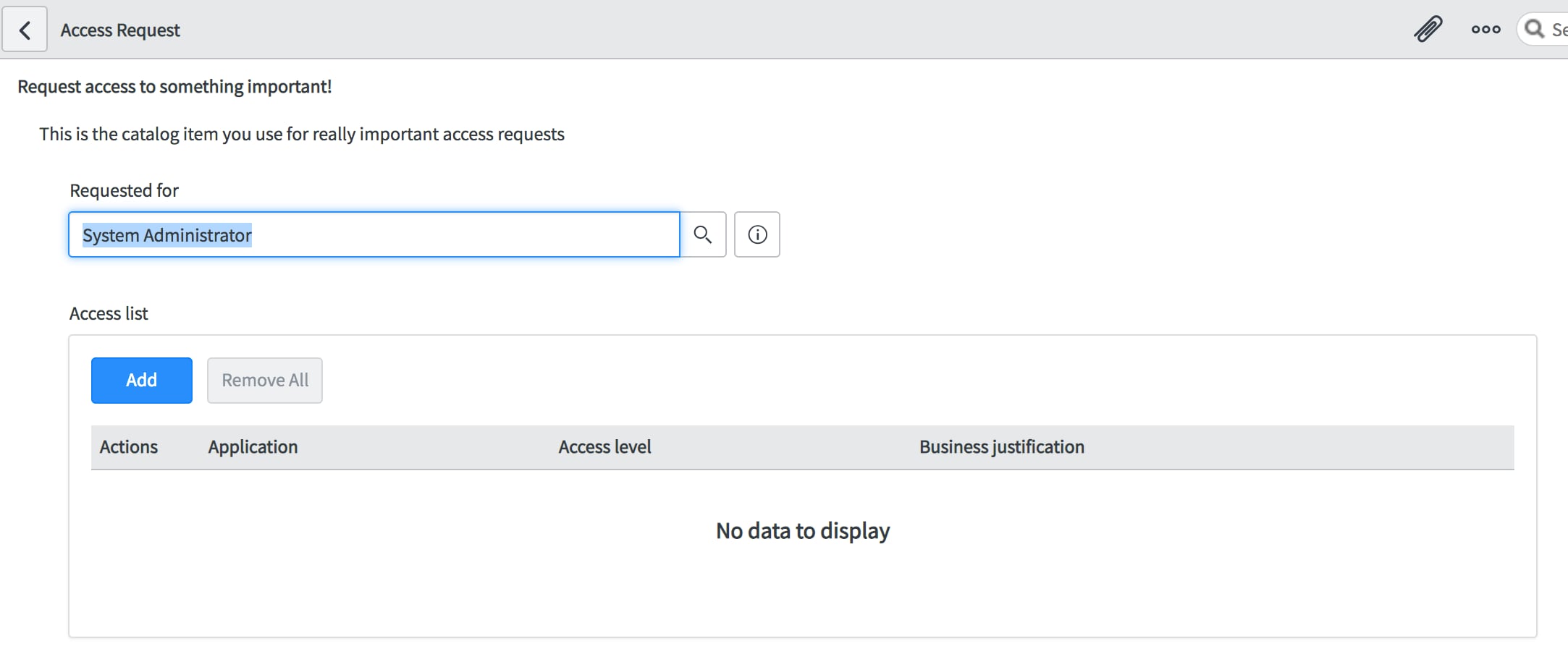
Now it's time to test it out! Clicking on the Try it button on the catalog item will bring up the item front end with the rendered variables. You can see that our Access list variable set has a table with no current entries in it.
find_real_file.png

Hitting the add button will bring up a modal with the three variables we defined inside the variable set, so we'll fill those out and click add.
find_real_file.png

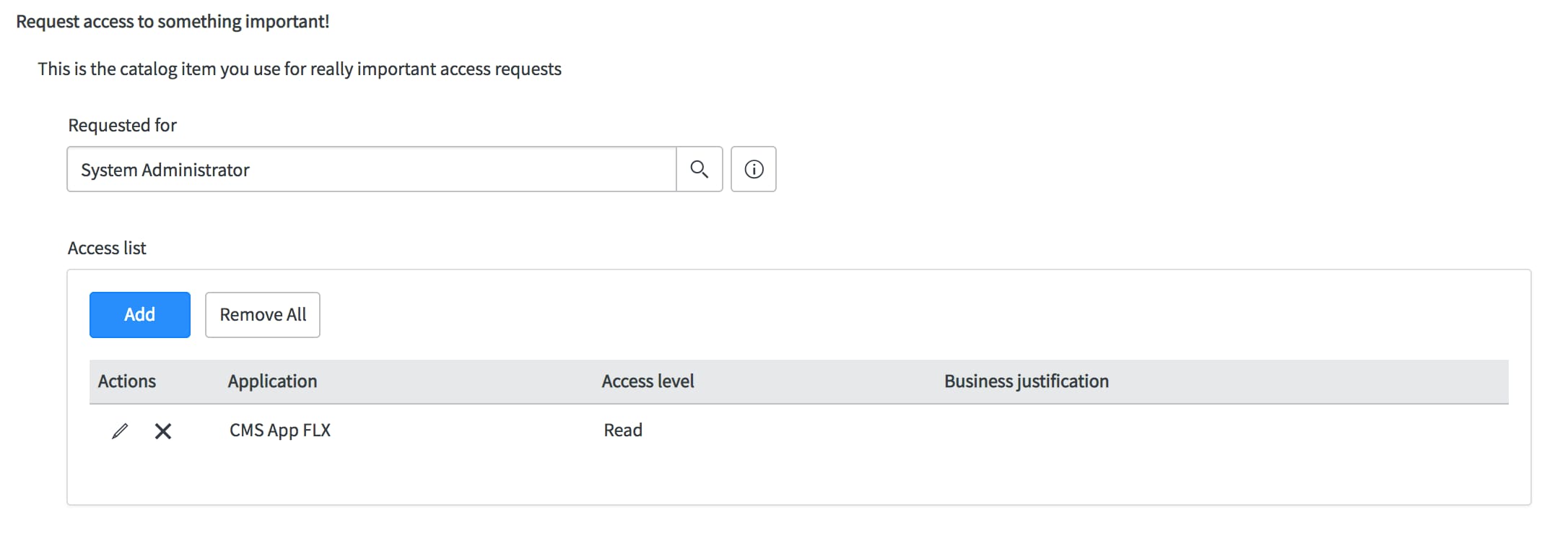
Now you can see that we've got a row for that entry.
find_real_file.png

Now we'll add another row, but this time change the access level to full access, which will trigger our ui policy to make the Business justification field mandatory.
find_real_file.png

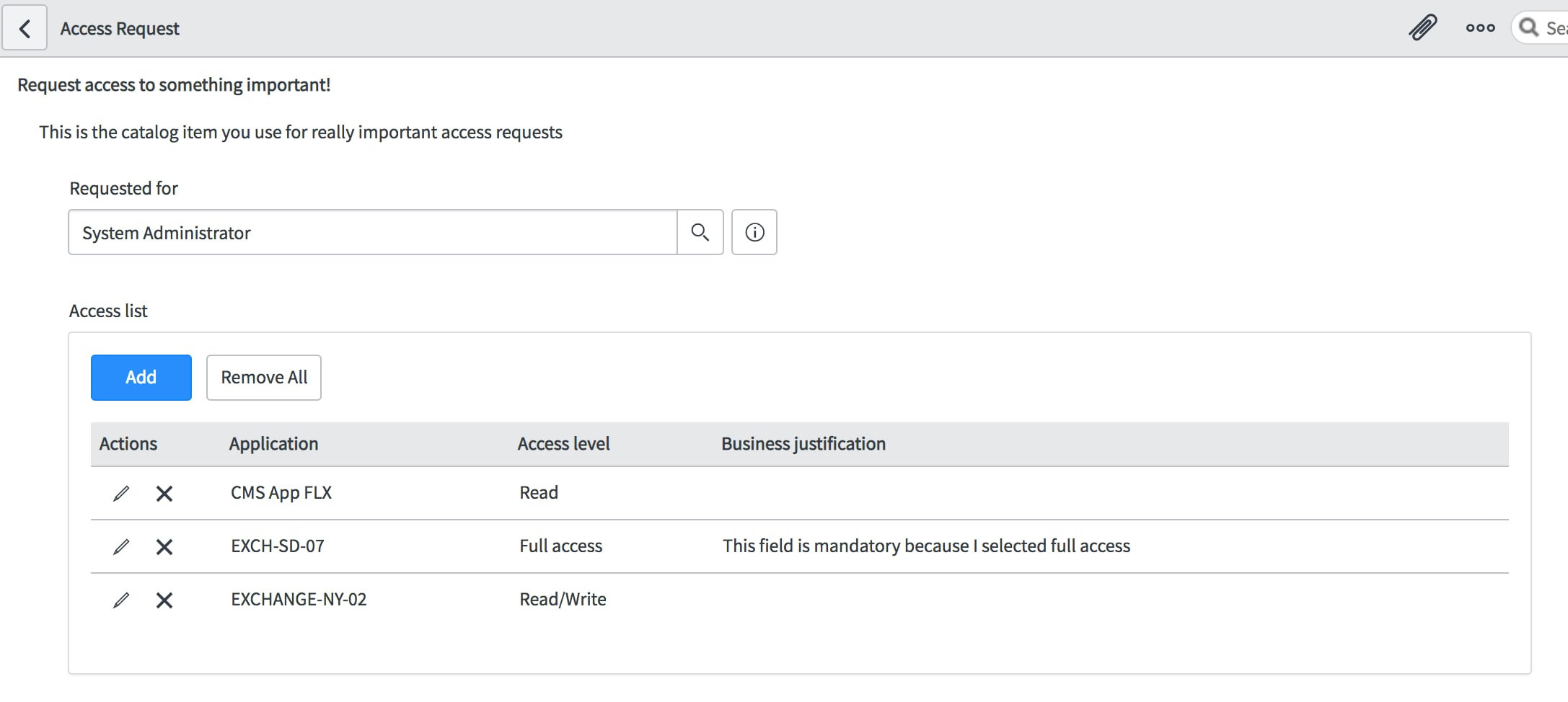
And then we'll add another entry and end up with 3 different rows in our multi-row variable set.
find_real_file.png

We can also edit or remove rows by clicking the pencil and x icons under the actions header in the table. 

From here we can order the catalog item and let the workflow take over. In the workflow, we may want to do things like send approvals to various people based on the different applications selected, automate the provisioning of this access, or create tasks dynamically for each of these applications and access.

See my next post: Scripting the Multi-row Variable Set

66 Comments
Gulzar Manuja2
Kilo Guru

Hi All,

Greetings !!!

I have one 'Multi Row' type variable set under which there is a variable named 'email_address' as shown below:

This Email Address variable on the Service Portal form looks as shown below:

Now, I want to use value of this variable in the workflow. In order to do so, I tried to extract value of the 'email_address' variable by making use of following statements:

var abc = current.variables.email_address;
gs.log("Value of Guided Email domain is: " +abc);

When I checked the script log statements after running the workflow, I got value of the 'email_address' variable to 'undefined' shown as follows:

Can someone suggest me what am I doing incorrectly ? Any help will be highly appreciated.


Thanks & Regards,

Gulzar Manuja

Ankit18
Mega Contributor

You can use below code to get the value

var mrvs = current.variables.guest_access_domain;

var rowCount = mrvs.getRowCount();

for (var i = 0; i < rowCount; i++)

{

var row = mrvs.getRow(i);

var email_address = row.email_address;

gs.print('email address  ' + email_address);

}

Gulzar Manuja2
Kilo Guru

Hi Ankit,

Thanks a lot for your response.

The solution suggested by you worked as a charm. However, I would be extremely grateful if you could extend your help. The question that was asked by me was the first part of the requirement.

Second and final part of the requirement needs to compare the emails/domains entered by the user in the Multi Row variable with the entries in the Custom Table 'Domains' (u_domains). Table has only one String type field 'Domain Name' (u_domain_name). Screenshot of the table is shown below.


find_real_file.png


If a match is found, then we have to create a SCTask which would be assigned to 'XYZ' team. And if the match is not found, we have to trigger an approval of "ABC" person. My current workflow looks something like this:


find_real_file.png

find_real_file.png


Highly appreciate your help.

Thanks & Regards,
Gulzar Manuja

Ankit18
Mega Contributor

You can use the IF conditional You have to GlideRecord your domain table to check the email and then trigger the new task in workflow. Your workflow should look like this 


find_real_file.png 


and the if condition should have below code


answer = ifScript();

function ifScript() {
var mrvs = current.variables.guest_access_domain;
var rowCount = mrvs.getRowCount();
for (var i = 0; i < rowCount; i++)
{
var row = mrvs.getRow(i);
var email_address = row.email_address;
gs.print('email address ' + email_address);
var val_domain = new GlideRecord('u_domain');
val_domain.addQuery('email', email_address);
if(val_domain.next())
return 'Yes';
}

return 'No';
}

A Amrin Banu
Tera Contributor

https://community.servicenow.com/community?id=community_question&sys_id=0424a208db81b30023f4a345ca96...


check this out to see how to hide variables in a multi-row variable set. Hope that helps!

Nannette Stephe
Tera Contributor

I can't get the Multi-Row Variable to save the data if it is entered on the Portal.  I am not sure how to get the data to save in the RITM.

A Amrin Banu
Tera Contributor
https://community.servicenow.com/community?id=community_question&sys_id=4c6287eddb98dbc01dcaf3231f9619e8
Ajay74
Kilo Contributor

Hi, 

I have a requirement where I am using a MVRS with other variables.

I cannot include all the catalog variable in a MVRS as I have field that should be repeated 'n' times.


Is there any way , I can include MVRS inside another MVRS?

or 

How to repeat all the catalog variable along with the MVRS 'n' number of times 


Thanks,

Ajay K S

Mahi15
Tera Contributor

Hi Brad,


This is a great article. I created an MRVS for a catalog item and I found that the MRVS is not displayed in Emails, Approval variable Summarizer and Catalog Task variable Summarizer. The variable set is just not there - all other variables are displayed. The variable appears only on the RITM form. This happens both on Platform and Service Portal. We are on NY. From the docs, I learnt that we cannot mark the variables inside the MRVS as Global and I am assuming this is the reason why it won't appear. 

Do you have any suggestions please? Thank you.

Thanks,

Mahati

Not applicable

Very nice article indeed.

Is there a way to change the text Add Row on the Popup when clicked on add button ?