mitchellstutler
Tera Contributor
Options
- Subscribe to RSS Feed
- Mark as New
- Mark as Read
- Bookmark
- Subscribe
- Printer Friendly Page
- Report Inappropriate Content
10-25-2016
09:55 AM
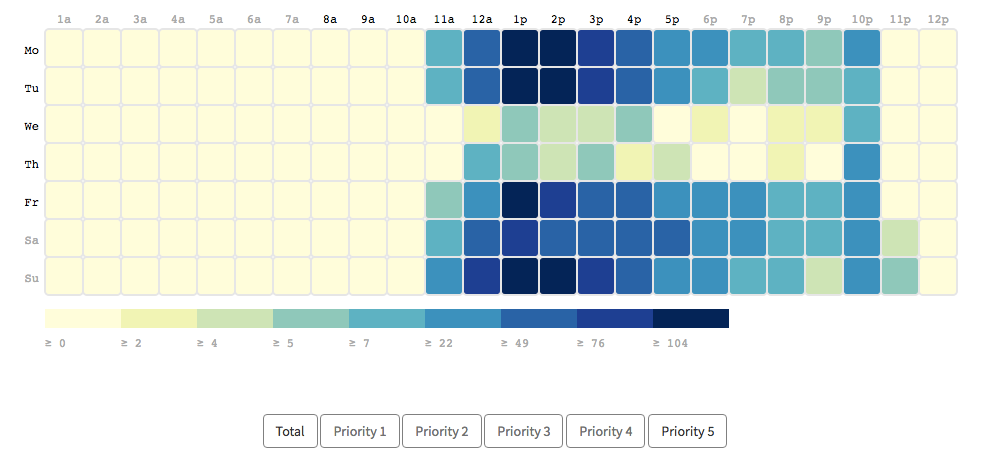
In this post, I am going to outline how I created an interactive heat map in a Service Portal widget by leveraging D3.js. This heat map displays a matrix of colored blocks that indicate how many incidents were created at a given time on a given week day. This could help you forecast service desk scheduling needs, plan when to implement changes, or even identify your highest risk periods.
Given that this post is using incident data from my instance, I also added in the capability to click a button and transition the heat map to only focus on a particular incident priority. I'm sure that you can imagine multiple use cases for this heat map, so I suggest you view this post as a framework which you can modify to your own needs.
Since there are previous posts giving a more in-depth introduction to using D3 and Service Portal together, I won't go into much detail with the code. Here are screenshots and/or pasted code for my HTML, CSS, Client Script, and Server Script:
HTML
<div class="centered-chart row">
<div id="chart"></div>
<button class="btn" ng-click="c.updateMap(c.data.blocks, 'total')">Total</button>
<button class="btn" ng-click="c.updateMap(c.data.blocks, 'p1')">Priority 1</button>
<button class="btn" ng-click="c.updateMap(c.data.blocks, 'p2')">Priority 2</button>
<button class="btn" ng-click="c.updateMap(c.data.blocks, 'p3')">Priority 3</button>
<button class="btn" ng-click="c.updateMap(c.data.blocks, 'p4')">Priority 4</button>
<button class="btn" ng-click="c.updateMap(c.data.blocks, 'p5')">Priority 5</button>
</div>
CSS
rect.bordered {
stroke: #E6E6E6;
stroke-width:2px;
}
text.mono {
font-size: 9pt;
font-family: Consolas, courier;
fill: #aaa;
}
text.axis-workweek {
fill: #000;
}
text.axis-worktime {
fill: #000;
}
.btn {
background-color: white;
border: 1px solid gray !important;
}
.centered-chart {
text-align: center;
}
Client Script
function() {
/* widget controller */
var c = this;
var margin = { top: 50, right: 0, bottom: 100, left: 30 },
width = 960 - margin.left - margin.right,
height = 430 - margin.top - margin.bottom,
gridSize = Math.floor(width / 24),
legendElementWidth = gridSize*2,
buckets = 9,
colors = ["#ffffd9","#edf8b1","#c7e9b4","#7fcdbb","#41b6c4","#1d91c0","#225ea8","#253494","#081d58"],
days = ["Mo", "Tu", "We", "Th", "Fr", "Sa", "Su"],
times = ["1a", "2a", "3a", "4a", "5a", "6a", "7a", "8a", "9a", "10a", "11a", "12a", "1p", "2p", "3p", "4p", "5p", "6p", "7p", "8p", "9p", "10p", "11p", "12p"];
// Create the chart svg using the defined sizes
var svg = d3.select("#chart").append("svg")
.attr("width", width + margin.left + margin.right)
.attr("height", height + margin.top + margin.bottom)
.append("g")
.attr("transform", "translate(" + margin.left + "," + margin.top + ")");
// Create the update function that takes the data and count property as parameters
c.updateMap = function(data, count) {
// Create day labels
var dayLabels = svg.selectAll(".dayLabel")
.data(days)
.enter().append("text")
.text(function (d) { return d; })
.attr("x", 0)
.attr("y", function (d, i) { return i * gridSize; })
.style("text-anchor", "end")
.attr("transform", "translate(-6," + gridSize / 1.5 + ")")
.attr("class", function (d, i) { return ((i >= 0 && i <= 4) ? "dayLabel mono axis axis-workweek" : "dayLabel mono axis"); });
// Create time labels
var timeLabels = svg.selectAll(".timeLabel")
.data(times)
.enter().append("text")
.text(function(d) { return d; })
.attr("x", function(d, i) { return i * gridSize; })
.attr("y", 0)
.style("text-anchor", "middle")
.attr("transform", "translate(" + gridSize / 2 + ", -6)")
.attr("class", function(d, i) { return ((i >= 7 && i <= 16) ? "timeLabel mono axis axis-worktime" : "timeLabel mono axis"); });
// Creates color scale based on the number of buckets and
var colorScale = d3.scaleQuantile()
.domain([0, buckets - 1, d3.max(data, function (d) { return d[count]; })])
.range(colors);
// Enter and update blocks
var blocks = svg.selectAll(".hour")
.data(data, function(d) {return d.day+':'+d.hour;});
blocks.enter().append("rect")
.attr("x", function(d) { return (d.hour - 1) * gridSize; })
.attr("y", function(d) { return (d.day - 1) * gridSize; })
.attr("rx", 4)
.attr("ry", 4)
.attr("class", "hour bordered")
.attr("width", gridSize)
.attr("height", gridSize)
.style("fill", colors[0])
.transition().duration(1500)
.style("fill", function(d) { return colorScale(d[count]); });
blocks.transition().duration(1500)
.style("fill", function(d) { return colorScale(d[count]); });
// Create the new legend and remove the existing legend
var legend = svg.selectAll(".legend")
.data([0].concat(colorScale.quantiles()), function(d) { return d; });
var legendEnter = legend.enter().append("g")
.attr("class", "legend");
legendEnter.append("rect")
.attr("x", function(d, i) { return legendElementWidth * i; })
.attr("y", height)
.attr("width", legendElementWidth)
.attr("height", gridSize / 2)
.style("fill", function(d, i) { return colors[i]; })
legendEnter.append("text")
.attr("class", "mono")
.text(function(d) { return "≥ " + Math.round(d); })
.attr("x", function(d, i) { return legendElementWidth * i; })
.attr("y", height + gridSize);
legend.exit().remove();
};
// Function that sets the initial blocks while waiting for the server data to be returned
function setInitialBlocks() {
var intialBlocks = [];
for (i=1;i<8;i++) {
for (j=1;j<25;j++) {
intialBlocks.push({"day": i, "hour": j, "total": 0});
}
}
c.updateMap(intialBlocks, "total");
}
// Function to retrieve block data from the server script
c.display = function() {
c.server.update().then(function(data) {
c.updateMap(c.data.blocks, "total");
})
}
setInitialBlocks();
c.display();
}
Server Script
(function() {
if (input) {
var incData = [];
for (i=1;i<8;i++) {
for (j=1;j<25;j++) {
incData.push({"id": i + ":" + j, "day": i, "hour": j, "total": 0, "p1": 0,
"p2": 0, "p3": 0, "p4": 0, "p5": 0});
}
}
// Query the incident table and start totaling the number of records for each priority
var incGR = new GlideRecord('incident');
incGR.orderByDesc('opened_at');
incGR.setLimit(3000);
incGR.query();
while (incGR.next()) {
var hour = incGR.opened_at.slice(11,13);
var gdt = new GlideDateTime(incGR.opened_at);
var day = gdt.getDayOfWeek();
var key = day+':'+hour;
var block = incData.filter(findBlock(key));
if (block) {
block[0].total++;
switch(incGR.priority+'') {
case '1':
block[0].p1++;
break;
case '2':
block[0].p2++;
break;
case '3':
block[0].p3++;
break;
case '4':
block[0].p4++;
break;
case '5':
block[0].p5++;
break;
}
}
}
data.blocks = incData;
}
function findBlock(key) {
return function(element) {
return element.id == key;
}
}
})();
D3 Transitions
By clicking one of the priority buttons, we can transition our heat map to only look at our incidents with that priority. Although screenshots won't demo the aesthetically pleasing, gradual D3 transitions used in our widget, here is an example:
All incidents:
Priority 4 incidents:
Mitch Stutler
VividCharts Founder
linkedin.com/in/mitchellstutler
Sources
5 Comments
You must be a registered user to add a comment. If you've already registered, sign in. Otherwise, register and sign in.