dave_slusher

ServiceNow Employee
Options
- Subscribe to RSS Feed
- Mark as New
- Mark as Read
- Bookmark
- Subscribe
- Printer Friendly Page
- Report Inappropriate Content
11-12-2015
04:00 PM
The Geneva release is here, and it includes a number of features of interest to developers. These will be explored in depth over time, but here is a high level overview of some of the key points to explore. If there is any specific topic you would like to see covered in more depth, leave a comment on this post.
Studio
The environment you use to interact with scoped applications, either from the ServiceNow App Store or ones that you are developing, has been revamped from the ground up. Studio has an IDE like editor experience that lets you edit multiple application files simultaneously. You can have a table definition open in one tab, a business rule in another and a script include in a third. Navigating back and forth between forms is a thing of the past, you can have them all open simultaneously and each with their own context.
Studio also includes several new searching tools. You can search by name and/or type across all the files in your application to find a specific one. You can also do a code search across all the files of your application that will search the content of the files. This will search across them all, regardless of file type, so that will solve the problem of looking for a bit of code but not remembering if it was in a business rule, a script include or a Workflow. Even better, with a checkbox the search can be expanded to all scoped applications on the instance.
The Studio also includes several kinds of protection to keep developers from losing work. If you accidentally try to close a tab with unsaved work, you will be presented with a confirmation dialog that asks if you are sure you want to close.
If you are editing application files and get interrupted by session timeout or internet outages, you will be able to auto-recover the lost work even if your browser page refreshed.
Script Editor
Any place in the UI where you can edit code, HTML or XML you are now presented with auto-complete information. When editing the script of a Business Rule, for example, after you have selected which table the rule is for any time you access "current" in the script editor, it can auto-complete all the functions and fields on that object. This prevents you from having to look up the exact field names of tables as you write the script, now they are all accessible on the objects as you type. This also goes for JSON objects and any other Javascript object for which the editor knows the definition. Typing "Ctrl-<space>" will open any auto-complete information that is available for that variable.
Instead of having to do an explicit syntax check with the button as you edit code, there is now a real time syntax checker. As you type, you'll see a yellow or red dot to the left of the code, indicating if there is a warning or error associated with that line. Hovering over the dot will show you the text of the warning or error.
Scripted REST APIs
As of Geneva, it is now possible to create a fully custom REST API inside of your scoped application. Once you name your API, you are given a base path that represents access to that set of APIs. Within that, you can specify individual resources with any of the HTTP verbs (GET,POST, PUT, DELETE, and PATCH) and write a script for that resource. The script has access to both the request and the response objects, as well as any parameters you define in the URL itself. This allows you to script any arbitrarily complex functionality you like as part of these APIs. You can query multiple tables within your scoped application and take action or return data based on them.
This allows you to create logical level APIs for your scoped application that are different from the built in REST APIs. It also allows you to create more abstract APIs that don't require any knowledge of the underlying implementation details. For example, you could have a an API like
PUT http://instance-bame/api/x_14806_marketing/marketing_app/updateAttendeeName/{id}
that will take in data and update the attendee accordingly. The user of the API doesn't need to know where there is a first_name field, or a single name field. The script implementing the API can handle that. Similarly, you could create an API that matches an existing legacy API. If existing applications rely on certain actions being available under a base URL, you can create all those endpoints and then implement the behavior you desire.
Rest Attachment API
Geneva includes a REST API for handling attachments. You can create a new attachment with a POST request, delete one with a DELETE request or use GET requests to read them in several ways. You can GET the list of attachments, GET the metadata about a given attachment or the binary of the file itself.
CORS Support
CORS support is new in Geneva. This allows you to define a set of external domains that are allowed to access REST apis on a ServiceNow instance. If, for example, you wanted to allow for AJAX calls from you main portal to interact with the Attachment API previous discussed, you could set up rules to allow that traffic. In this way, both the instance knows that this external traffic is permissible and modern browsers also understand that. It prevents the browser from giving an error about accessing AJAX resources that don't originate from the same domain as the current website.
Add Related Lists to external tables
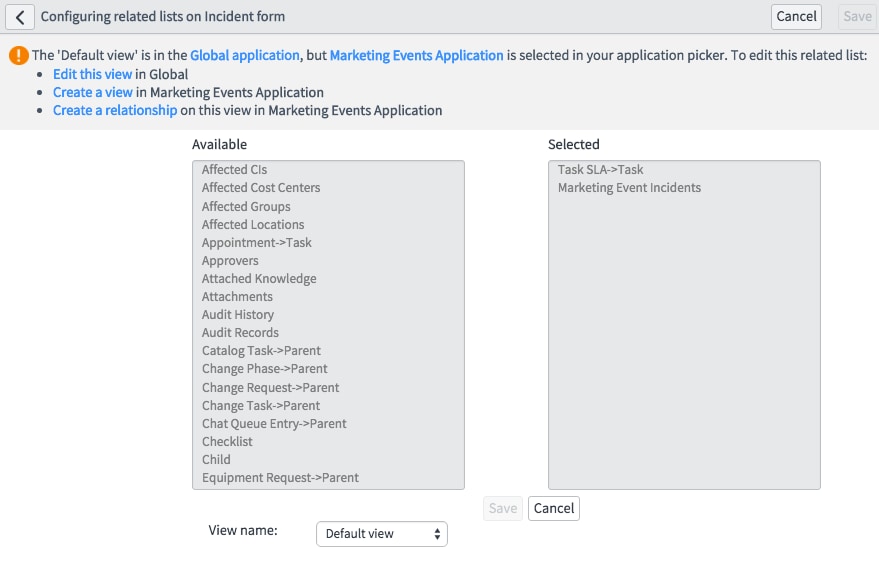
New functionality that was added in Geneva allows a developer of a scoped application to add related lists to other forms. Let's say you created a custom application that had an Outage table, with a reference to Incident. Inside your application you could configure the Incident form to have a related list that showed any referenced Outage records. On any instance that installed your custom application, the Incident form would then automatically receive this related list. This is without any changes in the Global scope or configuration to the Incident form itself, this relationship is contained within the scope of your application.
Other Enhancements to Integration
Other functionality added to Geneva includes Export Sets. Once you establish a MID server as the Export Target, you can define recurring exports to that target. You can export only the deltas from previous exports, define filtering or format and otherwise control the output to that MID server.
Outbound REST messages have expanded OAuth 2.0 support. This includes support for authentication headers, including the OAuth 2.0 Authorization Code flow to obtain access and refresh tokens. OAuth 2.0 profiles can be used for authentication as well.
Other entries in this series:
17 Comments
- « Previous
-
- 1
- 2
- Next »
You must be a registered user to add a comment. If you've already registered, sign in. Otherwise, register and sign in.