Add 5 days in date/time field in servicenow

- Mark as New
- Bookmark
- Subscribe
- Mute
- Subscribe to RSS Feed
- Permalink
- Report Inappropriate Content
04-16-2019 06:26 AM
Hi
I have a date/time field. I want when user click on that field date should populate 5 days after today.
Please let me know how can I achieve this.
Thanks,
Saurabh
- Labels:
-
Scripting and Coding

- Mark as New
- Bookmark
- Subscribe
- Mute
- Subscribe to RSS Feed
- Permalink
- Report Inappropriate Content
04-16-2019 06:46 AM
Hi coolsaurabh,
Try to use this script:
var cdt = g_form.getValue('some_date'); //Choose the field to add time from
var addtime = 3; //The amount of time to add
var addtype = 'day'; //The time type.   Can be day, week, month, year.

var ajax = new GlideAjax('ClientDateTimeUtils');
ajax.addParam('sysparm_name', 'addDateAmount');
ajax.addParam('sysparm_fdt', cdt);
ajax.addParam('sysparm_addtime', addtime);
ajax.addParam('sysparm_addtype', addtype);
ajax.getXML(doSomething);


function doSomething(response){
       var answer = response.responseXML.documentElement.getAttribute("answer");
       alert(answer);
}

For more information: here.


- Mark as New
- Bookmark
- Subscribe
- Mute
- Subscribe to RSS Feed
- Permalink
- Report Inappropriate Content
04-16-2019 06:49 AM
Hi,
please check the following Blog very well done, it will give you the idea on how to achieve it easily:
Auto-populating and validating date fields
In details you should use the following script:
javascript:var cdt = new GlideDateTime();cdt.addDays(5);cdt.getDisplayValue();If I have answered your question, please mark my response as correct so that others with the same question in the future can find it quickly and that it gets removed from the Unanswered list.
Thank you
Cheers
Alberto
- Mark as New
- Bookmark
- Subscribe
- Mute
- Subscribe to RSS Feed
- Permalink
- Report Inappropriate Content
04-16-2019 07:00 AM
Cool,
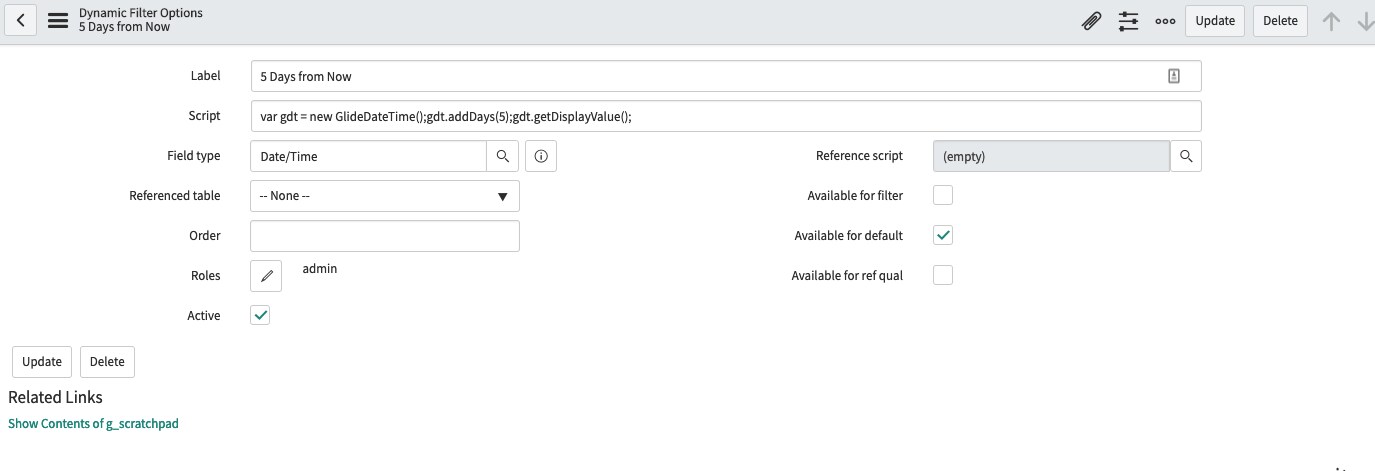
If you are setting this for a form field in the native UI you can use a Dynamic Filter Option. Navigate to System Definition > Dynamic Filter Option and create a new record.
var gdt = new GlideDateTime();gdt.addDays(5);gdt.getDisplayValue();
After creating the filter option, navigate to the field definition and set the default value to use the Dynamic Filter Option,
If you are setting this in a Catalog Item Variable, in the Service portal, you can set the default value as noted below:
javascript: var gdt = new GlideDateTime();gdt.addDays(5);gdt.getDisplayValue();

Thanks,
Derrick Johnson