- Mark as New
- Bookmark
- Subscribe
- Mute
- Subscribe to RSS Feed
- Permalink
- Report Inappropriate Content
02-09-2016 12:53 AM
Hi
I am trying to find out if it is possible to assign multiple tickets to a single resource. I currently have to go into each ticket and assign it manually.
Is there any way that I can block select and assign all selected tickets in one go?
Kind Regards
Solved! Go to Solution.
- Mark as New
- Bookmark
- Subscribe
- Mute
- Subscribe to RSS Feed
- Permalink
- Report Inappropriate Content
02-09-2016 01:08 AM
Hi Derek,
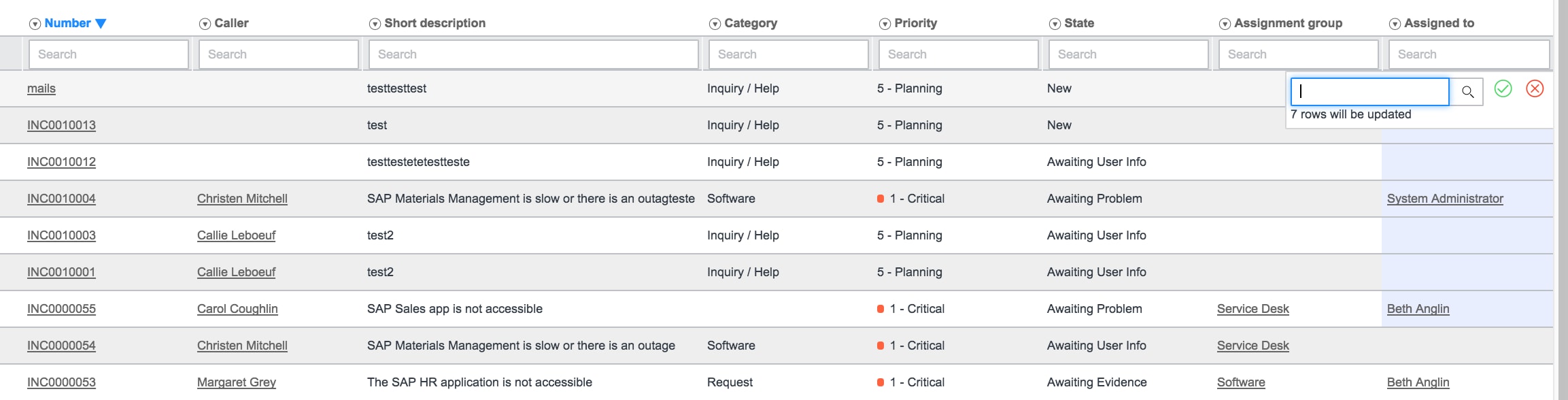
You can edit multiple tickets from List layout. Click on a field and use mouse+down arrow to select the rows below.
Below is the sample screen.

Thanks
Srini
- Mark as New
- Bookmark
- Subscribe
- Mute
- Subscribe to RSS Feed
- Permalink
- Report Inappropriate Content
2 weeks ago
First, I need to know field is to be selected. I have tried the Assign to and highlight them all, right clicked and selected assign to me and only one of the many selected are assigned to me. I have done the previous steps, and selected the checkboxes at the left and then selected assign to me with the same results as above. How do I select multiple tickets and assign them to me?
- Mark as New
- Bookmark
- Subscribe
- Mute
- Subscribe to RSS Feed
- Permalink
- Report Inappropriate Content
08-25-2019 05:11 PM
Hi there,
Can you please explain this a little better; you have tick boxes on the list page to select multiple items.
But I cant see a way to pick up the tickets?
- Mark as New
- Bookmark
- Subscribe
- Mute
- Subscribe to RSS Feed
- Permalink
- Report Inappropriate Content
02-04-2021 11:41 AM
I agree, could you show how to do that in more detail? Also, do you need to have special permissions to perform that action?
Cheers
- Mark as New
- Bookmark
- Subscribe
- Mute
- Subscribe to RSS Feed
- Permalink
- Report Inappropriate Content
02-04-2021 12:35 PM
Click the Assigned to Column on the first item you want to change.

Hold the Shift Key and drag down from that first click to select the column for all the incidents you want to change

Double Click the assigned to column in the first row to change. Enter your value here and choose the green check.

Hope that Helps. You shouldn't need special permission but you must be allowing list edits of that list.