- Mark as New
- Bookmark
- Subscribe
- Mute
- Subscribe to RSS Feed
- Permalink
- Report Inappropriate Content
01-30-2017 05:13 AM
Hello
I am trying to bold current.variables.number_text in my mail script and its not populating. Can someone help?
<mail_script>
template.print('The assigned asset number for: '+current.variables.asset_description +' is '+current.variables.number_text);
</mail_script>
Click here to view RITM: ${URI_REF}

Thanks
Denee
Solved! Go to Solution.
- Labels:
-
Scripting and Coding
- Mark as New
- Bookmark
- Subscribe
- Mute
- Subscribe to RSS Feed
- Permalink
- Report Inappropriate Content
01-30-2017 05:51 AM
Hi Denee,
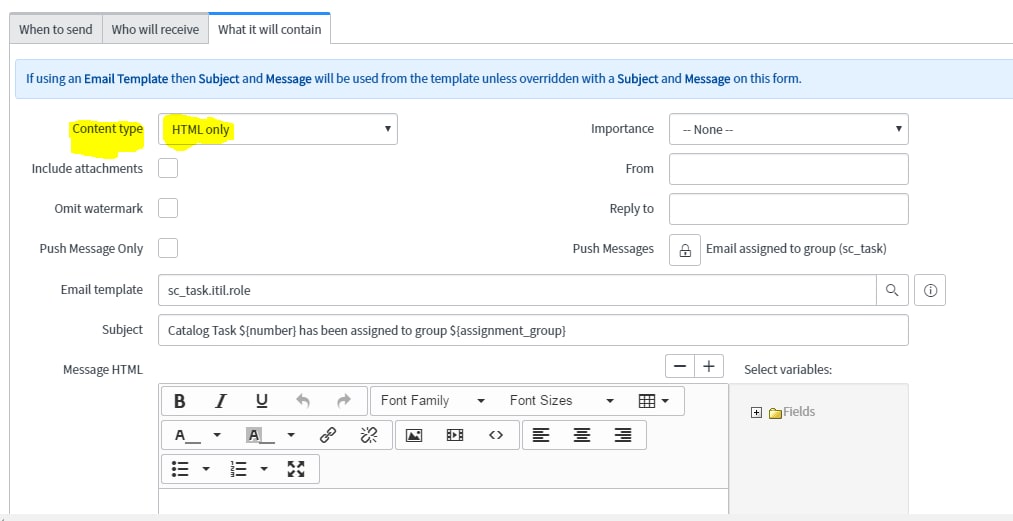
From your screenshot it looks like that you have selected the notification content type as plain text. PLease set that to html and then set the bold and try.

- Mark as New
- Bookmark
- Subscribe
- Mute
- Subscribe to RSS Feed
- Permalink
- Report Inappropriate Content
01-30-2017 06:22 AM
Hello Chuck
We have till the end of this Quarter to upgrade and we are working on that.
Thanks for the update .
Deneee
- Mark as New
- Bookmark
- Subscribe
- Mute
- Subscribe to RSS Feed
- Permalink
- Report Inappropriate Content
01-30-2017 06:22 AM
Content type is field on the form. Personalise to the form layout and add that.
After Eureka the message text field were converted to html fields. Below link may be helpful
http://wiki.servicenow.com/index.php?title=Email_Notifications#gsc.tab=0
- Mark as New
- Bookmark
- Subscribe
- Mute
- Subscribe to RSS Feed
- Permalink
- Report Inappropriate Content
01-30-2017 06:44 AM
Thanks Harshtimes and Chuck.
I was able to get it to work.
Denee
- Mark as New
- Bookmark
- Subscribe
- Mute
- Subscribe to RSS Feed
- Permalink
- Report Inappropriate Content
01-30-2017 06:16 AM
Hello harshtimes
this notification is in a workflow, I don't know where to change it to html