- Mark as New
- Bookmark
- Subscribe
- Mute
- Subscribe to RSS Feed
- Permalink
- Report Inappropriate Content
06-12-2019 07:35 PM
I'm able to create a Change ticket using rest api,, after that I want to add more Ci's to affected Ci's part using Rest Api,, I have gone through many posts,, they have suggested to use task_ci but im not able to figure out how to accomplish my work using that table, it would be easy if someone shares rest api code for that , thanks in advance.
Solved! Go to Solution.
- Labels:
-
Personal Developer Instance

- Mark as New
- Bookmark
- Subscribe
- Mute
- Subscribe to RSS Feed
- Permalink
- Report Inappropriate Content
06-16-2019 10:14 PM
Hi,
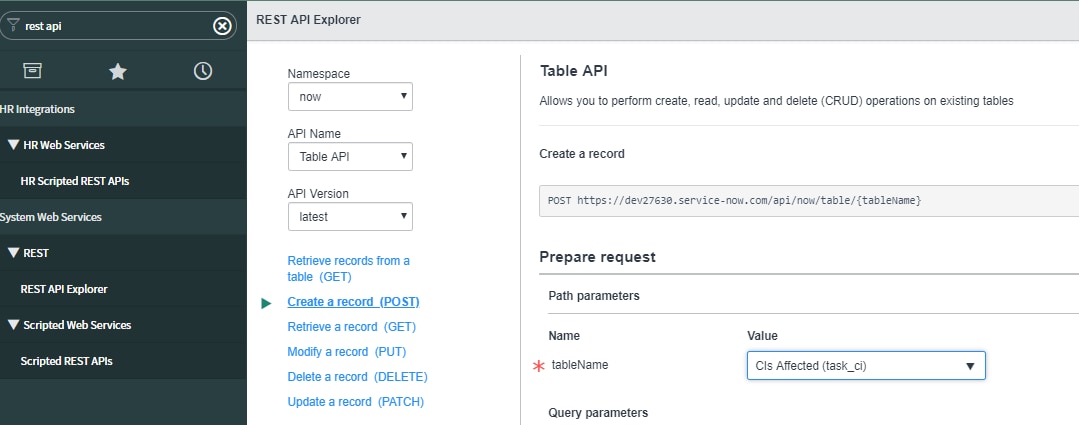
You can go to Rest API explorer in Service Now and get your required code for triggering the request. Follow these steps:
1) Go to rest api explorer and select these details as shown (Table is task_ci)

2) Provide change request and CI sys_id as input to your request

3) You could also provide a CI name if you are sending it via a script by dot walking on the ci_item.name field. To get the script, scroll down further and select the required language of your choice.

Your Rest endpoint would be:
Headers:
Accept: application/json
Content-Type: application/json
Request Body
{"ci_item":"572928028727227928298228222","task":"784874808727227928298228222"}

Here ci_item is your CI sys_id and task is your change request sys_id received while creating the change. If you send ci_item.name, then you can also pass the CI as Name
- Mark as New
- Bookmark
- Subscribe
- Mute
- Subscribe to RSS Feed
- Permalink
- Report Inappropriate Content
06-16-2019 09:46 PM
Hi Darshan,
Are you using OOB Table REST API to create a change? If that is the case, you can write an AFTER INSERT business rule on change_request table to create records in task_ci table
Note: Please mark reply as correct if it has answered your question or mark it as helpful if you find it helpful
var tc = new GlideRecord("task_ci");
tc.initialize();
tc.task = current.getValue("sys_id");
tc.ci_item = "Put SYS ID OF CI HERE";
tc.insert();
- Mark as New
- Bookmark
- Subscribe
- Mute
- Subscribe to RSS Feed
- Permalink
- Report Inappropriate Content
06-16-2019 10:14 PM
Hi,
You can go to Rest API explorer in Service Now and get your required code for triggering the request. Follow these steps:
1) Go to rest api explorer and select these details as shown (Table is task_ci)
2) Provide change request and CI sys_id as input to your request
3) You could also provide a CI name if you are sending it via a script by dot walking on the ci_item.name field. To get the script, scroll down further and select the required language of your choice.
Your Rest endpoint would be:
Headers:
Accept: application/json
Content-Type: application/json
Request Body
{"ci_item":"572928028727227928298228222","task":"784874808727227928298228222"}

Here ci_item is your CI sys_id and task is your change request sys_id received while creating the change. If you send ci_item.name, then you can also pass the CI as Name
- Mark as New
- Bookmark
- Subscribe
- Mute
- Subscribe to RSS Feed
- Permalink
- Report Inappropriate Content
03-05-2021 04:52 AM
Hi,
I am able to attach CI through API (api/now/table/task_ci). Actually I am passing the server name (not sys_id) as ci_item. And change number as task in the body. It works fine.
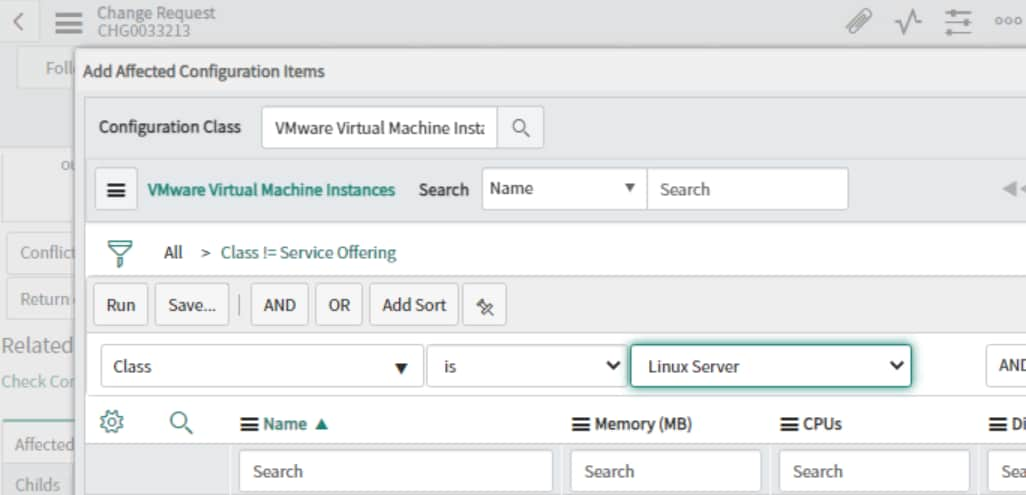
But, I have same server name in multiple classes. I want to put a filter and search the server name from different class. We can How, can I put the filter and fetch CIs from different class through API

I am able to do this from Web UI. But I have to do this through API.
Kindly help me to put this filter when I do POST
Thanks
-Praful