Catalog Client Script - Exclude Weekends

- Mark as New
- Bookmark
- Subscribe
- Mute
- Subscribe to RSS Feed
- Permalink
- Report Inappropriate Content
10-02-2019 08:02 AM
Hi, I am currently trying to build a catalog client script but I am having trouble.
We have a request that if on the date field if a user selects a date that is within 2 business days from the current date then a new field with display. The problem is in using the UI Policy we cannot exclude weekends. So I knew that I could do it using a catalog client script but I am having trouble call the script include so that I can reference the setSchedule.
Any help would be appreciated.
- Mark as New
- Bookmark
- Subscribe
- Mute
- Subscribe to RSS Feed
- Permalink
- Report Inappropriate Content
10-07-2019 05:03 AM
Hi, are you able to still help me with this?
- Mark as New
- Bookmark
- Subscribe
- Mute
- Subscribe to RSS Feed
- Permalink
- Report Inappropriate Content
10-03-2019 05:09 AM
Is there anyone that can help with this?
- Mark as New
- Bookmark
- Subscribe
- Mute
- Subscribe to RSS Feed
- Permalink
- Report Inappropriate Content
10-03-2019 10:59 AM
Build your script around this:
var now = new Date();
var day = now.getDay();

	// do not run on saturday or sunday
if (day !=6 && day != 7) {

	// script here
}
- Mark as New
- Bookmark
- Subscribe
- Mute
- Subscribe to RSS Feed
- Permalink
- Report Inappropriate Content
10-07-2019 06:52 AM
Looking at what you have so far it sounds like you want to compare the selected date/time with a calculated value of now with 2 business days added to it. Then that comparison will be used in the Client Script to show the field as necessary.
What we will do is create a Client Callable Script Include, then modify your Catalog Client Script to make the appropriate AJAX call to show the second variable.
1. Create a Client Callable Script Include:
Name: dateTimeUtilAjax
Client callable: true
Accessible from: All application scopes
Description: Custom Client callable Script Include for Client side DateTime calculations
Script:
var dateTimeUtilAjax = Class.create();
dateTimeUtilAjax.prototype = Object.extendsObject(AbstractAjaxProcessor, {

    /**
     * Checks if the calculated date time is contained within a schedule
     *
     * @param      {string}   sysparm_fdt  Date/Time to check against
     * @param      {string}   sysparm_chk  Either 'before' or 'after'
     * @param      {string}   sysparm_add  Look ahead value AddType-AddTime
     * @param      {string}   sysparm_sid  The sysID of the Schedule to check.
     * @return     {Boolean}  Returns true if the Date/Time is in the schedule,
     *                        otherwise returns false.
     */
    checkSchedAdd: function() {
        var firstDT = this.getParameter('sysparm_fdt');
        var chkType = this.getParameter('sysparm_chk');
        var lookVar = this.getParameter('sysparm_add');
        var schedID = this.getParameter('sysparm_sid');
        var fstDT = new GlideDateTime(firstDT);
        var nowDT = new GlideDateTime().getDisplayValue();
        var endDT = this._addLookAhead(nowDT, lookVar);
        var dc = new DurationCalculator();
        var durSec = dc.calcScheduleDuration(nowDT, endDT);
        var chkDT = this._getNextBusDateTime(nowDT, durSec, schedID);
        var diff = this._getDateDiff(chkType, chkDT, fstDT);
        if (diff > 0) {
            return false;
        } else {
            return this._isWithinSched(fstDT, schedID);
        }
    },

    /**
     * Adds a Look Ahead value to a Date/Time string
     *
     * @param      {string}         dateTime  Date/Time String YYYYMMDD HH:MM:SS
     * @param      {string}         lookVar   addTYPE-addTime value
     * @return     {GlideDateTime}  Calculated Date/Time
     */
    _addLookAhead: function(dateTime, lookVar) {
        var addTYPE = lookVar.split('-')[0];
        addTYPE = addTYPE.toLowerCase();
        var addTIME = lookVar.split('-')[1];
        if (lookVar.split('-')[2] == 'before') {
            addTIME = '-' + addTIME;
        }
        var gdt = new GlideDateTime(dateTime);
        if (addTYPE == 'min') {gdt.addSeconds(addTIME * 60);}
        if (addTYPE == 'hr') {gdt.addSeconds(addTIME * (60 * 60));}
        if (addTYPE == 'day') {gdt.addDaysUTC(addTIME);}
        if (addTYPE == 'wk') {gdt.addWeeksUTC(addTIME);}
        if (addTYPE == 'mo') {gdt.addMonthsUTC(addTIME);}
        if (addTYPE == 'yr') {gdt.addYearsUTC(addTIME);}
        return gdt;
    },

    /**
     * Gets the next available Date/Time from a schedule
     *
     * @param      {string}         dateTime  Date/Time String YYYYMMDD HH:MM:SS
     * @param      {integer}        durSec    Number of seconds to calculate
     * @param      {string}         schedID   sys_id of the schedule
     * @param      {integer}        pad       Number of seconds to add
     * @return     {GlideDateTime}  Next available Date/Time
     */
    _getNextBusDateTime: function(dateTime, durSec, schedID) {
        var dc = new DurationCalculator();
        dc.setSchedule(schedID, gs.getSession().getTimeZone());
        var busHours = 9;
        var sdt = new GlideDateTime(dateTime);
        dc.setStartDateTime(sdt);
        var cDuration = durSec;
        if (durSec >= 86400) {
            var busDays = durSec / (60 * 60 * 24);
            cDuration = busDays * busHours * 3600;
        }
        if (!dc.calcDuration(cDuration)) {
            gs.log("*** Error calculating duration");
            return;
        }
        return dc.getEndDateTime();
    },

    /**
     * Returns if the dateTime is within a schedule
     *
     * @param      {string}   dateTime  Date/Time String YYYYMMDD HH:MM:SS
     * @param      {string}   schedID   The sysID of the Schedule to check.
     * @return     {Boolean}  Returns true if the Date/Time is in the shedule,
     *                        otherwise returns false.
     */
    _isWithinSched: function(dateTime, schedID) {
        var sched = new GlideSchedule(schedID);
        var chkDT = new GlideDateTime(dateTime);
        return (sched.isInSchedule(chkDT));
    },

    type: 'dateTimeUtilAjax'
});
2. Create a Catalog Client Script to show the second variable.
In this example, I am using Business days [bus_days] as the variable to show. Be sure to change the variable names accordingly.
Name: Show Business Days onChange
Type: onChange
Variable name: start_date
Applies on a Catalog Item view: true
Script:
function onChange(control, oldValue, newValue, isLoading, isTemplate) {
    if (isLoading || newValue === '') {
        return;
    }

    var ga = new GlideAjax('global.dateTimeUtilAjax'); //Instantiate the Script Include
    ga.addParam('sysparm_name','checkSchedAdd'); //Call the function
    ga.addParam('sysparm_fdt', newValue); //This is the date you are checking against
    ga.addParam('sysparm_chk', 'before')
    ga.addParam('lookVar', 'hr-18'); //Adding 2 business days (if you have a 9 hour day)
    ga.addParam('sysparm_sid', '338db49d300fddlajfdljfaklfjkldj'); //SysID of your schedule
    ga.getXML(showVar);
}

function showVar(response){
    var answer = response.responseXML.documentElement.getAttribute("answer");
    if (answer == 'true') {
        g_form.setVisible('bus_days', true);
    }
}
Feel free to make any adjustments as necessary to account for the variable you want to make visible.
- Mark as New
- Bookmark
- Subscribe
- Mute
- Subscribe to RSS Feed
- Permalink
- Report Inappropriate Content
10-07-2019 08:27 AM
Hi,
Thank you for this. I am having a little trouble, I added the variable name for my date field here.
ga.addParam('sysparm_fdt', 'start_date'); //This is the date you are checking against
I also updated this addParam name (the first line is what you had and the second line is what I added). Is this correct?
ga.addParam('lookVar', 'hr-18'); //Adding 2 business days (if you have a 9 hour day)

ga.addParam('sysparm_add', 'hr-18'); //Adding 2 business days (if you have a 9 hour day)
The trouble I am having is the fields displays always. I am trying to show the field if the start_date selected is within the 2 days of today's date or if a past date is selected.
Example:
Today's date is 10/7/2019 based on our schedule, 2 days from now is 10/10/2019. So if the users selects 10/08/2019 in the start date field then the bus_days field will display else if they select 10/17/2019 then the field will not display.
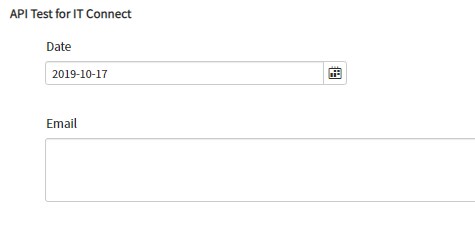
As you can see in the screenshots, both days are displaying the variable that needs to be shown.


Am I missing something?