- Mark as New
- Bookmark
- Subscribe
- Mute
- Subscribe to RSS Feed
- Permalink
- Report Inappropriate Content
06-11-2020 06:56 AM
Hi, I have a requirement wherein I have to check the content type of attachment, i.e., if it is pdf or not. If its not a pdf i need to alert the user that they need to attach a pdf.
I've made a script include for checking the attachment using GlideRecord on 'sys_attachment' table:
var AttachmentPdfValidationAjax = Class.create();
AttachmentPdfValidationAjax.prototype = Object.extendsObject(AbstractAjaxProcessor, {
    validateAttachment: function() {
        var gr = new GlideRecord("sys_attachment");
        gr.addQuery("table_name", "sc_cart_item");
        gr.addQuery("table_sys_id", this.getParameter('sysparm_my_id'));
        gr.addQuery('content_type', 'application/pdf');
        gr.orderByDesc('sys_created_on');
        gr.query();
        if (gr.next()) {
			return true;
        }
		return false;
    },
    type: 'AttachmentPdfValidationAjax'
});
Also, I've made one onSubmit catalog client script as below:
function onSubmit() {
    if (g_form.getValue('Attachments') != "true") {
        getMessage("Please attach 'SLF Asia Device Control - Exemption Request Form'", function(msg1) {
            alert(msg1);
        });

        return false;
    }
	else {
        if (g_scratchpad._ajaxChecked) {
            // We have run our Ajax Checks, so we can continue on
            // and let our form submission continue
            return true;
        }
        // use this line below if you want to store the specific action name
        g_scratchpad._action = g_form.getActionName();
        g_scratchpad._ajaxChecked = false;
//         var cat_id = g_form.getUniqueValue();
// 		var cat_id = gel('sysparm_item_guid').value;
		var cat_id = g_form.getParameter("sysparm_item_guid");
		alert(cat_id);
        var ga = new GlideAjax('AttachmentPdfValidationAjax');
        ga.addParam('sysparm_name', 'validateAttachment');
        ga.addParam('sysparm_my_id', cat_id);
        ga.getXMLAnswer(function(answer) {
			console.log('Inside XML Answer  '+answer);
            // I made this a simple check of a true/false result
            // but you can change this to check whatever suits your business case
            // and base it on what gets returned from your script include
            if (answer == "false") {
                // it didn't pass our checks, so alert the user and quit
				console.log('Inside answer = false block');
                alert("Please attach PDF format form");
                return;
            }
            // it worked! now we can resubmit the form with the
            // property in place to allow us to continue
            // so once we resubmit, it will re-run this function but will return true
            // at line 5 of this script

            g_scratchpad._ajaxChecked = true;
			console.log('ajax true');
            if (typeof g_form.orderNow != 'undefined') {
                // this is a catalog item
                g_form.orderNow();
            }
			else {
                //this will resubmit the form using the saved
                //ui action that was originally clicked
                g_form.submit(g_scratchpad._action);
            }
        });
        // always return false if we get to this point
        return false;
    }
}
The problem I'm facing is to get the sys_id of the associated sc_cart_item from g_form when using Service Portal.
var cat_id = gel('sysparm_item_guid').value;The above one also doesn't work as DOM manipulation doesn't work on SP.
Does anyone know of some workarounds to get the sys_id of the associated item?
Solved! Go to Solution.


- Mark as New
- Bookmark
- Subscribe
- Mute
- Subscribe to RSS Feed
- Permalink
- Report Inappropriate Content
06-11-2020 10:12 AM
Hi,
below worked for me in Portal to get the attachment file names
you can then iterate over and search for the extension
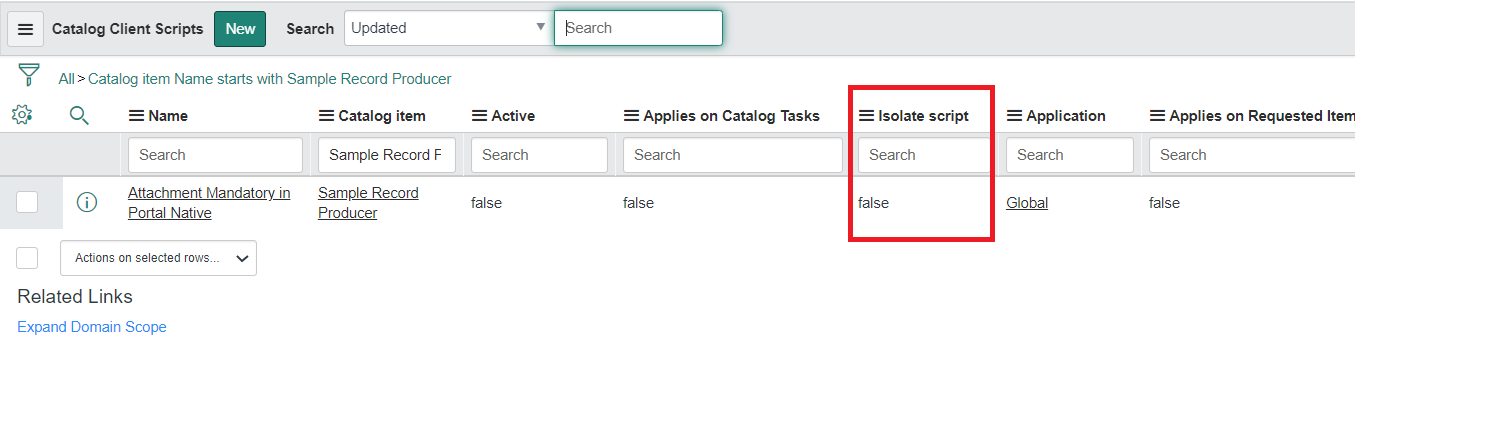
Ensure: Isolate Script field is set to false for this catalog client script
This field is not available on form layout but present on list; by default is is true; so set to false
function onSubmit() {
	//Type appropriate comment here, and begin script below

	var arr = [];
	var extension = '.pdf';
	var names = this.document.getElementsByClassName('get-attachment ng-binding ng-scope');

	for (var i = 0; i < names.length; i++) {
		var val = names[i].innerHTML;
		arr.push(val.toString());
		// or
		// names[i].querySelector('i').textContent += ' Changed...'
	}
	alert(arr);

	for(var j=0;j<arr.length;j++){

		if(arr[j].indexOf(extension) == -1){
			alert('Please give only ' + extension);
			return false;
		}
	}
}
Mark ✅ Correct if this solves your issue and also mark 👍 Helpful if you find my response worthy based on the impact.
Thanks
Ankur
Ankur
✨ Certified Technical Architect || ✨ 10x ServiceNow MVP || ✨ ServiceNow Community Leader
- Mark as New
- Bookmark
- Subscribe
- Mute
- Subscribe to RSS Feed
- Permalink
- Report Inappropriate Content
06-11-2020 07:05 AM
Hi,
you cannot use DOM in portal
the Ajax you are using is Asynchronous and may not wait till catalog is submitted
Regards
Ankur
Ankur
✨ Certified Technical Architect || ✨ 10x ServiceNow MVP || ✨ ServiceNow Community Leader
- Mark as New
- Bookmark
- Subscribe
- Mute
- Subscribe to RSS Feed
- Permalink
- Report Inappropriate Content
06-11-2020 07:22 AM
Hi Ankur,
The Async call would wait before submission as I've tested this. Also Do you know of some other way of getting the new sys_id, other than DOM?
- Mark as New
- Bookmark
- Subscribe
- Mute
- Subscribe to RSS Feed
- Permalink
- Report Inappropriate Content
06-11-2020 10:12 AM
Hi,
below worked for me in Portal to get the attachment file names
you can then iterate over and search for the extension
Ensure: Isolate Script field is set to false for this catalog client script
This field is not available on form layout but present on list; by default is is true; so set to false
function onSubmit() {
	//Type appropriate comment here, and begin script below

	var arr = [];
	var extension = '.pdf';
	var names = this.document.getElementsByClassName('get-attachment ng-binding ng-scope');

	for (var i = 0; i < names.length; i++) {
		var val = names[i].innerHTML;
		arr.push(val.toString());
		// or
		// names[i].querySelector('i').textContent += ' Changed...'
	}
	alert(arr);

	for(var j=0;j<arr.length;j++){

		if(arr[j].indexOf(extension) == -1){
			alert('Please give only ' + extension);
			return false;
		}
	}
}
Mark ✅ Correct if this solves your issue and also mark 👍 Helpful if you find my response worthy based on the impact.
Thanks
Ankur
Ankur
✨ Certified Technical Architect || ✨ 10x ServiceNow MVP || ✨ ServiceNow Community Leader
- Mark as New
- Bookmark
- Subscribe
- Mute
- Subscribe to RSS Feed
- Permalink
- Report Inappropriate Content
06-11-2020 12:36 PM
Hi,
Thanks for the solution but is there no other way to check the attachments extension except DOM Manipulation??