Conditional process flow formatter

- Mark as New
- Bookmark
- Subscribe
- Mute
- Subscribe to RSS Feed
- Permalink
- Report Inappropriate Content
06-12-2017 11:43 PM
Hi All,
I needed a help in configuring the process flow formatter based on the type of the change request. I need to have different process flow to be displayed for different types. I have tried using https://share.servicenow.com/app.do#/detailV2/b2e4d80e2b5b75004a1e976be8da152c/overview posted by Drew West on Share portal, however, it didn't work. I am using the Helsinki version. Also, I am pretty new to UI formatting. Seek your help on step-by-step process for this configuration.
Thanks in advance,
Anu

- Mark as New
- Bookmark
- Subscribe
- Mute
- Subscribe to RSS Feed
- Permalink
- Report Inappropriate Content
06-12-2017 11:49 PM
Hi Anu,
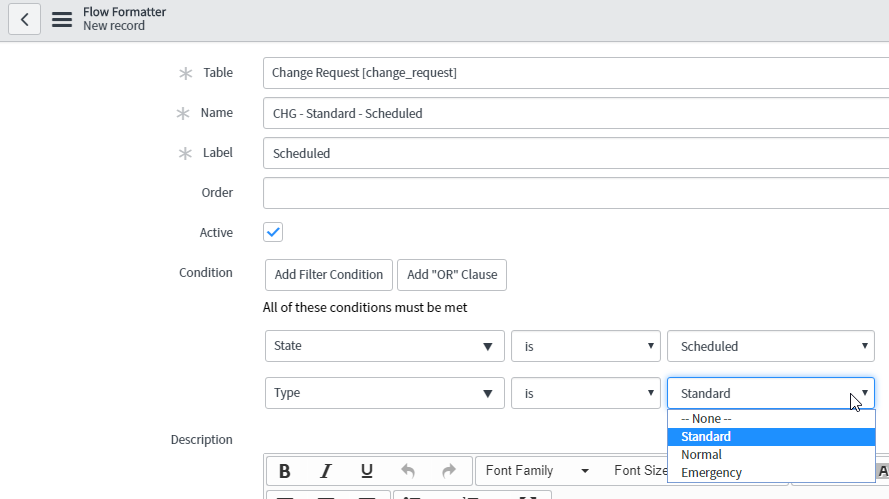
You can give condition like type is Normal or standard or emergency while defining the process flow.
Refer the below link may helpful to you.
http://wiki.servicenow.com/index.php?title=Process_Flow_Formatter#gsc.tab=0
Create a process flow formatter

- Mark as New
- Bookmark
- Subscribe
- Mute
- Subscribe to RSS Feed
- Permalink
- Report Inappropriate Content
06-12-2017 11:52 PM
Hi Anu,
You can create your own Process flow formatters. If you use the Change Request 'Type' and 'State', You'll be able to implement your requirements.

Create 3 groups of flows, one for each Type.
You can then define the other conditions as required by your specs.
- Mark as New
- Bookmark
- Subscribe
- Mute
- Subscribe to RSS Feed
- Permalink
- Report Inappropriate Content
06-13-2017 12:09 AM
Hi Shiva,
Thanks for your quick response. I had tried the same thing first. However, it didn't work based on "type" condition. It worked based on "state" condition only.
Thanks,
Anu.
- Mark as New
- Bookmark
- Subscribe
- Mute
- Subscribe to RSS Feed
- Permalink
- Report Inappropriate Content
06-13-2017 12:11 AM
Anu,
Have you given multiple conditions for the process flow like state ,type ... etc?
If no please try.