
- Mark as New
- Bookmark
- Subscribe
- Mute
- Subscribe to RSS Feed
- Permalink
- Report Inappropriate Content
11-28-2018 01:48 PM
Hi,
I need help in customizing our existing Approval notifications on Requests. In our current system(Asset mgmt) when a user request let's say 2 items , our approval notifications will provide the details of each and every Requested item(RITM) as shown below:

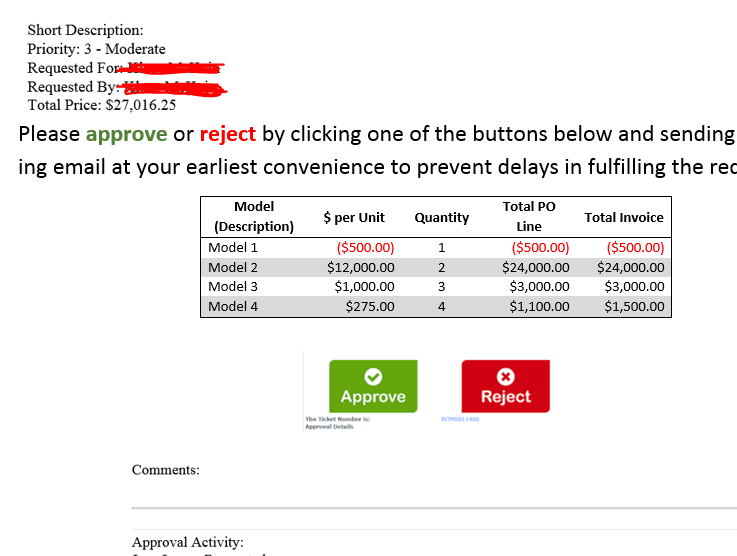
Sometimes, our requests that have 100 request items and the notification looks very clumsy. I am trying to update this into the following format which consists of a table for all the Requested items(RITMs)

Can someone please help me how to achieve this kind of notification so that all the items are in a table.
Regards,
Manoj
Solved! Go to Solution.



- Mark as New
- Bookmark
- Subscribe
- Mute
- Subscribe to RSS Feed
- Permalink
- Report Inappropriate Content
12-11-2018 11:23 AM
Can you change it to
Short Description: ${sysapproval.short_description}
Priority: ${sysapproval.priority}
Requested For: ${sysapproval.requested_for}
Requested By: ${sysapproval.opened_by}
Total Price: ${sysapproval.price}
<hr/>
<mail_script>
var item = new GlideRecord("sc_req_item");
item.addQuery("request", current.sysapproval);
item.query();
if (item.getRowCount() > 0) {
template.print('<table border="1"><th colspan="4" style="text-align:center">Summary of Requested items</th>');
while(item.next()) {
template.print('<tr><th>'item.number + '</th><th>' + item.quantity + '</th><th>' + item.cat_item.getDisplayValue() + '</th><th>' + item.price.getDisplayValue() + '</th></tr>')
}
template.print('</table>');
}
</mail_script>
if that doesnt work, try this as well
Short Description: ${sysapproval.short_description}
Priority: ${sysapproval.priority}
Requested For: ${sysapproval.requested_for}
Requested By: ${sysapproval.opened_by}
Total Price: ${sysapproval.price}
<hr/>
<mail_script>
var item = new GlideRecord("sc_req_item");
item.addQuery("request", current.sysapproval);
item.query();
if (item.getRowCount() > 0) {
template.print('<table border="1">');
while(item.next()) {
template.print('<tr><th>'item.number + '</th><th>' + item.quantity + '</th><th>' + item.cat_item.getDisplayValue() + '</th><th>' + item.price.getDisplayValue() + '</th></tr>')
}
template.print('</table>');
}
</mail_script>
- Mark as New
- Bookmark
- Subscribe
- Mute
- Subscribe to RSS Feed
- Permalink
- Report Inappropriate Content
12-14-2018 03:52 PM
Can you tell me, what exactly you want to change?
Do you want to change the style the table is displayed?
- Mark as New
- Bookmark
- Subscribe
- Mute
- Subscribe to RSS Feed
- Permalink
- Report Inappropriate Content
12-17-2018 11:09 AM
Yes, I am just trying to update how table is displayed. Instead of borders for each cell as shown in my image 1 above , I need something like image 2
Regards,
Manoj
