- Mark as New
- Bookmark
- Subscribe
- Mute
- Subscribe to RSS Feed
- Permalink
- Report Inappropriate Content
09-16-2016 01:15 AM
Hi,
I've the following script that allows not to select any past dates. But I would like to modify this to select the current date and any future dates. Please advise. Thanks ! function onChange(control, oldValue, newValue, isLoading, isTemplate) { if (isLoading || newValue == '') { return; } var d = getDateFromFormat(newValue, g_user_date_format); var today = new Date(); if (d < today) { alert('The date value cannot be before the current date and time. Please correct.'); g_form.clearValue("effective_date"); } }
Solved! Go to Solution.
- Labels:
-
Scripting and Coding
- Mark as New
- Bookmark
- Subscribe
- Mute
- Subscribe to RSS Feed
- Permalink
- Report Inappropriate Content
09-16-2016 04:08 AM
Hi Imran and All,
Let us make this very very simple.
We will make a UI Policy with this condition :

here manufacture_date is the field which I'm checking if a past date is not entered. Replace it with your own variable name.
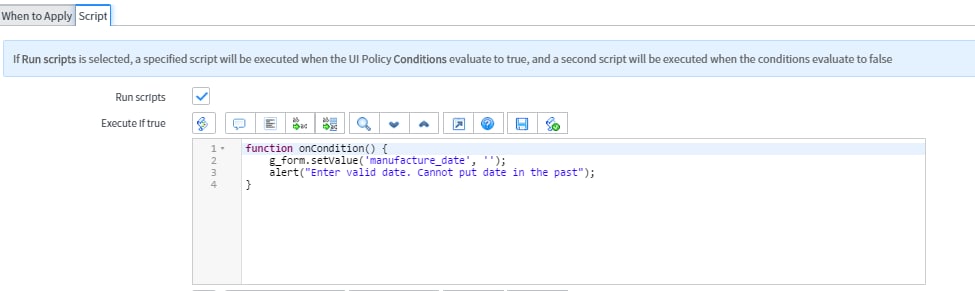
And now we just write a 2 line code in the "Script" part of the same UI Policy :

And that's it guys. We are good to go. We need not use any client scripts because for form validations the best practice is to use UI Policies. Using client scripts would have performance issues.
Please let me know if you have further doubts.
Thanks,
Arnab
- Mark as New
- Bookmark
- Subscribe
- Mute
- Subscribe to RSS Feed
- Permalink
- Report Inappropriate Content
11-16-2018 01:45 PM
Hi Arnab,
I like this Idea.
But this is not working for record producer on portal side.
Can you please help me on this?
Thanks,
Jay
- Mark as New
- Bookmark
- Subscribe
- Mute
- Subscribe to RSS Feed
- Permalink
- Report Inappropriate Content
03-22-2019 04:18 AM
Hi Arnabwa,
I have same requirement but only change is date field allow to enter only past dates , no current date also not allowed .
I really appreciate is any possible to make all days before current date (including current date) to show some appearances difference .
Thanks in advance ..
Thanks
Chetan
- Mark as New
- Bookmark
- Subscribe
- Mute
- Subscribe to RSS Feed
- Permalink
- Report Inappropriate Content
06-04-2019 06:10 AM
Why this solution is not working on portal even after selecting ui type as all?
- Mark as New
- Bookmark
- Subscribe
- Mute
- Subscribe to RSS Feed
- Permalink
- Report Inappropriate Content
06-20-2022 06:33 AM
But It was not reflecting in agent workspace
- Mark as New
- Bookmark
- Subscribe
- Mute
- Subscribe to RSS Feed
- Permalink
- Report Inappropriate Content
12-05-2025 04:42 AM
It is working in classic ui but it is not working in employee centre portal. Could you please guide me on this. how we can achieve this?