Demand IN Workspace: Monetary Benefit Plan "New" related list action does not populate Task field

- Mark as New
- Bookmark
- Subscribe
- Mute
- Subscribe to RSS Feed
- Permalink
- Report Inappropriate Content
3 weeks ago
Hi Community,
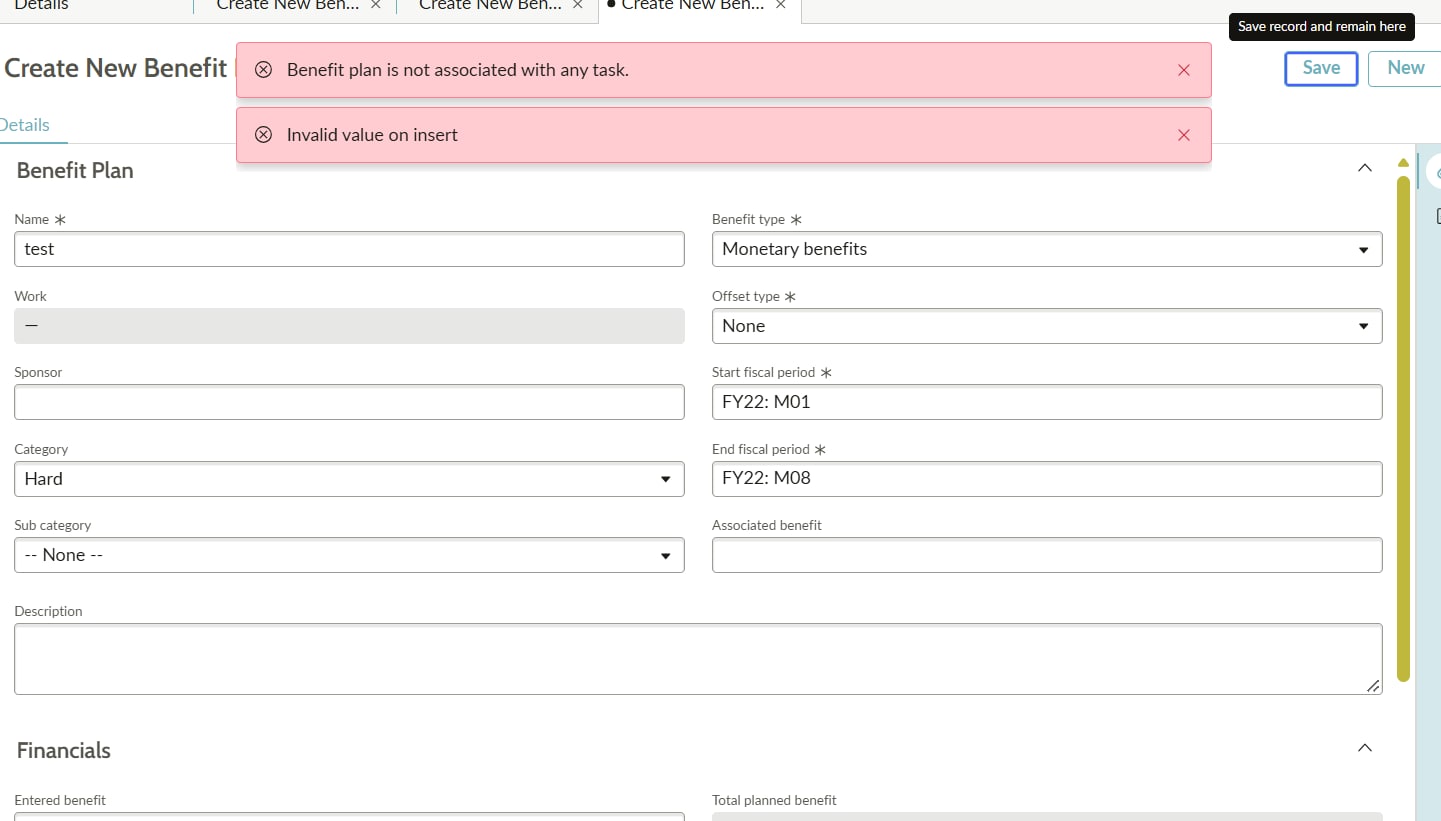
We are encountering an issue when creating a Monetary Benefit Plan (benefit_plan) from a Demand record inside Demand / SPM Workspace.
Error Message: "Benefit is not associated with any task"
Observed Behavior: •
1)When clicking "New" on the Monetary Benefit Plan related list in the Classic/Native UI, the Task reference field automatically populates with the Demand sys_id and saves without issue. •
2)In Workspace, clicking "New" opens the creation modal, but the Task field remains blank/unpopulated, causing the task association error upon submit.
Troubleshooting Already Completed: 1. Confirmed the issue is isolated strictly to Workspace (Native UI works fine). 2. Checked the Sys Relationship record ("Monetary Benefit Plan" -> Applies to Task, Queries from Benefit Plan).
3. Tested a display Business Rule on benefit_plan, but found that display rules do not fire during the initial Workspace modal render payload.
4. Checked Declarative Actions (sys_declarative_action_assignment) for the benefit_plan "New" button, but could not locate direct parameter mapping for the task field.
Questions: 1. What is the correct Declarative Action payload JSON or UX Event Mapping required to ensure parent.sys_id passes directly into the task field upon clicking "New" in Workspace?
2. Is there a specific configuration in UI Builder for the Demand form related list component required to pass the parent binding context down to the benefit_plan modal?
Any guidance or code snippets for UX Add-on event mappings or UI Builder component property bindings would be greatly appreciated!
- Mark as New
- Bookmark
- Subscribe
- Mute
- Subscribe to RSS Feed
- Permalink
- Report Inappropriate Content
3 weeks ago
Hi, you can follow these steps:
Go to Workspace Experience > Actions & Components > Related List Actions and create a new action with the label New, table benefit_plan, action model Related list, implemented as a UXF Client Action.
On the client action, set the payload to open the record modal and pass the parent across, using
"table": "benefit_plan"`, "parentRecordSysId": "{{parentRecordSysId}}"`, `"parentFieldName": "task"` and `"view": "workspace"
. Then open the global New action on that same related list and add benefit_plan to its Action Exclusions, otherwise you end up with two buttons. Clear the cache and reload the workspace before testing. The payload keys and client action setup are covered here:
https://www.servicenow.com/community/next-experience-forum/how-to-add-records-in-a-related-list-with...