Hello there,
Hope everyone is doing well! I am new to ServiceNow and I am struggling to download a file from API. This API returns file content with mimetype and contentdisposition. Mainly I have 2 problems with my code.
First, this code will download the file, but I am getting an error opening the pdf, error says: "This file is damaged and could not be repaired". So not sure what is going wrong. Even if I hardcode some string, I still cannot download any pdf with this code.
Second, I cannot see the contents of the file (English characters) in console. Am I doing encoding and decoding correctly?
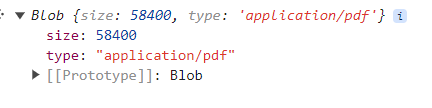
I have attached the images of data conversion at each step: data.responseBody (from Server Script), after converting it into bytes via atob, blob and pdf error. Your help is greatly appreciated. Thanks in advance.
This is my ServerSide script:
if (input && input.action == 'downloadFile') {
var dwnld = new sn_ws.RESTMessageV2('xxxxxxx Api', 'Download File');
dwnld.setStringParameterNoEscape('docType', input.selectedContainer);
dwnld.setQueryParameter('xxx', input.xx.xxx);
dwnld.setQueryParameter('xxx', input.xx.xx);
dwnld.setHttpMethod('GET');
var dwnld_response = dwnld.execute();
var dwnld_responseBody = dwnld_response.getBody();
var base64ResponseBody = GlideStringUtil.base64Encode(dwnld_responseBody);
gs.info(base64ResponseBody);
var contentDisposition = dwnld_response.getHeader('Content-Disposition');
var filename = extractFilename(contentDisposition);
var mimeType = dwnld_response.getHeader('Content-Type') || 'application/octet-stream';
data.mimeType = mimeType;
data.responseBody = base64ResponseBody;
data.fileName = filename;
data.contentDisposition = contentDisposition;
}
This is my Client Script:
$scope.downloadFile = function(item){
$scope.downloadDetails = item;
c.data.action = 'downloadFile';
c.data.fileObj = item;
c.data.selectedContainer = $scope.xxx;
c.server.update().then(function(results) {
c.data.action = '';
// Decode base64 response
var binaryString = window.atob(c.data.responseBody);
var len = binaryString.length;
var bytes = new Uint8Array(len);
for (var i = 0; i < len; i++) {
bytes[i] = binaryString.charCodeAt(i);
}
var blob = new Blob([bytes], { type: c.data.mimeType });
var url = URL.createObjectURL(blob);
var a = document.createElement('a');
a.href = url;
a.download = c.data.fileName;
a.style.display = 'none';
document.body.appendChild(a);
a.click();
document.body.removeChild(a);
window.URL.revokeObjectURL(url);
});