
- Mark as New
- Bookmark
- Subscribe
- Mute
- Subscribe to RSS Feed
- Permalink
- Report Inappropriate Content
02-12-2018 04:16 AM
Hello!
I want to get incidents by using, for example table API, and then filter them by tags.
For example I've assigned these two tags: "Tum4ik" and "ffff"

But in some reason I don't see these tags in the response for https://service-now-instance.com/api/now/table/incident
There is property "sys_tags", but it is always empty.
Response JSON:
{
....................
"reopen_count": "",
"sys_tags": "",
"escalation": "0",
"upon_approval": "proceed",
"correlation_id": "",
"location": "",
"category": ""
}
Could somebody help me? Is there some API to get items filtered by tags?
Solved! Go to Solution.

- Mark as New
- Bookmark
- Subscribe
- Mute
- Subscribe to RSS Feed
- Permalink
- Report Inappropriate Content
02-13-2018 05:38 AM
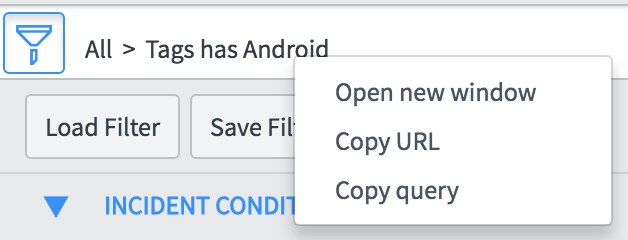
First, I went to the list and built the filter I wanted. Example: incidents tagged with Android, look like this:

Then, I right click on the breadcrumbs of the filter to get the query.

Then I pasted that in to the sysparm_query field in the REST API Explorer to test...

Then I checked the URL after hitting Send and it shows me what I need to build for the API.





- Mark as New
- Bookmark
- Subscribe
- Mute
- Subscribe to RSS Feed
- Permalink
- Report Inappropriate Content
02-12-2018 05:09 AM
Hi,
Following article might be helpful to you.
Re: Difference between u_tags and sys_tags
I feel that you might be required a scripted rest api or you need to directly filter based tag name, As I shown in below example.
Hit ✅Correct, â�ï¸�Helpful, or â�£ï¸�Like, Endorsers depending on the impact of the response
@Lakshmaiah Dumpala
- Mark as New
- Bookmark
- Subscribe
- Mute
- Subscribe to RSS Feed
- Permalink
- Report Inappropriate Content
02-12-2018 09:54 AM
What do mean those strange values?
sys_tags.46da4b68db5c130077377bedbf961971=46da4b68db5c130077377bedbf961971
- Mark as New
- Bookmark
- Subscribe
- Mute
- Subscribe to RSS Feed
- Permalink
- Report Inappropriate Content
02-13-2018 05:38 AM
First, I went to the list and built the filter I wanted. Example: incidents tagged with Android, look like this:
Then, I right click on the breadcrumbs of the filter to get the query.
Then I pasted that in to the sysparm_query field in the REST API Explorer to test...
Then I checked the URL after hitting Send and it shows me what I need to build for the API.
- Mark as New
- Bookmark
- Subscribe
- Mute
- Subscribe to RSS Feed
- Permalink
- Report Inappropriate Content
02-18-2018 11:58 AM
ok, thanks. Those strings is the sys_id of tag. So now I know how to use it to build by API.
