- Mark as New
- Bookmark
- Subscribe
- Mute
- Subscribe to RSS Feed
- Permalink
- Report Inappropriate Content
04-03-2022 10:03 PM
Hi,
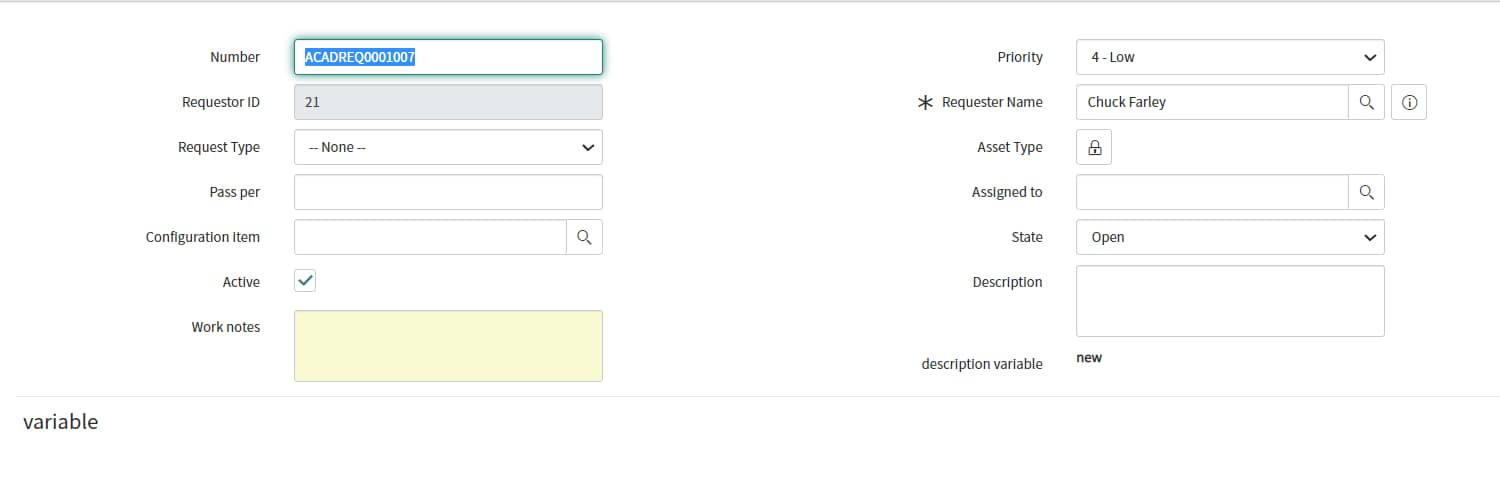
I have created scoped table(extended Task table) -> created Record producer - > added Formatter to show request variable details in scope table form.
Formatter is not working in form.
Screenshot
Formatter :
Form design:

Form:

Solved! Go to Solution.
- Labels:
-
Scoped App Development


- Mark as New
- Bookmark
- Subscribe
- Mute
- Subscribe to RSS Feed
- Permalink
- Report Inappropriate Content
04-03-2022 10:20 PM
Hi,
you have used the incorrect UI macro name in the formatter record
can you try using this -> com_glideapp_questionset_default_question_editor

regards
Ankur
Ankur
✨ Certified Technical Architect || ✨ 10x ServiceNow MVP || ✨ ServiceNow Community Leader

- Mark as New
- Bookmark
- Subscribe
- Mute
- Subscribe to RSS Feed
- Permalink
- Report Inappropriate Content
04-03-2022 10:13 PM
Hi
Deactivate any Duplicate macro had created and disable existing sample formatter which has used on form.
Go to form design > create a new section > give it a name (say, Incident) > drag that section at the top > save
Mark my answer correct & Helpful, if Applicable.
Thanks,
Sandeep
- Mark as New
- Bookmark
- Subscribe
- Mute
- Subscribe to RSS Feed
- Permalink
- Report Inappropriate Content
04-03-2022 10:20 PM
- Mark as New
- Bookmark
- Subscribe
- Mute
- Subscribe to RSS Feed
- Permalink
- Report Inappropriate Content
04-03-2022 10:25 PM

- Mark as New
- Bookmark
- Subscribe
- Mute
- Subscribe to RSS Feed
- Permalink
- Report Inappropriate Content
04-03-2022 10:28 PM