- Mark as New
- Bookmark
- Subscribe
- Mute
- Subscribe to RSS Feed
- Permalink
- Report Inappropriate Content
03-17-2017 07:07 AM
Hi ServiceNow community
When inside an incident and putting this command in the browser console g_form.getReference('caller_id').name it works and returns the name of the caller.
When I use the exact same command in a template it does not work and returns a NULL value.
I tested if scripts actualy work in templates by using gs.getUserDisplayName() and this returns the currently logged on user.
What I am trying to do is write more personal messages that Service Desk can use for people that log incidents:
"""
Hi *caller_id_DisplayName*
*customized message which can be anything*
with kind regards
*currently logged on user*
"""
Solved! Go to Solution.
- Labels:
-
Scripting and Coding

- Mark as New
- Bookmark
- Subscribe
- Mute
- Subscribe to RSS Feed
- Permalink
- Report Inappropriate Content
03-20-2017 06:25 AM
Hi Julio,
I don't think Templates were meant to be used in this way. As such, I don't have a solution for your to make the messages parametric. That being said, you might consider an alternative... Create a new table that contains your messages with optional parameters that you control (e.g. ${user_name} or {$caller_id}) and then place a field (for only your properly roled users to see) so they can pick which quick message they want to use. A client script can then do a GlideAjax call to the server, passing the value of this "quick message" field and the server can do the search/replace on the parameters you put in the message, returns the resulting text, and places it in the comments box. This makes it quick to update the messages going forward - in production if desired.
If you want some demonstrations how to use GlideAjax, take a look at episodes 5, 6 and 33 of TechNow.
Docs: Client Scripts
Docs: GlideForm
Docs: GlideAjax
Client Script Best Practices - ServiceNow Wiki
- Mark as New
- Bookmark
- Subscribe
- Mute
- Subscribe to RSS Feed
- Permalink
- Report Inappropriate Content
03-20-2017 06:25 AM
Hi Julio,
I don't think Templates were meant to be used in this way. As such, I don't have a solution for your to make the messages parametric. That being said, you might consider an alternative... Create a new table that contains your messages with optional parameters that you control (e.g. ${user_name} or {$caller_id}) and then place a field (for only your properly roled users to see) so they can pick which quick message they want to use. A client script can then do a GlideAjax call to the server, passing the value of this "quick message" field and the server can do the search/replace on the parameters you put in the message, returns the resulting text, and places it in the comments box. This makes it quick to update the messages going forward - in production if desired.
If you want some demonstrations how to use GlideAjax, take a look at episodes 5, 6 and 33 of TechNow.
Docs: Client Scripts
Docs: GlideForm
Docs: GlideAjax
Client Script Best Practices - ServiceNow Wiki
- Mark as New
- Bookmark
- Subscribe
- Mute
- Subscribe to RSS Feed
- Permalink
- Report Inappropriate Content
03-20-2017 07:09 AM
How to get test
- Mark as New
- Bookmark
- Subscribe
- Mute
- Subscribe to RSS Feed
- Permalink
- Report Inappropriate Content
03-20-2017 07:13 AM
Can you clarify? Where are you seeing this? In the community?
- Mark as New
- Bookmark
- Subscribe
- Mute
- Subscribe to RSS Feed
- Permalink
- Report Inappropriate Content
03-20-2017 07:47 AM
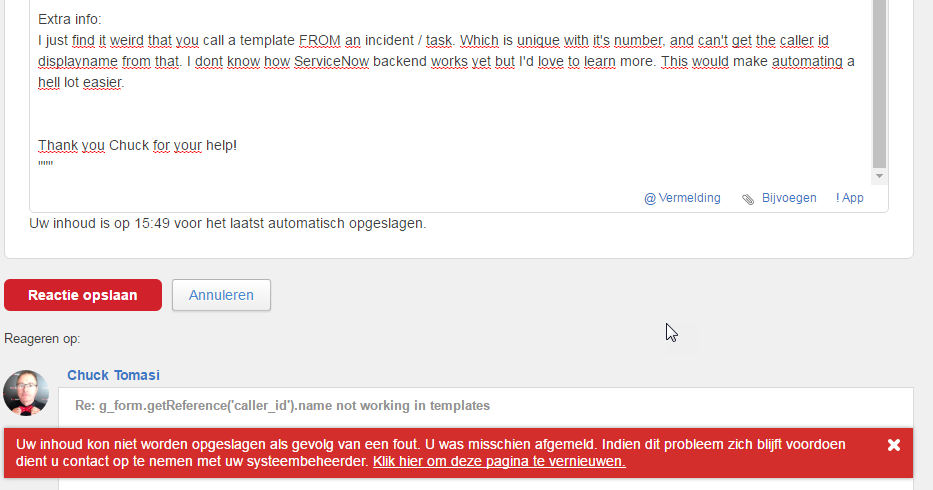
Yes, I get a notification I was posting spam And couldn't post my comment / edit it. The only coment I could post was the above one. This was the comment: I tried to post:
"""
Q: how to get caller id displayname
A: Not possible
Workaround: provided by Chuck Thomas in previous message.
Maybe my request can be implemented in an update?
Extra info:
I just find it weird that you call a template from an incident / task. Which is unique with it's number, and can't get the caller id displayname from that. I dont know how ServiceNow backend works yet but I'd love to learn more.
Thanks chuck for your help!
"""
This is the message I had: (dutch)