
- Mark as New
- Bookmark
- Subscribe
- Mute
- Subscribe to RSS Feed
- Permalink
- Report Inappropriate Content
10-09-2025 02:28 AM
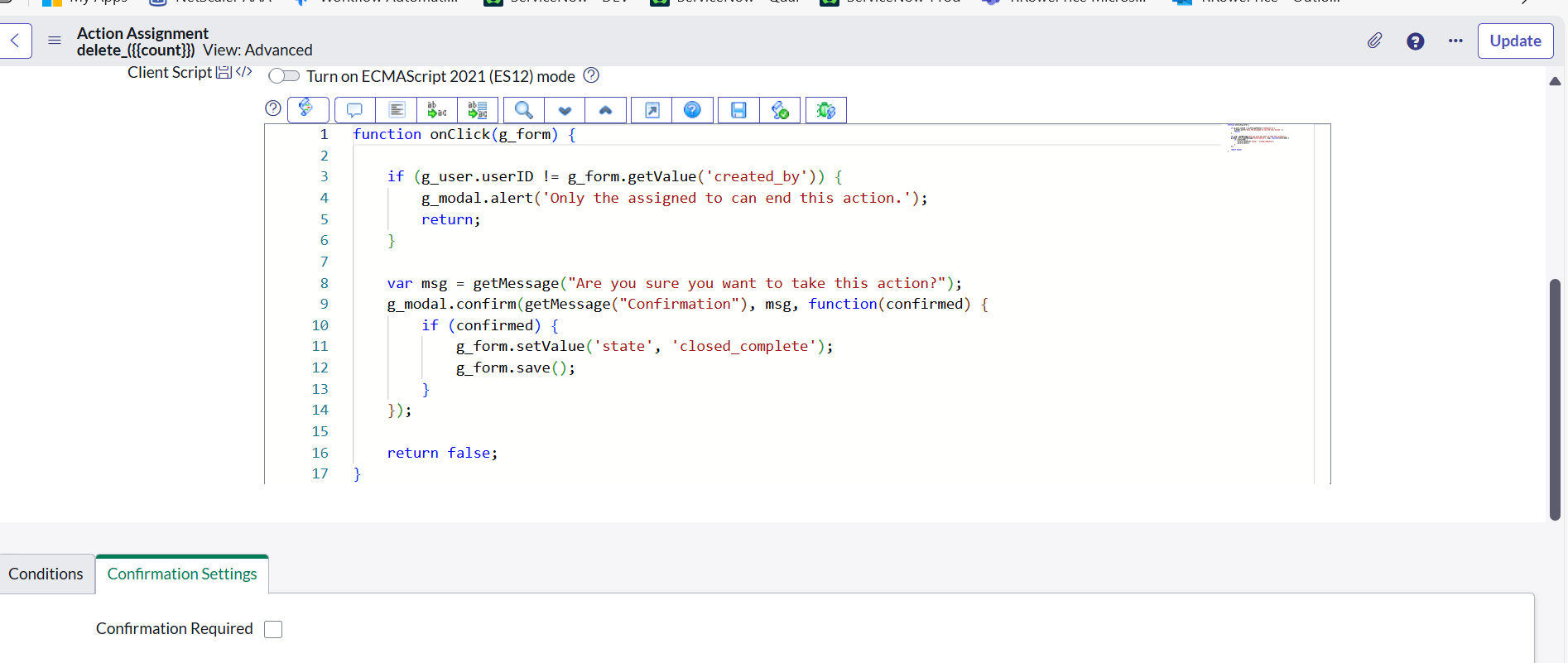
I am tryign to show a modal confirm message when deleting the records I am using g_modal it is not working

Regards,
APV Babu
Solved! Go to Solution.

- Mark as New
- Bookmark
- Subscribe
- Mute
- Subscribe to RSS Feed
- Permalink
- Report Inappropriate Content
10-09-2025 03:06 AM
Hi @APV Babu ,
you’re trying to show a confirmation modal before deleting a record, but g_modal isn’t working.
g_modal only works in UI Builder or Now Experience, not in classic UI.
Classic UI (use gsftConfirm)
function onClick(g_form) {
    if (g_user.userID != g_form.getValue('created_by')) {
        alert('Only the assigned user can end this action.');
        return;
    }

    var msg = "Are you sure you want to take this action?";
    gsftConfirm(msg, function(confirmed) {
        if (confirmed) {
            g_form.setValue('state', 'closed_complete');
            g_form.save();
        }
    });
    return false;
}
UI Builder / Now Experience (use g_modal.confirm)
g_modal.confirm('Are you sure?', 'Confirmation', function(confirmed) {
    if (confirmed) {
        g_form.setValue('state', 'closed_complete');
        g_form.save();
    }
});
Summary:
Classic UI → gsftConfirm()
UI Builder → g_modal.confirm()
If my response helped, please mark it as the accepted solution so others can benefit as well.

- Mark as New
- Bookmark
- Subscribe
- Mute
- Subscribe to RSS Feed
- Permalink
- Report Inappropriate Content
10-09-2025 03:58 AM
Hi @APV Babu
Below will help you to understand!!
Confirm Modals in ServiceNow
| UI Type | Supported Method | Example | Notes |
|---|---|---|---|
| Classic UI (forms, lists) | gsftConfirm() | ```javascript | |
| function onClick(g_form) { | |||
| if (g_user.userID != g_form.getValue('created_by')) { |
}
var msg = "Are you sure you want to take this action?";
gsftConfirm(msg, function(confirmed) {
if (confirmed) {
g_form.setValue('state', 'closed_complete');
g_form.save();
}
});
return false;
}
| **UI Builder / Now Experience** | `g_modal.confirm()` | ```javascript
g_modal.confirm('Are you sure?', 'Confirmation', function(confirmed) {
if (confirmed) {
g_form.setValue('state', 'closed_complete');
g_form.save();
}
});
``` | Works only in **UI Builder / Workspace** components that support the `g_modal` API. |
---
- Mark as New
- Bookmark
- Subscribe
- Mute
- Subscribe to RSS Feed
- Permalink
- Report Inappropriate Content
10-09-2025 03:06 AM
Hi @APV Babu ,
you’re trying to show a confirmation modal before deleting a record, but g_modal isn’t working.
g_modal only works in UI Builder or Now Experience, not in classic UI.
Classic UI (use gsftConfirm)
function onClick(g_form) {
    if (g_user.userID != g_form.getValue('created_by')) {
        alert('Only the assigned user can end this action.');
        return;
    }

    var msg = "Are you sure you want to take this action?";
    gsftConfirm(msg, function(confirmed) {
        if (confirmed) {
            g_form.setValue('state', 'closed_complete');
            g_form.save();
        }
    });
    return false;
}
UI Builder / Now Experience (use g_modal.confirm)
g_modal.confirm('Are you sure?', 'Confirmation', function(confirmed) {
    if (confirmed) {
        g_form.setValue('state', 'closed_complete');
        g_form.save();
    }
});
Summary:
Classic UI → gsftConfirm()
UI Builder → g_modal.confirm()
If my response helped, please mark it as the accepted solution so others can benefit as well.


- Mark as New
- Bookmark
- Subscribe
- Mute
- Subscribe to RSS Feed
- Permalink
- Report Inappropriate Content
10-09-2025 03:21 AM
what's your actual business requirement here?
If my response helped please mark it correct and close the thread so that it benefits future readers.
- Mark as New
- Bookmark
- Subscribe
- Mute
- Subscribe to RSS Feed
- Permalink
- Report Inappropriate Content
10-09-2025 03:58 AM
Hi @APV Babu
Below will help you to understand!!
Confirm Modals in ServiceNow
| UI Type | Supported Method | Example | Notes |
|---|---|---|---|
| Classic UI (forms, lists) | gsftConfirm() | ```javascript | |
| function onClick(g_form) { | |||
| if (g_user.userID != g_form.getValue('created_by')) { |
}
var msg = "Are you sure you want to take this action?";
gsftConfirm(msg, function(confirmed) {
if (confirmed) {
g_form.setValue('state', 'closed_complete');
g_form.save();
}
});
return false;
}
| **UI Builder / Now Experience** | `g_modal.confirm()` | ```javascript
g_modal.confirm('Are you sure?', 'Confirmation', function(confirmed) {
if (confirmed) {
g_form.setValue('state', 'closed_complete');
g_form.save();
}
});
``` | Works only in **UI Builder / Workspace** components that support the `g_modal` API. |
---
- Mark as New
- Bookmark
- Subscribe
- Mute
- Subscribe to RSS Feed
- Permalink
- Report Inappropriate Content
10-09-2025 05:01 AM
Hi Ravi can we customize GlideModal Buttons instead of 'OK' and 'Cancel'
Regards,
APV Babu
