- Mark as New
- Bookmark
- Subscribe
- Mute
- Subscribe to RSS Feed
- Permalink
- Report Inappropriate Content
05-31-2017 07:20 AM
Hello,
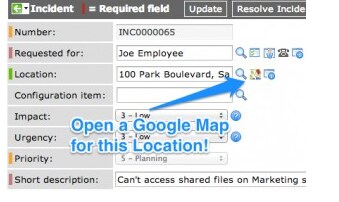
I want to have google map in the Incident location like the below Image.

We are usinf Helsinki version and I have followed the step mentioned in this blog.
https://www.servicenowguru.com/system-ui/ui-actions-system-ui/open-google-map-location-record/
But its not working .
Can some one help do I need check any other thing rather than this.
Please help me on the same.
Thanks
Saranya
Solved! Go to Solution.
- Labels:
-
Scripting and Coding

- Mark as New
- Bookmark
- Subscribe
- Mute
- Subscribe to RSS Feed
- Permalink
- Report Inappropriate Content
05-31-2017 09:37 PM
Hi Saranya,
Using the SNGuru post I am able to get the google map icon next to location, not sure what's wrong in your instance.
I have just followed the below step to achieve, please check if it helps you.
1. Open UI Macro and create on New Button

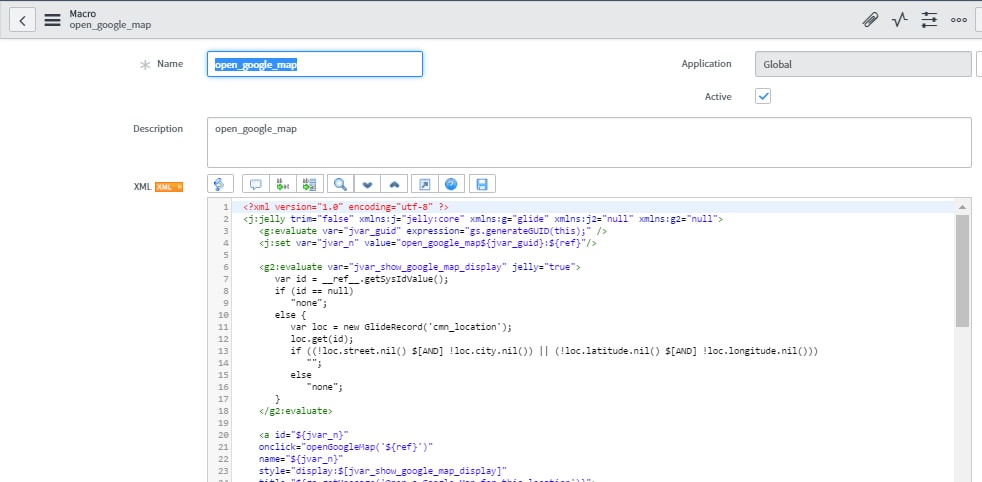
2. Create new UI Macro with code provided, I am copying the code here for your reference.

<?xml version="1.0" encoding="utf-8" ?>
<j:jelly trim="false" xmlns:j="jelly:core" xmlns:g="glide" xmlns:j2="null" xmlns:g2="null">
<g:evaluate var="jvar_guid" expression="gs.generateGUID(this);" />
<j:set var="jvar_n" value="open_google_map${jvar_guid}:${ref}"/>
<g2:evaluate var="jvar_show_google_map_display" jelly="true">
var id = __ref__.getSysIdValue();
if (id == null)
"none";
else {
var loc = new GlideRecord('cmn_location');
loc.get(id);
if ((!loc.street.nil() $[AND] !loc.city.nil()) || (!loc.latitude.nil() $[AND] !loc.longitude.nil()))
"";
else
"none";
}
</g2:evaluate>
<a id="${jvar_n}"
onclick="openGoogleMap('${ref}')"
name="${jvar_n}"
style="display:$[jvar_show_google_map_display]"
title="${gs.getMessage('Open a Google Map for this location')}">
<img border="0" src="https://maps.gstatic.com/favicon2.ico" height="16" width="16"/> </a>
<script>
needsRefreshLoc = false;
function onChange_location_show_google_map(element, original, changed, loading) {
var s = '${ref}'.split('.');
var referenceField = s[1];
if (needsRefreshLoc == false) {
needsRefreshLoc = true;
return;
}
if (changed.length == 0) {
$('${jvar_n}').hide();
return;
}
var locRec = g_form.getReference(referenceField, locationGoogleMapReturn);
}
function locationGoogleMapReturn(locRec) {
var e = $('${jvar_n}');
if ((locRec.street $[AND] locRec.city) || (locRec.latitude $[AND] locRec.longitude))
e.show();
else
e.hide();
}
//Event.observe(g_form.getControl(${ref}.split('.')[1]), 'change', onChange_cmn_location_show_google_map);
var l = new GlideEventHandler('onChange_location_show_google_map', onChange_location_show_google_map, '${ref}');
g_event_handlers.push(l);
//Pop open google maps window of location specified
//URL should follow this format...http://maps.google.com/?q=1200 Pennsylvania Ave SE, Washington, District of Columbia, 20003
function openGoogleMap(reference) {
var s = reference.split('.');
var referenceField = reference.substring(s[0].length+1);
var sysId = g_form.getValue(referenceField);
//Retrieve the 'Location' record
var gr = new GlideRecord('cmn_location');
gr.get(sysId);
//Create and display the Map URL
var mapURL = "http://maps.google.com/?q=";
//Try location and city
if(gr.street $[AND] gr.city){
mapURL = mapURL + gr.street + ',' + gr.city + ',' + gr.state + ',' + gr.zip + ',' + gr.country;
}
//Else try latitude and longitude
else if(gr.latitude $[AND] gr.longitude){
mapURL = mapURL + gr.latitude + ',' + gr.longitude;
}
//Strip '#' symbols to avoid encoding errors
mapURL = mapURL.replace(/#/g, "");
window.open(mapURL);
}
</script>
</j:jelly>
3. Go to your incident page and right click to configure the dictionary

4. Give attributes ref_contributions=open_google_map and the save the dictionary

5. Select the location in the location field on your incident page and then Google Map Icon will appear.
Please try and see if it works, i just followed the instruction given in the same and was able to do.
- Mark as New
- Bookmark
- Subscribe
- Mute
- Subscribe to RSS Feed
- Permalink
- Report Inappropriate Content
05-31-2017 11:07 PM

- Mark as New
- Bookmark
- Subscribe
- Mute
- Subscribe to RSS Feed
- Permalink
- Report Inappropriate Content
05-31-2017 11:08 PM
Yes you can. with a comma
- Mark as New
- Bookmark
- Subscribe
- Mute
- Subscribe to RSS Feed
- Permalink
- Report Inappropriate Content
05-31-2017 11:09 PM

- Mark as New
- Bookmark
- Subscribe
- Mute
- Subscribe to RSS Feed
- Permalink
- Report Inappropriate Content
05-31-2017 11:16 PM
Awesome it worked.Super
Thank you very much.You are awesome
Thanks
Saranya
- Mark as New
- Bookmark
- Subscribe
- Mute
- Subscribe to RSS Feed
- Permalink
- Report Inappropriate Content
05-31-2017 09:49 PM
Paste the below code in Ui amcro
<?xml version="1.0" encoding="utf-8" ?>
<j:jelly trim="false" xmlns:j="jelly:core" xmlns:g="glide" xmlns:j2="null" xmlns:g2="null">
<g:evaluate var="jvar_guid" expression="gs.generateGUID(this);" />
<j:set var="jvar_n" value="open_google_map${jvar_guid}:${ref}"/>
<g2:evaluate var="jvar_show_google_map_display" jelly="true">
var id = __ref__.getSysIdValue();
if (id == null)
"none";
else {
var loc = new GlideRecord('cmn_location');
loc.get(id);
if ((!loc.street.nil() $[AND] !loc.city.nil()) || (!loc.latitude.nil() $[AND] !loc.longitude.nil()))
"";
else
"none";
}
</g2:evaluate>
<a id="${jvar_n}"
onclick="openGoogleMap('${ref}')"
name="${jvar_n}"
style="display:$[jvar_show_google_map_display]"
title="${gs.getMessage('Open a Google Map for this location')}">
<img border="0" src="https://maps.gstatic.com/favicon2.ico" height="16" width="16"/> </a>
<script>
needsRefreshLoc = false;
function onChange_location_show_google_map(element, original, changed, loading) {
var s = '${ref}'.split('.');
var referenceField = s[1];
if (needsRefreshLoc == false) {
needsRefreshLoc = true;
return;
}
if (changed.length == 0) {
$('${jvar_n}').hide();
return;
}
var locRec = g_form.getReference(referenceField, locationGoogleMapReturn);
}
function locationGoogleMapReturn(locRec) {
var e = $('${jvar_n}');
if ((locRec.street $[AND] locRec.city) || (locRec.latitude $[AND] locRec.longitude))
e.show();
else
e.hide();
}
//Event.observe(g_form.getControl(${ref}.split('.')[1]), 'change', onChange_cmn_location_show_google_map);
var l = new GlideEventHandler('onChange_location_show_google_map', onChange_location_show_google_map, '${ref}');
g_event_handlers.push(l);
//Pop open google maps window of location specified
//URL should follow this format...http://maps.google.com/?q=1200 Pennsylvania Ave SE, Washington, District of Columbia, 20003
function openGoogleMap(reference) {
var s = reference.split('.');
var referenceField = reference.substring(s[0].length+1);
var sysId = g_form.getValue(referenceField);
//Retrieve the 'Location' record
var gr = new GlideRecord('cmn_location');
gr.get(sysId);
//Create and display the Map URL
var mapURL = "http://maps.google.com/?q=";
//Try location and city
if(gr.street $[AND] gr.city){
mapURL = mapURL + gr.street + ',' + gr.city + ',' + gr.state + ',' + gr.zip + ',' + gr.country;
}
//Else try latitude and longitude
else if(gr.latitude $[AND] gr.longitude){
mapURL = mapURL + gr.latitude + ',' + gr.longitude;
}
//Strip '#' symbols to avoid encoding errors
mapURL = mapURL.replace(/#/g, "");
window.open(mapURL);
}
</script>
</j:jelly>
Go to the Location field Dictionary and In attributes Enter the ref_contributions = ui macro name
Pls HIt correct my answer if this is helpful