
- Mark as New
- Bookmark
- Subscribe
- Mute
- Subscribe to RSS Feed
- Permalink
- Report Inappropriate Content
07-21-2019 03:50 AM
Hi All,
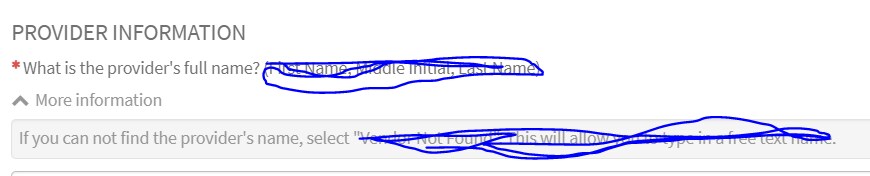
I have requirement, I want hide to 'More Information' toggle from the form.
I don't know how but it is exist for current instance(London), now we have upgraded it to Madrid, It is showing for Madrid.
It is showing in London instance as below,

It is showing in Madrid as below,

I want same as London (First screenshot) in Madrid.
Thanks in advance.
Solved! Go to Solution.

- Mark as New
- Bookmark
- Subscribe
- Mute
- Subscribe to RSS Feed
- Permalink
- Report Inappropriate Content
07-21-2019 09:43 PM
Go to Service Portal -> Pages and open the page with ID= sc_cat_item.
Add the CSS as shown below



- Mark as New
- Bookmark
- Subscribe
- Mute
- Subscribe to RSS Feed
- Permalink
- Report Inappropriate Content
07-21-2019 08:48 AM
This will only work in portal and you dont need to modify every catalog items.
Go the service portal page sc_cat_item and then add the above mentioned CSS in the page specific one. It is global solution at the portal level.
- Mark as New
- Bookmark
- Subscribe
- Mute
- Subscribe to RSS Feed
- Permalink
- Report Inappropriate Content
07-21-2019 12:24 PM
Thanks for your help.
I didn't get you, where am I supposed to add this code?
Could you please give me the steps?
- Mark as New
- Bookmark
- Subscribe
- Mute
- Subscribe to RSS Feed
- Permalink
- Report Inappropriate Content
07-21-2019 09:43 PM
- Mark as New
- Bookmark
- Subscribe
- Mute
- Subscribe to RSS Feed
- Permalink
- Report Inappropriate Content
07-31-2019 05:19 AM
Hi Alikutty,
Thanks for your all help.
I had another question, Is there any way we can hide same toggle button in CMS view?
Any help is apprciated.
Thanks
