- Mark as New
- Bookmark
- Subscribe
- Mute
- Subscribe to RSS Feed
- Permalink
- Report Inappropriate Content
12-06-2018 08:36 AM
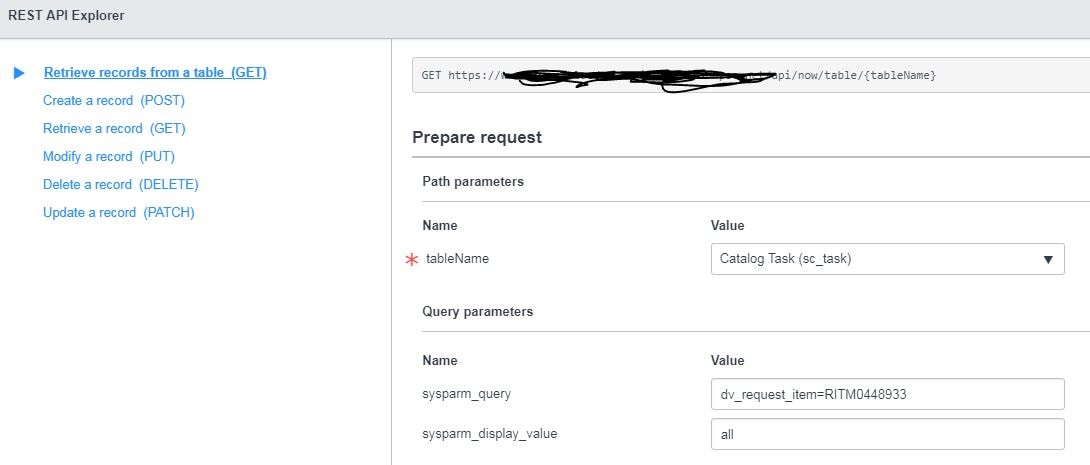
I would like to create rest api which provides all the task associated with any RITM.
I want to pass the RITM number like (RITM1231) in query parameter as end user don't have the sys_id of RITM.
How can I achieve it. Please find attached the screen shot for your reference.
Thank you
Solved! Go to Solution.
- Labels:
-
Integrations

- Mark as New
- Bookmark
- Subscribe
- Mute
- Subscribe to RSS Feed
- Permalink
- Report Inappropriate Content
12-06-2018 08:51 AM
The display value of a reference field is just one of the fields of the referenced table so you would just need to dot-walk to the display value field.

- Mark as New
- Bookmark
- Subscribe
- Mute
- Subscribe to RSS Feed
- Permalink
- Report Inappropriate Content
12-06-2018 08:51 AM
- Mark as New
- Bookmark
- Subscribe
- Mute
- Subscribe to RSS Feed
- Permalink
- Report Inappropriate Content
12-06-2018 08:54 AM
Hi Shalini,
In your case you should create an Scripted REST API and use the GET method.
In the scripted REST API, use the GET method and give the relative path as sys_id.

Now write the logic in the scripted rest api like below
// implement resource here
var toNum = request.pathParams.sys_id;
var body = {};
var sc = new GlideRecord('sc_req_item');
sc.addQuery('active', 'true');
sc.addQuery('number', toNum);
sc.query();
while(sc.next())
{
//write your logic here to return the tasks.
}
Hope this might be helpful to you.
Thank you.