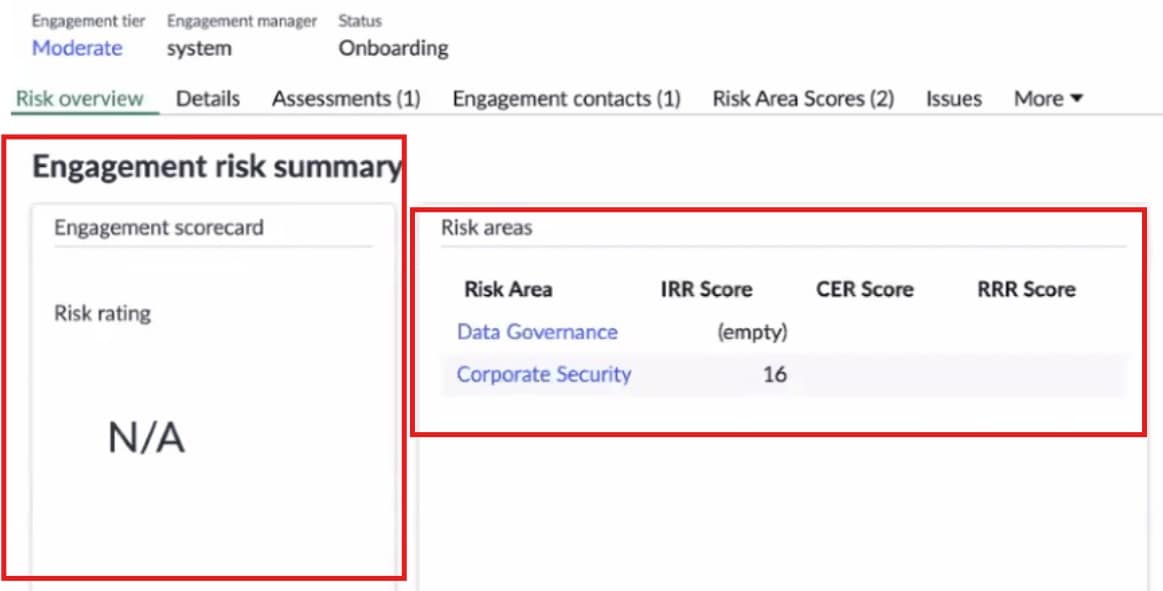
Engagement Risk Summary not showing Risk Areas in Vendor Management Workspace

- Mark as New
- Bookmark
- Subscribe
- Mute
- Subscribe to RSS Feed
- Permalink
- Report Inappropriate Content
12-12-2025 04:32 AM
Hi everyone,
I’m working in the Vendor Management Workspace and facing an issue with the Engagement Risk Summary section.
According to the scoring logic, results should be calculated normally at the engagement level, and the Supplier Ratings should update based on the highest active score. When an engagement is reassessed, the previous version becomes inactive, so only the latest assessment should influence the Supplier Rating.
But in my case, the Risk Areas panel is not populating, even though the engagement has associated risk areas and related scores. The left side shows N/A, and the right side shows “No records to display”.
I’ve attached screenshots for reference.
My questions:
Why are the Risk Areas not appearing even when they exist at the engagement level?
Is there any configuration or data condition required in Vendor Management Workspace for the risk areas to display?
Does the scoring refresh depend on a specific scheduled job, script, or workflow that might not be running?
Are there any known issues with engagement-level scoring not updating the workspace view?
Any guidance would be appreciated. Thank you!
- Mark as New
- Bookmark
- Subscribe
- Mute
- Subscribe to RSS Feed
- Permalink
- Report Inappropriate Content
12-12-2025 05:19 AM
To clarify the issue, basis the screenshots, the problem is not that the engagement has no Risk Areas, but that Vendor Management Workspace (VMW) is not detecting a valid, active, scored assessment version to display in the Engagement Risk Summary widget. This is a very common issue in VRM / VMW when one of the scoring dependencies is missing.
Your Risk Areas exist (as seen in backend), but Workspace displays N/A because:
- The assessment version is not fully scored, or scoring jobs have not run.
- One or more risk-area records have empty score fields.
- Workspace requires complete scoring + active version to show the panel.
Once all scores are populated and the scoring jobs run, Workspace will display the Risk Areas and Engagement Risk Summary correctly.
Share:
Your current VRM plugin version
</ Screenshot of vrm_engagement_area.list />
List of scheduled jobs related to VRM