- Mark as New
- Bookmark
- Subscribe
- Mute
- Subscribe to RSS Feed
- Permalink
- Report Inappropriate Content
04-01-2016 11:49 AM
How to access custom objects defined from the global UI Script in UI16 frame banner?
It seems like the new UI16 frame banner is now using Angler? I've this test global UI Script that works just fine in UI15 but not in UI16.
foo = {};
foo.helloWorld = function() {
console.log("Hello World!");
};
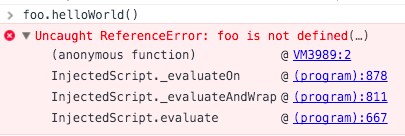
However, when you try to call foo.helloWorld() on the new UI16, you will get this error:

Solution:
The global object are applicable to gsft_main only. So use gsft_main.obj...

Solved! Go to Solution.
- Labels:
-
Integrations
-
User Interface (UI)

- Mark as New
- Bookmark
- Subscribe
- Mute
- Subscribe to RSS Feed
- Permalink
- Report Inappropriate Content
04-01-2016 11:57 AM
Have you switched your iframe to gsft_main in browser console. The global object are applicable to gsft_main only.
Let me know in case that still did not solve your problem.
Hope this helps.
- Mark as New
- Bookmark
- Subscribe
- Mute
- Subscribe to RSS Feed
- Permalink
- Report Inappropriate Content
04-01-2016 11:57 AM
Have you switched your iframe to gsft_main in browser console. The global object are applicable to gsft_main only.
Let me know in case that still did not solve your problem.
Hope this helps.
- Mark as New
- Bookmark
- Subscribe
- Mute
- Subscribe to RSS Feed
- Permalink
- Report Inappropriate Content
04-01-2016 11:57 AM
Hi Alex,
While doing the console hope you are pointing to right frame. On the top right you should be choosing the main frame or gsft_main instead of top.