How to add reference record link in the send email action in flow designer

- Mark as New
- Bookmark
- Subscribe
- Mute
- Subscribe to RSS Feed
- Permalink
- Report Inappropriate Content
08-20-2024 12:49 PM
Hi All,
How to add a reference record link like {URI_REF}in the Send email action in flow designer
I have seen the link generator but I couldn't find that action in the
Can someone tell me the how to achieve
Thanks

- Mark as New
- Bookmark
- Subscribe
- Mute
- Subscribe to RSS Feed
- Permalink
- Report Inappropriate Content
08-20-2024 01:29 PM
Hey @Shantharao,
To add a reference record link in your Flow Designer email, you can use a Custom Script Action.
In your flow, add a Script Action to generate the record link. Use this script:
(function execute(inputs, outputs) {
    var link = gs.getProperty('glide.servlet.uri') + '/' + inputs.tableName + '.do?sys_id=' + inputs.sysId;
    outputs.link = link;
})(inputs, outputs);
Don't forget to set input/output variables.
In your "Send Email" action, simply reference the link with ${link} in the email body.
Hi,

You can check the record by clicking <a href="${link}">here</a>.

Cheers!
If you need further assistance with the specifics of your Flow Designer implementation, feel free to ask!
- Mark as New
- Bookmark
- Subscribe
- Mute
- Subscribe to RSS Feed
- Permalink
- Report Inappropriate Content
08-23-2024 11:18 AM
Hi @Community Alums
I have created two input variables and one output variable , I am using this action in my flow but not working as expected, am I missing any step
Could you please provide the step by step process

Thanks
- Mark as New
- Bookmark
- Subscribe
- Mute
- Subscribe to RSS Feed
- Permalink
- Report Inappropriate Content
11-20-2024 06:41 AM
Hey there,
A little bit late but you don't need to create a custom action for that (unless the intent is to reuse or depending on your final goal...) try using a flow variable, flow variable allows the use of scripting.
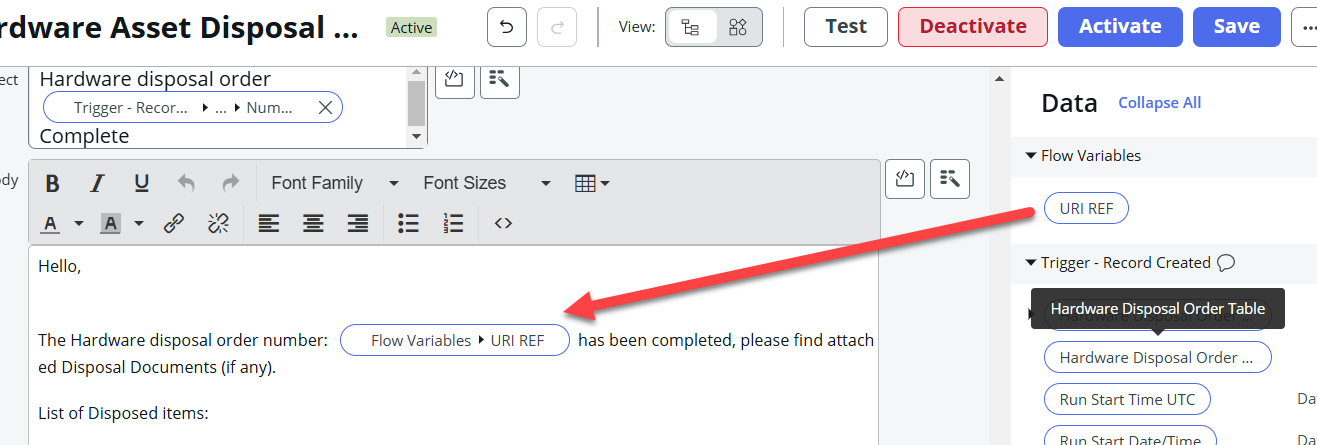
For example I did this for HAM
This is the code that will go on your variable ( Just add a new variable, then add a "Set Flow variables" step then form there you can add script to your variable something like: ( make sure to change the code to your needs)

var instanceName = gs.getProperty('glide.servlet.uri');
var url = instanceName + '/nav_to.do?uri=sn_hamp_hardware_disposal.do?sys_id=' + fd_data.trigger.current.sys_id;
var number = fd_data.trigger.current.number;
var emailContent = '<html><body>';

emailContent += '<a href="' + url + '" style="color: #007BFF; text-decoration: none;"><strong><u>' + number + '</u></strong></a>';
emailContent += '</body></html>';
return emailContent;
Then on your email make sure to add the Variable pill on your email body.

Your email should look like