- Mark as New
- Bookmark
- Subscribe
- Mute
- Subscribe to RSS Feed
- Permalink
- Report Inappropriate Content
09-21-2021 01:10 PM
Hello Experts and SN Community,
I need some assistance on the Attachment API- POST method (Binary)...I simulated it in REST API Explorer and POSTMAN and it works well:
....Simulation in REST API Explorer

...simulation in POSTMAN

In my source instance (PDI), I copy the same URI as shown (with a Script Includes to invoke the RESTMessageV2; this is triggered via Business Rule)
...simulation in my PDI

...my Script Includes:
RSMDASHeBondingCustomerUtil.prototype = {
initialize: function() {
this.AUTH_TYPE = "basic"; //oauth2
this.PROFILE_NAME = gs.getProperty("dash.ebonding.profile.name"); //sys_id of the user profile
//====================
this.RESTAPIAttachment = "RSM DASH Attachment API";
this.POSTFileContents = "POST Attachment to Case";
//====================
},
postFileToDash: function (argTargetTable, argCaseSysID, argINCFileName, argContentType,
argINCSysID, argSourceTable, argFileSysID){
try {
var r = new sn_ws.RESTMessageV2(this.RESTAPIAttachment, this.POSTFileContents);
r.setAuthenticationProfile(this.AUTH_TYPE, this.PROFILE_NAME);
r.setStringParameterNoEscape("case_table_name", argTargetTable);
r.setStringParameterNoEscape("case_sys_id", argCaseSysID);
r.setStringParameterNoEscape("incident_file_name", argINCFileName);
r.setRequestHeader("Content-Type", argContentType);
r.setRequestHeader("Accept", "application/json");
r.setQueryParameter("table_sys_id", argINCSysID);
r.setQueryParameter("file_name", argINCFileName);
r.setQueryParameter("table_name", argSourceTable);
r.setRequestBodyFromAttachment(argFileSysID);
var response = r.execute();
var responseBody = response.getBody();
var httpStatus = response.getStatusCode();
gs.info("Dor Test - postFileToDash \n "
+ "\nresponseBody : " + responseBody
+"\nhttpStatus : " + httpStatus);
} catch(ex) {
var message = ex.message;
gs.info("RSM DASH alert: " + message);
}
},
...my part of my Business Rules:
//STEP3: Compare files in CETS Incident and DASH Case
var arrCD = current.correlation_display.split("|");
//sample: sn_customerservice_case|a42f5117dbaeb050b6b5c8981396199e|2021-09-20|02:11:39
var mdCaseFiles = dash.getFilesMetaData(arrCD[0], arrCD[1]);
var arrFilesMD = JSON.parse(mdCaseFiles);
gs.info("Dor Test - RSM DASH: Sent Incident Details\n"
+ "\nmdCaseFiles : "+ mdCaseFiles);
//get list of Incident Files attachments
var att = new GlideSysAttachment();
var agr = att.getAttachments(myTable, mySysID);
while(agr.next()){
var hasFile = "false";
for(var j = 0; j < arrFilesMD.length; j++){//loop through the files metadata in target instance
var mySB = arrFilesMD[j].size_bytes+"";
var myFN = arrFilesMD[j].file_name+"";
var myH = arrFilesMD[j].hash+"";
var myCT = arrFilesMD[j].content_type+"";
var mySI = arrFilesMD[j].sys_id+"";
//check if file already exist in target instance
var incSB = agr.getValue("size_bytes")+"";
var incFN = agr.getValue("file_name")+"";
var incH = agr.getValue("hash")+"";
var incCT = agr.getValue("content_type")+"";
var incFNSysID = agr.getValue("sys_id")+"";
if(incSB == mySB && incFN == myFN && incH == myH &&
incCT.includes(myCT)){
hasFile = "true";
}
}
//--------------------------------------------------------------
//STEP 4: Send Attachment to DASH
if(hasFile == "false"){
gs.info("Dor Test - RSM DASH: Sent Incident Details\n"
+ "\narrCD[0] : " + arrCD[0]
+ "\narrCD[1] : " + arrCD[1]
+ "\nincFN : " + incFN
+ "\nincCT : " + incCT
+ "\nmySysID : " + mySysID
+ "\nmyTable : " + myTable
+ "\naincFNSysID : " + incFNSysID);
dash.postFileToDash(arrCD[0], arrCD[1], incFN, incCT,
mySysID, myTable, incFNSysID);
}
}
...sample printout:

I attached the target file and clicked 'Test'...here's what I got:

I tried running the B/R that invokes the Script Include but no output. I modified the URI as:
https://<source_instance_here>/api/now/attachment/file?table_name=${case_table_name}&table_sys_id=${case_sys_id}&${incident_file_name}
with modification in HTTP Query Parameters :

and it returned and error:
| RSM DASH alert: Error executing REST request: Invalid uri 'https://<source_instance_here>/api/now/attachment/file?table_name=sn_customerservice_case&table_sys_id=bf275ee8dbf2745083b5e88913961927&New STD Excel 1A.xlsx?=New+STD+Excel+1A.xlsx&table_sys_id=f7871aec2f367410553b2d6df699b6ab&table_name=incident&file_name=New+STD+Excel+1A.xlsx': Invalid query |
Question #1: How do I simulate in the REST Message module using 'Test' UI Action?
Question #2: What is the correct URI/URL endpoint? (It seems odd because REST API Explorer and POSTMAN works)
IF there is a better approach, please let me know. (The intention is to send a file from a source instance Incident to a target instance Case; their correlation IDs are utilized here to match/coalesce.)
Please help again.
Thanks in advance,
Dor
Solved! Go to Solution.
- Labels:
-
Integrations
- Mark as New
- Bookmark
- Subscribe
- Mute
- Subscribe to RSS Feed
- Permalink
- Report Inappropriate Content
09-22-2021 08:12 AM
Hi,
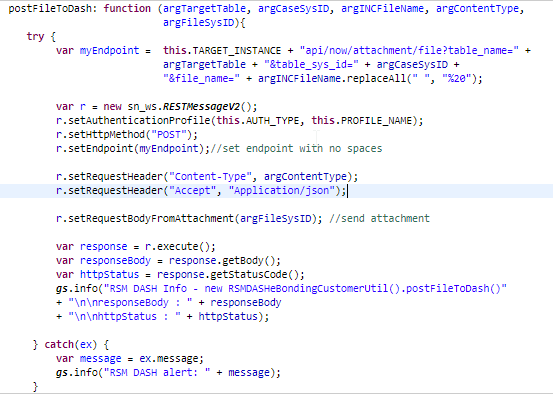
I was able to make it work with the following lessons-learned:
- I did not use the REST Message application (I will experiment this later); instead, I directly scripted all in RESTMessageV2(). Here's my code in my Script Includes:

- The Endpoint MUST HAVE NO SPACES. The 'replaceAll' JavaScript function helps a lot.
- setQueryParameter() and other query function is NOT necessary as long as you have proper target record that it suppose to go to in the Endpoint.
- 2 Headers (Accept, Content-Type) are important.
- setRequestBodyFromAttachment() function takes the sys_id of the file in the sys_attachment table (this is not the sys_id of the host record - e.g. Incident; table_sys_id).
I hope this may be a good reference for your Attachment API (POST) integration.
Cheers,
Dor
- Mark as New
- Bookmark
- Subscribe
- Mute
- Subscribe to RSS Feed
- Permalink
- Report Inappropriate Content
09-22-2021 08:12 AM
Hi,
I was able to make it work with the following lessons-learned:
- I did not use the REST Message application (I will experiment this later); instead, I directly scripted all in RESTMessageV2(). Here's my code in my Script Includes:
- The Endpoint MUST HAVE NO SPACES. The 'replaceAll' JavaScript function helps a lot.
- setQueryParameter() and other query function is NOT necessary as long as you have proper target record that it suppose to go to in the Endpoint.
- 2 Headers (Accept, Content-Type) are important.
- setRequestBodyFromAttachment() function takes the sys_id of the file in the sys_attachment table (this is not the sys_id of the host record - e.g. Incident; table_sys_id).
I hope this may be a good reference for your Attachment API (POST) integration.
Cheers,
Dor