How to change Icon Link widget colors

- Mark as New
- Bookmark
- Subscribe
- Mute
- Subscribe to RSS Feed
- Permalink
- Report Inappropriate Content
09-27-2016 06:55 AM
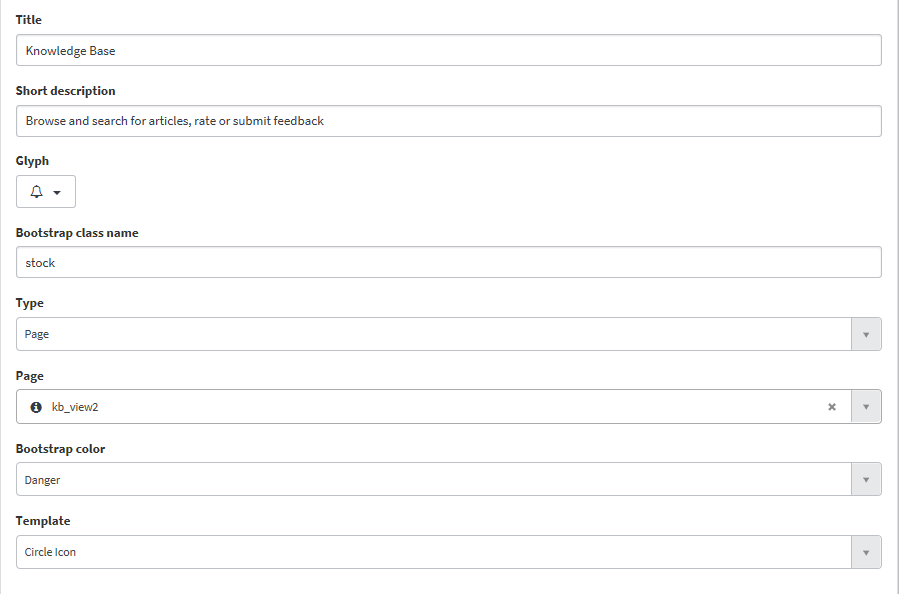
How to change Icon Link widget webpart colors. I have edit the webpart and change the webpart colors by selecting bootstarp colors(danger, success, primary, default....).
Now I want apply custom colors for webpart. Is there any way to change bootstarp colors or apply custom colors?
Please find the attached screenshots
- Mark as New
- Bookmark
- Subscribe
- Mute
- Subscribe to RSS Feed
- Permalink
- Report Inappropriate Content
01-02-2017 08:28 PM
Praveen, I've got similar issue. Any solution? Thanks.
- Mark as New
- Bookmark
- Subscribe
- Mute
- Subscribe to RSS Feed
- Permalink
- Report Inappropriate Content
01-05-2017 06:50 AM
Hi Solon,
Please have a look on below answer and check if it is working for you.
Regards,
Jeet.
- Mark as New
- Bookmark
- Subscribe
- Mute
- Subscribe to RSS Feed
- Permalink
- Report Inappropriate Content
01-04-2017 01:02 AM


- Mark as New
- Bookmark
- Subscribe
- Mute
- Subscribe to RSS Feed
- Permalink
- Report Inappropriate Content
03-14-2018 09:59 AM
Thanks Jeet.
One more observation is that, if all the widgets on the page should have the same background color then this CSS should be updated in the page level CSS like screenshot below.