How to Change the system language on the basis of user's preferred communication language?

- Mark as New
- Bookmark
- Subscribe
- Mute
- Subscribe to RSS Feed
- Permalink
- Report Inappropriate Content
01-19-2021 03:58 AM
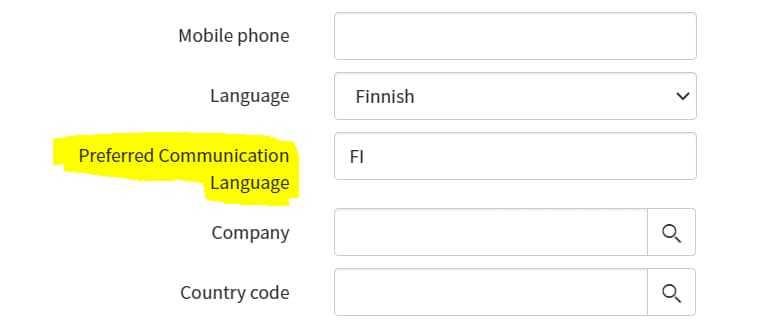
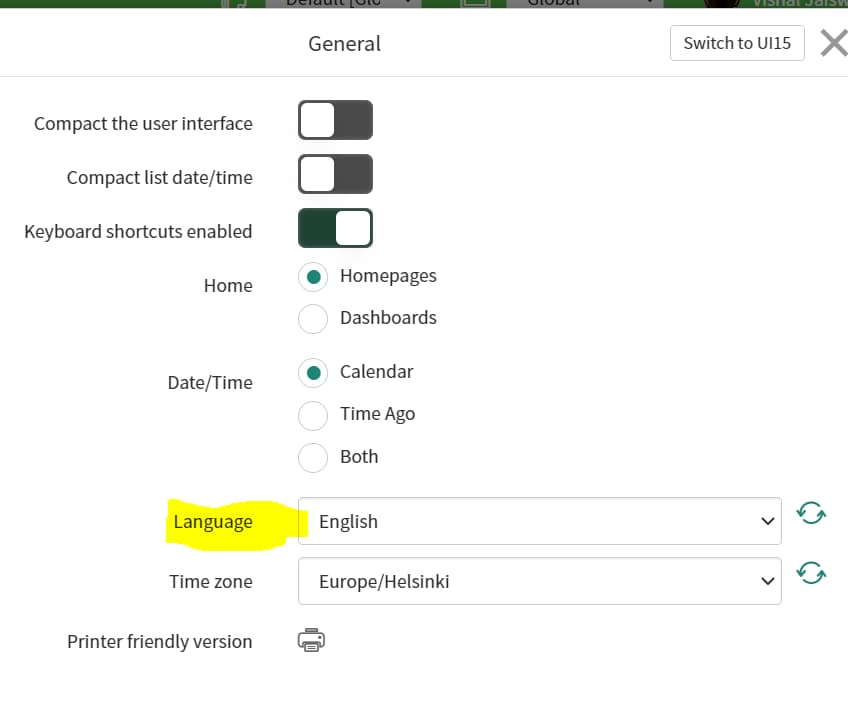
Scenario: There is a field "" in sys_user table and one field "Language" in system setting.
Expected solution: Need to change the system language on the basis of user's preferred communication language.
Example: If user's preferred communication language is FI then system language should automatically change to FI.
Please refer the attached pic.
- Mark as New
- Bookmark
- Subscribe
- Mute
- Subscribe to RSS Feed
- Permalink
- Report Inappropriate Content
01-19-2021 05:25 AM
Hi Ankur,
It worked after adding below script:
var util = new I18nUtils();

util.setLanguage('fi');
request.getSession().setLanguage("fi"); 

- Mark as New
- Bookmark
- Subscribe
- Mute
- Subscribe to RSS Feed
- Permalink
- Report Inappropriate Content
01-19-2021 06:11 AM
I could see you marked my response as correct earlier and now it is not
If my response helped you please mark it correct and helpful.
Regards
Ankur
Ankur
✨ Certified Technical Architect || ✨ 10x ServiceNow MVP || ✨ ServiceNow Community Leader
- Mark as New
- Bookmark
- Subscribe
- Mute
- Subscribe to RSS Feed
- Permalink
- Report Inappropriate Content
01-19-2021 06:12 AM
Hi,
final script
(function executeRule(current, previous /*null when async*/) {

    // Add your code here

var util = new I18nUtils();

util.setLanguage(current.preferred_language);

request.getSession().setLanguage(current.preferred_language);

})(current, previous);
Regards
Ankur
Ankur
✨ Certified Technical Architect || ✨ 10x ServiceNow MVP || ✨ ServiceNow Community Leader
- Mark as New
- Bookmark
- Subscribe
- Mute
- Subscribe to RSS Feed
- Permalink
- Report Inappropriate Content
01-19-2021 06:29 AM
Hi Ankur,
This is not working dynamically.
Issue: when i change one user A's preferred language to "X" then the system language change to "X". But it is not working for users A's system.
In short this work only when i do some changes and on my system itself whether i do changes for other users.
- Mark as New
- Bookmark
- Subscribe
- Mute
- Subscribe to RSS Feed
- Permalink
- Report Inappropriate Content
01-19-2021 06:34 AM
Expected sol: If the user's preferred language is "RU" (russian) in sys_user table.
Then that user's system language should be changed to russian by default whenever he log in from any device.