- Mark as New
- Bookmark
- Subscribe
- Mute
- Subscribe to RSS Feed
- Permalink
- Report Inappropriate Content
01-04-2021 09:56 PM
Hi,
When a request is approved or rejected mail is sent to requested for.
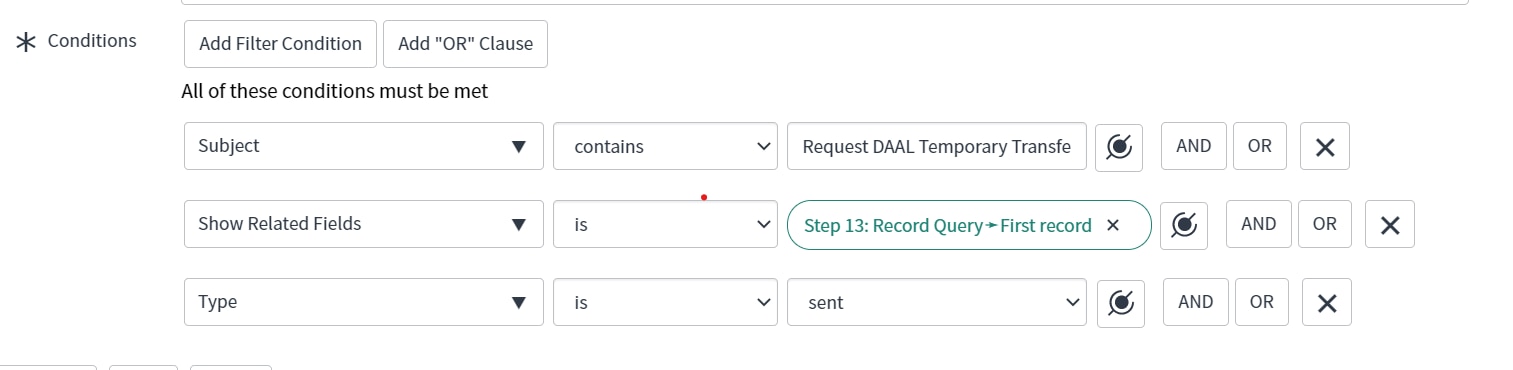
ATF step, i have written a record query for sys_email table.

I am getting below error.

I am getting sys id of the ritm that is why it is failing may be.
How to get the exact record.
Solved! Go to Solution.
- Labels:
-
Automated Test Framework


- Mark as New
- Bookmark
- Subscribe
- Mute
- Subscribe to RSS Feed
- Permalink
- Report Inappropriate Content
01-05-2021 09:28 PM
Hi,
the issue here is target field on sys_email is document_id so possibly it is not able to query
Use Run Server Side Script Step instead of Step 22 which is Record Query
(function(outputs, steps, stepResult, assertEqual) {
// add test script here

var STEP_10_SYS_ID= 'd9f8dd67db805410bea7550a48961930'; // step sys_id of Step 10

var val = steps(STEP_10_SYS_ID).first_record;

var emailRec = new GlideRecord('sys_email');
emailRec.addQuery('target_table', 'sc_req_item');
emailRec.addQuery('instance', val);
emailRec.query();
if(emailRec.next()){

outputs.table = 'sys_email';
outputs.record_id = emailRec.sys_id;

message = 'Found Email';
stepResult.setOutputMessage(message);

stepResult.setSuccess();
return true;
}
else{
message = 'Not Found Email';
stepResult.setOutputMessage(message);
stepResult.setFailed();
return false;
}

})(outputs, steps, stepResult, assertEqual);
Then For Step 23 do this select the output of the previous Run Server side script step
"Open the 'Email' form with id '{{Step 22: Record Query.Record id}}'
Regards
Ankur
Ankur
✨ Certified Technical Architect || ✨ 10x ServiceNow MVP || ✨ ServiceNow Community Leader
- Mark as New
- Bookmark
- Subscribe
- Mute
- Subscribe to RSS Feed
- Permalink
- Report Inappropriate Content
01-05-2021 07:39 PM
Yes Ankur
Mail is generating manually.
- Mark as New
- Bookmark
- Subscribe
- Mute
- Subscribe to RSS Feed
- Permalink
- Report Inappropriate Content
01-05-2021 09:28 PM
Hi,
the issue here is target field on sys_email is document_id so possibly it is not able to query
Use Run Server Side Script Step instead of Step 22 which is Record Query
(function(outputs, steps, stepResult, assertEqual) {
// add test script here

var STEP_10_SYS_ID= 'd9f8dd67db805410bea7550a48961930'; // step sys_id of Step 10

var val = steps(STEP_10_SYS_ID).first_record;

var emailRec = new GlideRecord('sys_email');
emailRec.addQuery('target_table', 'sc_req_item');
emailRec.addQuery('instance', val);
emailRec.query();
if(emailRec.next()){

outputs.table = 'sys_email';
outputs.record_id = emailRec.sys_id;

message = 'Found Email';
stepResult.setOutputMessage(message);

stepResult.setSuccess();
return true;
}
else{
message = 'Not Found Email';
stepResult.setOutputMessage(message);
stepResult.setFailed();
return false;
}

})(outputs, steps, stepResult, assertEqual);
Then For Step 23 do this select the output of the previous Run Server side script step
"Open the 'Email' form with id '{{Step 22: Record Query.Record id}}'
Regards
Ankur
Ankur
✨ Certified Technical Architect || ✨ 10x ServiceNow MVP || ✨ ServiceNow Community Leader
- Mark as New
- Bookmark
- Subscribe
- Mute
- Subscribe to RSS Feed
- Permalink
- Report Inappropriate Content
01-07-2021 02:55 AM
Thanks it worked
- Mark as New
- Bookmark
- Subscribe
- Mute
- Subscribe to RSS Feed
- Permalink
- Report Inappropriate Content
01-07-2021 04:25 AM
Glad to help.
Please mark appropriate response helpful as well.
Regards
Ankur
Ankur
✨ Certified Technical Architect || ✨ 10x ServiceNow MVP || ✨ ServiceNow Community Leader