How to create a dynamic filter on a related list (EDIT BUTTON)

- Mark as New
- Bookmark
- Subscribe
- Mute
- Subscribe to RSS Feed
- Permalink
- Report Inappropriate Content
05-05-2016 11:32 AM
Hey Folks of ServiceNow! I was wondering if there is a way to create a default filter in related list that references a many to many tables and that it must be dynamic! the issue I am having is because of the fact the tables Im using there is many to many relationship so when I try to get(or choose) information on a related list I get all of the data that it contains without restrictions! I would like to set a default filter that takes the current reference item that it has in common so it would only show the items associated to it for each form (each device in this case for what I am doing).. heres an example!
for example this is what I get in this related list without using a filter:

All of the elements in that table! but from those elements I only need those that has the "product" of the current table that has this related list:

in this case I only want to see those that belongs to this Panasonic Product, that could be achieved by a static default filter(I was able to do that) but it doesnt work because not all of the actions has as product like this panasonic device so another way to do this is manually each time you go into this slushbucket you create a filter for it:

wich is not good! we dont want to be creating filters each time we enter into this slushbucket we would like to have an automated dynamic filter for it! I've tryied everything but now I wonder if this is even possible or achievable?? thank you very much!
What I have tried:
*** Go into List control of this related list and modify the layout to show "Edit default filter" builder condition field.
*** Going into the dictionary of this field and modifying the UI Policy that hinders "the reference qualifier fields" , tested with a dynamic filter and it doesnt allows you to selec the dynamic filter you just created it doesnt even appear in the list of dynamic filters when you need to choose nor any dynamic filter.
*** Creating a ref qualifier for it. (DIDNT WORK).
*** Then I modified the "dynamic filter" field and created a dyanamic scripted filter as well didnt work, it doesnt show the filter once it is created.
*** All kind of different stuff and IT DIDNT WORK!
Thank you very much Guys in regard Jose
- Mark as New
- Bookmark
- Subscribe
- Mute
- Subscribe to RSS Feed
- Permalink
- Report Inappropriate Content
05-17-2016 01:22 PM
Lars I really appreciate you answer! sounds like something I must to try and I will for sure so I can mark you answer as correct for me and close this!!!!! thank you very much! and ctomasi and both of you guys! I implemented though something I little bit different! though maybe Lars answer is better implemenation than what I did! I will actually make a blog of this on the community soon! what I created was the following:
1) onDisplay Business Rule that takes the reference field of the record(the one that is different for each record so I can set the filter according to what each record has on this reference field).
2) then I took the value of that record and saved it in a variable.
3) Then I modified the table: "List control" (Weird for me yeah I am talking about the form you access when you right click on the related list and see "List control", here you can do a couple of things like omit edit button or omit new button etc, I thought it wasnt a table but something else like a ui page or something but it inst!!! I dont know about you guys but for me I was extremely awesome to know that!)
4) so modifying this table in the same business rule I modify dinamically the static filter(there is a static filter hidden on the form of each related list(List control form) named static filter or something like that) that it has for the related list putting on that filter the values I got first on the reference field of the main table I am working on the value I saved at the beggining on a variable!.
so everytime you load a form of these records I would immediately have a filter for my related lists! I would really like to hear recommendations about performance and how it might affect in long term the instance performance of if you see guys I am breaking some best practices! I create that blog and explain it step by step deeply and tag you so you and other folks can give your feedback!
I appreciate both answers!!

- Mark as New
- Bookmark
- Subscribe
- Mute
- Subscribe to RSS Feed
- Permalink
- Report Inappropriate Content
07-21-2016 04:32 PM
Hello Jose,
What "static filter" field are you referring to? I know about the Edit Default Filter field, however I dont know how a BR or onLoad script can set a Conditions field.
Trying to do something similar to set the filter to match fields on the current record. parent.caller_id is current.caller_id.
Thanks!
- Mark as New
- Bookmark
- Subscribe
- Mute
- Subscribe to RSS Feed
- Permalink
- Report Inappropriate Content
07-22-2016 08:30 AM
Hello Billi, yes I meant Edit Default Filter field! and I was able to set values to that field after several attempts using the following script :
...
this runs in my OnDisplay Business Rule that runs in the form I want to make that its related list has a dynamic filter!.
var gr = new GlideRecord('sys_ui_list_control');
gr.addQuery('related_list', 'x_volt2_iot_m2m_properties_actions.property'); //Here I am querying List Control table, specifically the related this that contains the slush bucket I want to make dynamic!.
gr.query();
if(gr.next()){
gr.edit_default_filter.setValue(filter); // This is how you would set that filter field!
gr.update();
}
...
This is it! though here I want to make clear crystal! I've found this doesnt work if that List Control record is not created already!! for my implementation it was not needed cause, it didnt matter If I create that record manually! what I mean?, when you have a related list, by default it doesnt mean it already has some record saved in List control, indeed that record is only created when you modify for the first time that List Control record! before this it doesnt exists! so here is when I've found it tricky! one solution could be up to what you are doing and where! but you could also implement some BR that creates this record automatically if it doesnt exists! so now on it will continually update dyanamically the slush bucket modifing the edit default filter any further questions! please ask me!! I said I was going to make some blog regarding this! ill see if this weekend Ill do one! and post it! so I will be more specific!.
Hope you find my answer helpful!
- Mark as New
- Bookmark
- Subscribe
- Mute
- Subscribe to RSS Feed
- Permalink
- Report Inappropriate Content
07-22-2016 08:47 AM
OOOOO Im sorry billy the filter variable mentioned in the script above is the following:
var deviceType = current.device_type; //here goes the sys of the record that you want to filter from in your slushbuckets! the one what that would be dynamically depending on what record is in that field in my case this reference field is named: "device_type", and what it contains will filter my slush bucket!
var filter = 'device_type=' + deviceType + '^EQ'; // and then this is the filter!
so let me explain it! first I set the sys_id that is named above plus the filter I want in this case I am filtering by deviceType ( wich means in my device type table searchs out this one that uses this sys_id, and then ^EQ wich makes it be equal to my paramereters
if I go and set it manually it would look like this:

- Mark as New
- Bookmark
- Subscribe
- Mute
- Subscribe to RSS Feed
- Permalink
- Report Inappropriate Content
07-22-2016 08:56 AM
o by the way I just remember an easier way to make it! or at least to give you examples! check this out! if you call that record look what is made that filter look:
so this are the steps in order to correctly create a filter that fits for your needs!:
1: go to some list control record and edit that filter to make it fits for your sample of how it should looks like coded! something like this in my case:

2: go to background scripts or wherever you want to run the script! and then using the sys_id of that list control record make a glide Record and call that record! and print what Edit Default Filter contains! so you would know! how servicenow in the background created this filter you would do this something like this:
2.1:

2.2:

2.3:

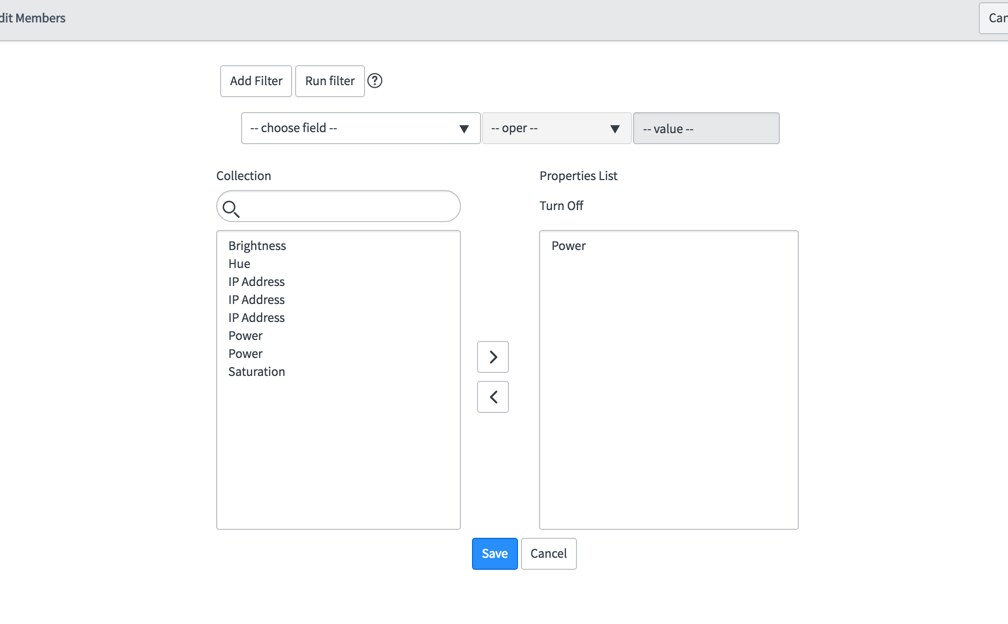


so now I know that I can copy that output and make my own filters just modifying dinamically the sys id shown there!


