How to dynamically populate a drop down in service portal widget

- Mark as New
- Bookmark
- Subscribe
- Mute
- Subscribe to RSS Feed
- Permalink
- Report Inappropriate Content
09-03-2020 08:53 AM
I need to add a dropdown to a widget in the service portal. This dropdown will need to pull the values from a field on the sys_user table. The values in this field need to populate into the dropdown list. I know that this will require some coordination between the html, client, and server scripts for the widget. Does anyone have any examples of how to pull values from a field on a table and populate them in a dropdown in a widget on the service portal?
thanks
- Labels:
-
Multiple Versions
- Mark as New
- Bookmark
- Subscribe
- Mute
- Subscribe to RSS Feed
- Permalink
- Report Inappropriate Content
09-03-2020 05:17 PM
Hi,
So lets start with the server script. We will look up the current user and add those values to a variable we can access in the html.
(function() {
  /* populate the 'data' object */
  /* e.g., data.table = $sp.getValue('table'); */

  var gr = new GlideRecord('sys_user');
  gr.get(gs.getUserID());

  // Assuming a comma separated value field
  data.choices = gr.getValue('my_field').split(',');

})();
So now we have an array to display. All we need now is the select box.
<div>
  <select
    ng-model="c.myValue"
    ng-options="opt as opt for opt in c.data.choices"
    class="form-control"
  >
    <option value="">-- None --</option>
  </select>
</div>
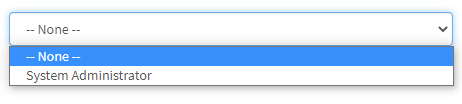
This will render a dropdown with "-- None --" as the first option. To works through angularjs' ngOptions and will save the value to the c.myValue variable. This is what it looks like on the users name.

- Mark as New
- Bookmark
- Subscribe
- Mute
- Subscribe to RSS Feed
- Permalink
- Report Inappropriate Content
09-04-2020 07:05 AM
- Mark as New
- Bookmark
- Subscribe
- Mute
- Subscribe to RSS Feed
- Permalink
- Report Inappropriate Content
09-06-2020 04:08 PM
Can you please show the HTML, Client Script and Server Script code you are using. I can think of a few likely issues that could be in any of those scripts.
- Make sure the values returned from the server script are strings
- The actual format for the ng-options attribute is "value as label for option in array" so if what you return is not a string you may get other things showing.
- Mark as New
- Bookmark
- Subscribe
- Mute
- Subscribe to RSS Feed
- Permalink
- Report Inappropriate Content
09-08-2020 04:08 AM
Thanks...here is what i have...
html:
<div>
<div class="list-group-item">
<select
ng-model="c.data.values"
ng-options="item as item.label for item in c.data.values"
class="form-control"
/>
</div>
Server script:
var gr = new GlideRecord('sys_user');
gr.get(gs.getUserID().toString());
data.values = gr.getValue('u_values').split(',').toString();
currently, i dont have really anything in the client script, and i think that is kinda the part i need to figure out...see anything obvious?