How to filter out duplicate (only show unique / distinct) records in list view of results or report?

- Mark as New
- Bookmark
- Subscribe
- Mute
- Subscribe to RSS Feed
- Permalink
- Report Inappropriate Content
04-04-2018 02:10 AM
Hi all, I am looking at a list view of users based on the Group membership table.
Some users belong to multiple groups (set in my filter conditions) however I am only interested in the unique users (i.e. how many and who as opposed to what actual groups they belong to).
So how can I easily filter out duplicate user records? I.e. I just want to see unique user record results.
The closest I can get is in a report, sorting by e.g Name - then the initial 'non-expanded' view of (unique) users is great but when I go to export this, all users are captured in the e.g. xls file. So is there a way I can only export the initial view of unique users or otherwise can I use an operator of sorts that only brings back unique records?
As a result of the above I and others have taken to exporting then manipulating data in Excel which seems a bit backwards.
Thanks in advance.

- Mark as New
- Bookmark
- Subscribe
- Mute
- Subscribe to RSS Feed
- Permalink
- Report Inappropriate Content
04-04-2018 02:26 AM
Hi Dasi,
There are 2 ways that I can think of.
- In your list of users, right click on the columns w/ the users name and click 'Group by Name' or whatever the column name is. The only problem w/ this is that you won't be able to export this view like what you see on your screen. But this will group all users by name. I do this on my sys_user_has_role table to see how many ppl have a role in my env't
- Write a background script that will give you a list of users in a given table. Here is a script that I am using for something similar, but it will give you the output you need (hopefully):
var ga = new GlideAggregate('sys_user');
ga.addAggregate('COUNT', 'user_member_id');
ga.addHaving('COUNT','>',1);
ga.query();
gs.log('This table has ' + ga.getRowCount() + ' users with more than 1 record');
while(ga.next()){
gs.log('The user name is: ' + ga.name);
}
Hopefully this will give you the output you need. It won't be pretty, but it should have the content you need.


- Mark as New
- Bookmark
- Subscribe
- Mute
- Subscribe to RSS Feed
- Permalink
- Report Inappropriate Content
11-29-2018 01:28 PM
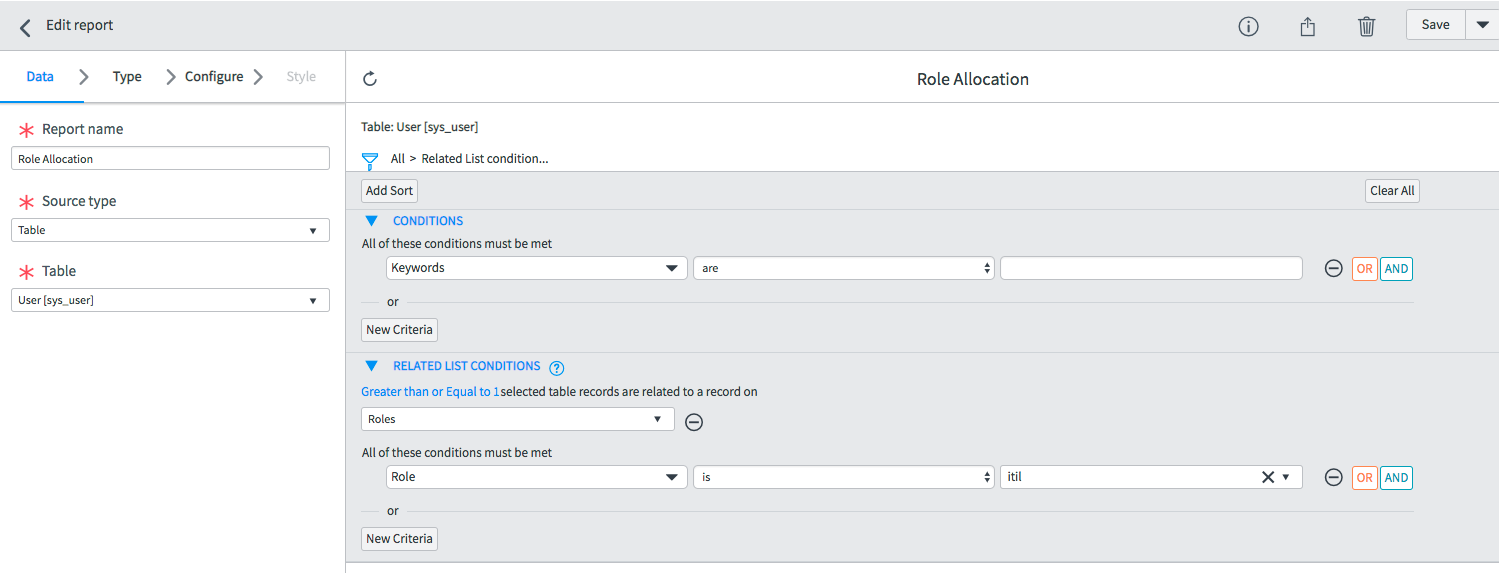
One way to do this is by using a Report and its Related List Condition:
- open sys_user as a list report
- Open the Filter condition and go to the related list condition
- Add "Roles" as the table for the related list
- possibly add a related list condition (like filter only the users who have the ITIL role)

- Mark as New
- Bookmark
- Subscribe
- Mute
- Subscribe to RSS Feed
- Permalink
- Report Inappropriate Content
08-26-2020 11:22 AM
This works like a charm.. thank you for sharing. I was able to use this concept to find out licensed user count as a single score to add it to my admin dashboard.
- Mark as New
- Bookmark
- Subscribe
- Mute
- Subscribe to RSS Feed
- Permalink
- Report Inappropriate Content
11-17-2025 08:36 AM
Navigate to PowerPoint Formatter Mapping. There are some out of the box option and you can add your own.

You can select the table, column and define a formatter. This is an example of a colored (red, green, yellow) ellipse based on resource status.